Join this week and get Pro free for 6 monthsLiked the free tool? Get your own page with Pro freeMoving to More.You? Get Pro free for 6 monthsPick a template and get Pro free for 6 monthsTry every Pro feature free for 6 monthsPut it into practice with Pro free for 6 months
Get Pro freeSign upTemplatesSee all templatesPricing



Product
Page blocksLinks, products, bookings, events and opening hoursThemes and fonts15 colour themes, 31 fonts, buttons and backgroundsClick analyticsPage views, clicks on each link, countries and devicesLinktree importPaste your Linktree address and pick the links to bringResources
TemplatePaperback
Link in bio template for authors
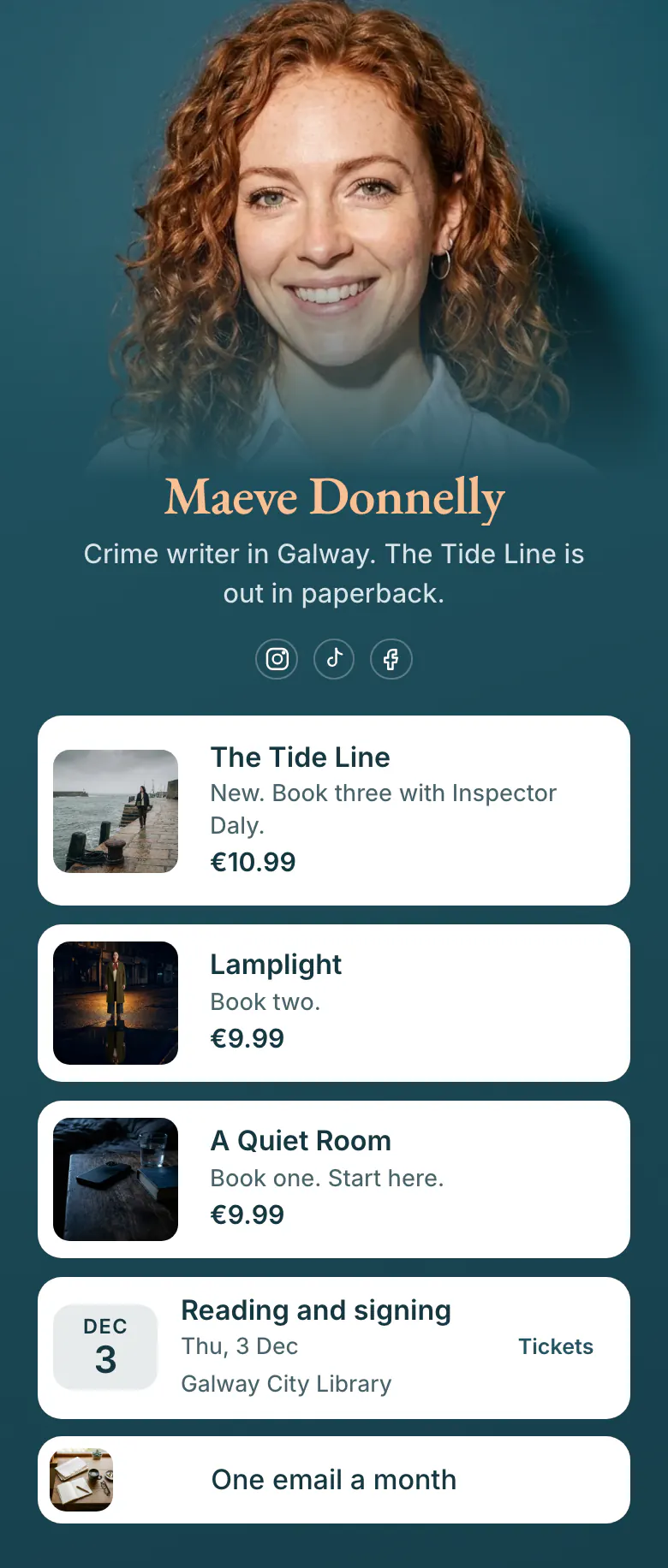
Maeve's three crime novels fill the top of the page, newest first, each with a price and a note such as 'Book one. Start here.' A reader who found her on BookTok knows which book to open first and where to get it.
An author's link in bio, book by book
Authors need four things in a link in bio, in this order: the newest book with its cover and price, the earlier books in reading order, the next reading or signing with a ticket link, and a newsletter link. Readers who discover one book want to know where the series starts, and a clear reading order sends them to the earlier books too.
What is on this page
- Name and bioMaeve DonnellyCrime writer in Galway. The Tide Line is out in paperback.
- Social iconsInstagram, TikTok, Facebook
- ProductThe Tide Line€10.99
One card for each book: picture, title, a line that gives its place in the series, and the price. A tap opens the bookshop you choose.
- ProductLamplight€9.99
- ProductA Quiet Room€9.99
- EventReading and signing3 Dec, Galway City Library
The next reading and signing with its date and place, Galway City Library. Readers tap Tickets and reach your ticket page.
- LinkOne email a month
A newsletter button with a small picture and a promise in its name, 'One email a month', so readers know how often you write.
Who it is for
Written for a novelist or non-fiction author with one or more books out, with a publisher or self-published. Readers find you on Instagram, TikTok or Facebook. A series fits best, because the order matters. If your main work is a newsletter and you have no book yet, start from the template for newsletter writers, which opens with an email signup.
How to make it yours
Lead with your newest book
Put your newest title where The Tide Line is in this template. Add its cover, its price and the shop link you want readers to use.
Set the reading order
Add your earlier books under it and write the order in each line, as Maeve does with 'Book two' and 'Book one'. Then add your next event and your newsletter link.
Publish and tell readers
Tell readers in three places once the page is published: your Instagram, TikTok and Facebook profiles, your email signature and the last page of your next book.
- Write 'Start here' on book one. New readers of a series ask where to begin more than anything else, and the answer fits in two words.
- Link each book to the shop you want to support: your publisher, a local bookshop or a large retailer. A book card opens one address, so choose it with care.
- Add a plain link to the shop page of your next book and give it a start time. Visitors see the link from publication day, not before.
Questions
What should an author put in their link in bio?
Show every book you have out, newest at the top. Give each one a cover, a price and a link to a shop, and say where a series begins. Under the books, add your next public event and a way to join your newsletter. Maeve's page stops there, with three novels, one signing and one newsletter button.
Should authors link to Amazon or to an independent bookshop?
Link to the shop where you want the sale to count, because each book card opens one address. A common choice is the publisher or a local bookshop for the new title, with a plain link named 'Other shops' under the books. Name the shop in the line under the title, so readers know where the tap leads.
What is the best way to announce a book signing to followers?
Add the signing as an event with its name, date and place, and link the ticket page. On Maeve's page it reads 'Reading and signing', 3 Dec, Galway City Library, with a Tickets label that opens the ticket page. Remove the event the day after, so readers never see a past date.
Can I match the page to my book cover?
Yes, in colour and in lettering. Maeve's version takes its teal from her photo. The colours of the background, the buttons and the text are your choice. Your name can have its own font from a list of 31, so it can match the lettering on your cover.

Start your page with this template
Type the name you want after more.you/ and create your account. Then change the words and photos to yours.
 more.you/yourname
Before you go
Put everything you share behind one link
More.You is a free link in bio page. No card needed.
- Start from a template made for your work
- Add links, products, bookings and events
- See how many people tap each link