Join this week and get Pro free for 6 monthsLiked the free tool? Get your own page with Pro freeMoving to More.You? Get Pro free for 6 monthsPick a template and get Pro free for 6 monthsTry every Pro feature free for 6 monthsPut it into practice with Pro free for 6 months
Get Pro freeSign upTemplatesSee all templatesPricing



Product
Page blocksLinks, products, bookings, events and opening hoursThemes and fonts15 colour themes, 31 fonts, buttons and backgroundsClick analyticsPage views, clicks on each link, countries and devicesLinktree importPaste your Linktree address and pick the links to bringResources
TemplateGlow room
Link in bio template for estheticians
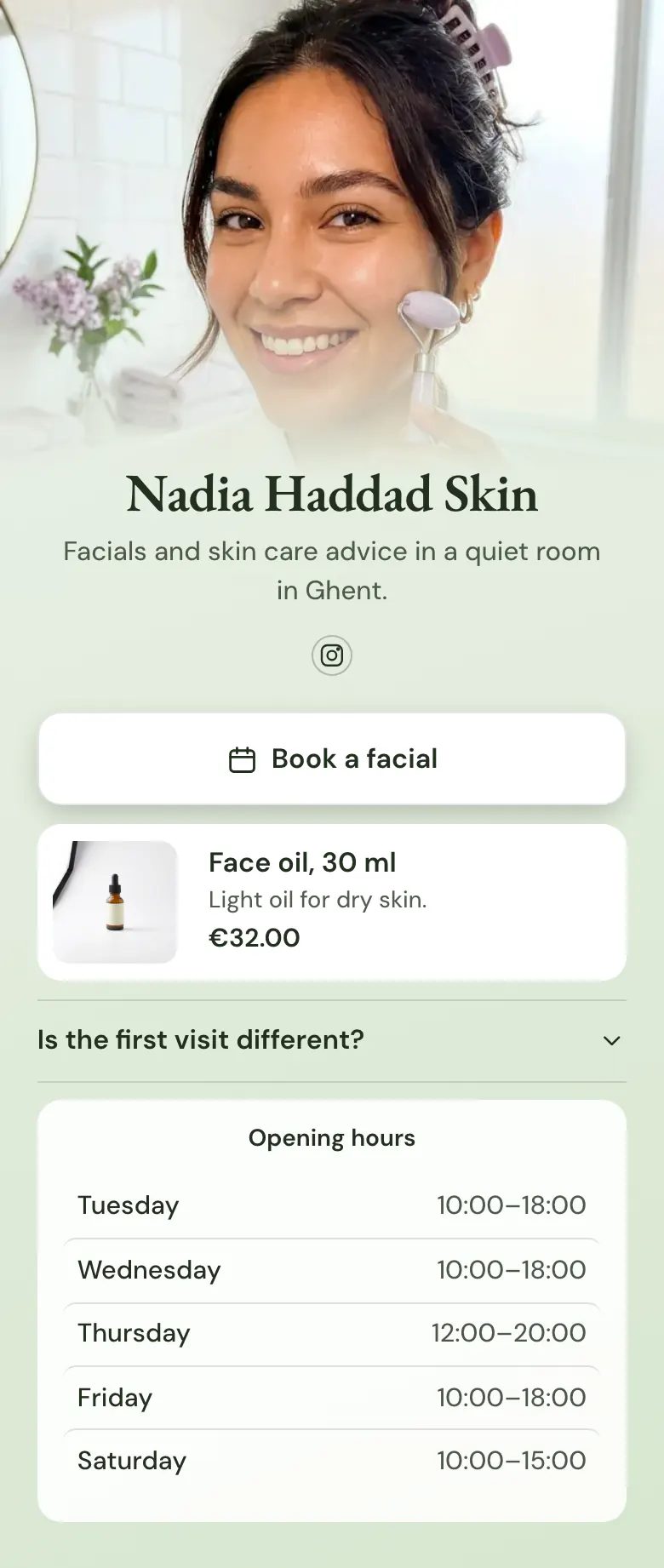
Book a facial is the first thing a new client can tap. Under that button sit one face oil with its price, the question every first visit starts with, and the days your room is open.
What an esthetician's bio link needs
An esthetician's link in bio needs four things, in this order: a button to book a facial, one product you recommend with its price, an answer about the first visit, and your opening hours. People who tap the link from a facial video already want an appointment, so booking comes first. On More.You each of the four is one block.
What is on this page
- Name and bioNadia Haddad SkinFacials and skin care advice in a quiet room in Ghent.
- Social iconsInstagram
- BookingBook a facial
The first button reads Book a facial. It opens your booking page on Fresha, Booksy, Square or the service you use now.
- ProductFace oil, 30 ml€32.00
One face oil with a photo, a short line and its price, €32.00. A tap on the oil opens your own store.
- FAQIs the first visit different?
New clients tap the question about the first visit and read your answer before they book.
- Opening hoursTuesday to Saturday
Your hours for each day, Tuesday to Saturday on the sample, with today's row marked for clients who plan a visit this week.
Who it is for
Solo estheticians and small skin clinics who take appointments through a booking service and find most new clients on Instagram or TikTok. It suits a short treatment menu and one product you believe in. If you run a salon with several chairs and a long price list, start from the template for salons and barbershops instead.
How to make it yours
Choose Glow room
Press Use this template and create a More.You account for your skin clinic. The booking button, the product, the first visit question and the opening hours arrive in that order.
Make the room yours
Replace the cover photo with one of you at work. Name your main treatment on the first button, show the product you recommend most and enter your real hours.
Put it in your bio
Publish your skin clinic page and paste more.you/yourname into your Instagram and TikTok profiles. A new client then reaches Book a facial in one tap.
- Name the first button after the treatment new clients ask for most, such as Book a facial. A button that reads Book now tells them less.
- Show one product, the one you recommend after almost every facial. A long product list makes a skin clinic look like a shop.
- Change your opening hours on the page before a holiday or a training day. Clients open the bio link before they ask if you are free on Saturday.
Questions
What should an esthetician put in their link in bio?
Start with a booking button, then add one product, one answer for new clients and your opening hours. A person who taps the link wants the facial they saw in your post. The other blocks answer what stops a booking, such as what happens at the first visit and which days you work.
Should I put my facial prices in my link in bio?
People should see a price before they book a facial. If your booking service lists prices, the Book a facial button already opens them. If it shows them only at the last step, add a question to the FAQ, such as How much is a facial, and answer with your starting price.
How do clients book a facial from my Instagram bio?
They tap the link in your bio, then tap Book a facial. That button opens your booking page on the service you already use, such as Fresha, Booksy or Square, and the client chooses a day there. Your diary and your reminders stay where they are now.
Is this esthetician link in bio template free?
Creating and publishing an esthetician page from this template is free. The Free plan has one page and every block type, so the booking button, the product, the FAQ and the opening hours are all included. You can also replace the soft green with your own colours and choose one of 31 fonts for your name.
Start your page with this template
Type the name you want after more.you/ and create your account. Then change the words and photos to yours.
 more.you/yourname
Before you go
Put everything you share behind one link
More.You is a free link in bio page. No card needed.
- Start from a template made for your work
- Add links, products, bookings and events
- See how many people tap each link