Join this week and get Pro free for 6 monthsLiked the free tool? Get your own page with Pro freeMoving to More.You? Get Pro free for 6 monthsPick a template and get Pro free for 6 monthsTry every Pro feature free for 6 monthsPut it into practice with Pro free for 6 months
Get Pro freeSign upTemplatesSee all templatesPricing



Product
Page blocksLinks, products, bookings, events and opening hoursThemes and fonts15 colour themes, 31 fonts, buttons and backgroundsClick analyticsPage views, clicks on each link, countries and devicesLinktree importPaste your Linktree address and pick the links to bringResources
TemplateNew start
Link in bio template for life coaches
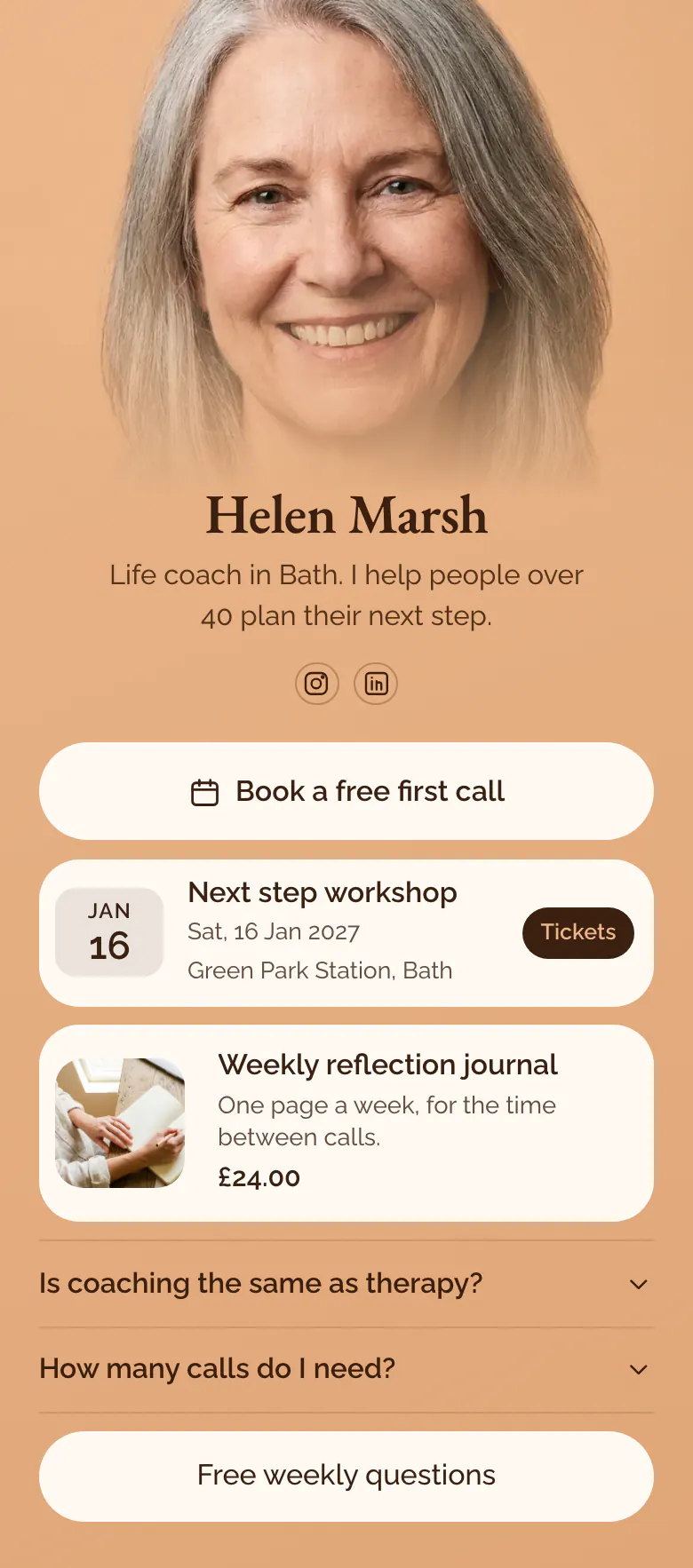
People who think about coaching need a small first step, so 'Book a free first call' is the first button. A Saturday workshop, a £24.00 journal and the question 'Is coaching the same as therapy?' follow for those who need more time.
What a life coach's link in bio needs
Life coaches should put these in their link in bio, in order: a free first call, the next workshop with its date and place, one small product such as a journal, answers to doubts like 'Is coaching the same as therapy?', and something free to read. A client hires a coach they trust, so the page offers several small ways to meet you first.
What is on this page
- Name and bioHelen MarshLife coach in Bath. I help people over 40 plan their next step.
- Social iconsInstagram, LinkedIn
- BookingBook a free first call
'Book a free first call' opens your page on the booking service you use. It is first because coaching starts with a talk.
- EventNext step workshop16 Jan, Green Park Station, Bath
The workshop card shows the name, 16 Jan and Green Park Station, Bath. A tap on Tickets opens your ticket page.
- ProductWeekly reflection journal£24.00
The journal has a photo, one line about its use and £24.00. Tapping the card opens your own store.
- FAQIs coaching the same as therapy?2 questions
'Is coaching the same as therapy?' and 'How many calls do I need?' answer two doubts that stop people from booking.
- LinkFree weekly questions
'Free weekly questions' gives a visitor who is not ready to book something useful at no cost.
Who it is for
Life, wellbeing and mindset coaches who work alone, meet clients on calls and sometimes run a workshop in their own town. Most of their audience finds them on Instagram or LinkedIn. A business or executive coach who offers a course or a group programme should start from the template for coaches instead.
How to make it yours
Choose New start
Open the template gallery and choose New start. A call button, a workshop card, a journal card, two questions and a free link are in the order a new client reads them.
Write in your own voice
Replace Helen's name, photo and bio line. Paste your booking link, type your next workshop date and place, and answer the therapy question in your own words.
Publish and share it
Publish, then paste more.you/yourname into your Instagram and LinkedIn profiles. Every published page has a QR code, so show it at the end of a workshop for guests who want a call.
- Say who you coach in the bio line, as Helen does with 'people over 40'. A reader who sees their own age or problem keeps reading.
- Answer the therapy question honestly and say when you send a person to a therapist. Clear limits make a careful client more willing to book.
- Name the call button by what happens, like 'Book a free first call'. A name such as 'discovery session' means little to someone new to coaching.
Questions
What should a life coach put in their link in bio?
A life coach needs a free call button first, then proof of real activity, like a workshop with a date and a place. One product with a price, a short FAQ about how coaching works and a free resource complete the page. Each block gives a hesitant visitor a different way to begin.
Should a life coach offer a free first call in their bio?
Yes, most clients want to hear your voice before they commit. Make the call the first button and say in its name that it is free, as the sample does with 'Book a free first call'. The button opens your booking service, so nobody has to message you to arrange it.
How do I explain the difference between coaching and therapy on my page?
Use an FAQ block and answer in a few plain sentences. Say that coaching works on plans and next steps, that it does not treat mental health conditions, and that you suggest a therapist when that is the better help. Visitors tap the question to open the answer.
Is the life coach template free to use, and can I change the peach colour?
You can create and publish the page for free. The peach background, the cream buttons and the brown text can all change to your own colours. The top of the page can be Classic, Hero, Banner, Cutout or Shape.
Start your page with this template
Type the name you want after more.you/ and create your account. Then change the words and photos to yours.
 more.you/yourname
Before you go
Put everything you share behind one link
More.You is a free link in bio page. No card needed.
- Start from a template made for your work
- Add links, products, bookings and events
- See how many people tap each link