Join this week and get Pro free for 6 monthsLiked the free tool? Get your own page with Pro freeMoving to More.You? Get Pro free for 6 monthsPick a template and get Pro free for 6 monthsTry every Pro feature free for 6 monthsPut it into practice with Pro free for 6 months
Get Pro freeSign upTemplatesSee all templatesPricing



Product
Page blocksLinks, products, bookings, events and opening hoursThemes and fonts15 colour themes, 31 fonts, buttons and backgroundsClick analyticsPage views, clicks on each link, countries and devicesLinktree importPaste your Linktree address and pick the links to bringResources
TemplateOn air
Link in bio template for podcasters
Listeners who liked a clip tap your bio link and see Episode 48 first, with a link to hear all of it. “Where to listen” holds each app below, and two more buttons serve guests and sponsors.
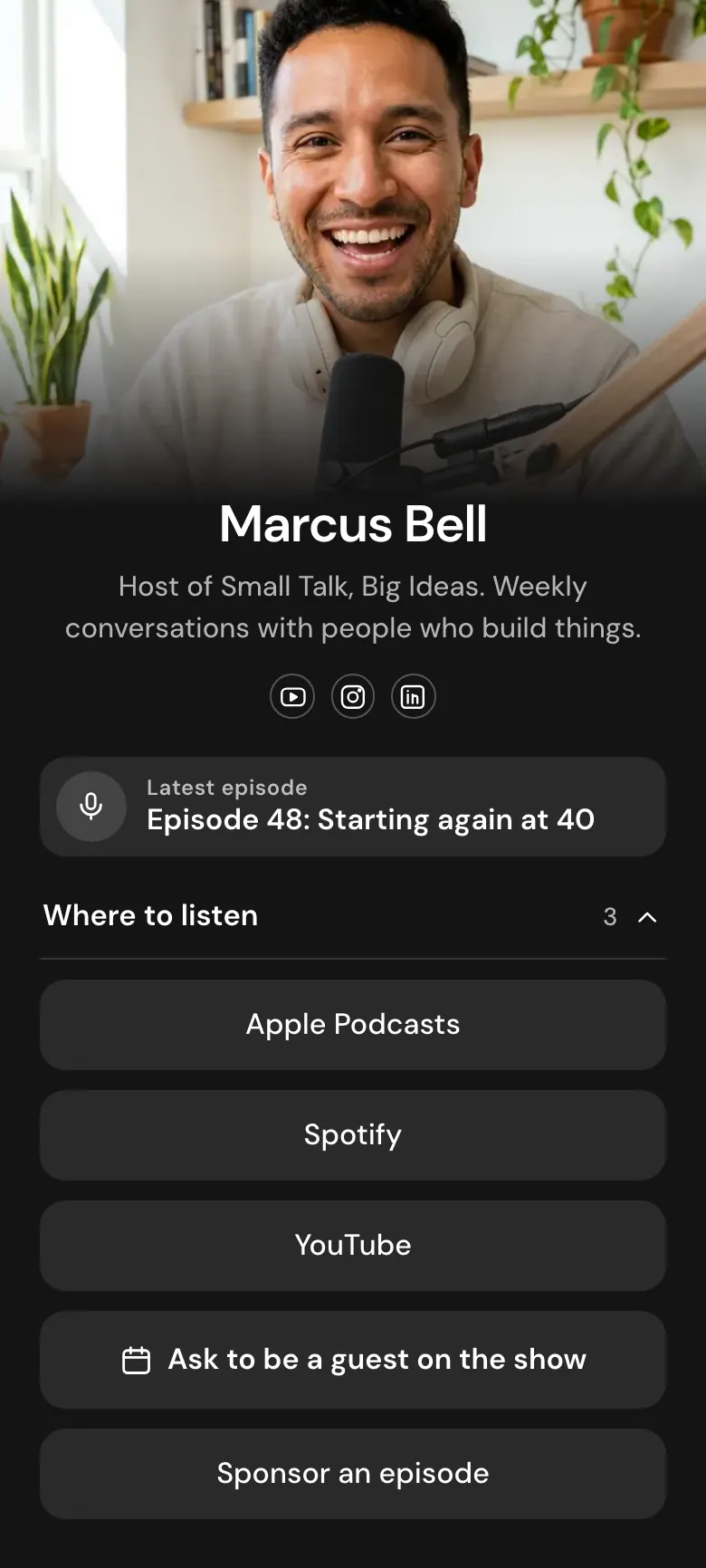
A podcaster's bio link for listeners and guests
Podcasters should put in their link in bio the episode they are promoting, then the show on each listening app, a way to ask to be a guest and a link for sponsors. Clips bring people who want one episode, and every listener prefers one app, so both come before the business links. A More.You episode block shows the title with a link to listen.
What is on this page
- Name and bioMarcus BellHost of Small Talk, Big Ideas. Weekly conversations with people who build things.
- Social iconsYouTube, Instagram, LinkedIn
- Podcast episodeEpisode 48: Starting again at 40
The title of one episode with a link to listen, so a clip viewer reaches the full conversation in one tap.
- CollectionWhere to listen3 links
“Where to listen” keeps Apple Podcasts, Spotify and YouTube under one title that opens and closes, so the page stays short.
- LinkApple Podcasts
Each app is its own button inside the group. “Sponsor an episode” is the last button on the page, for brands.
- LinkSpotify
- LinkYouTube
- BookingAsk to be a guest on the show
“Ask to be a guest on the show” opens your booking page, for example on Calendly or Cal, so guest pitches stop arriving as DMs.
- LinkSponsor an episode
Who it is for
A weekly show run by one host or a small team is the best match, mostly interview shows that share clips on YouTube, Instagram and LinkedIn and receive guest pitches. If your show is a video channel before anything else, the template for YouTubers is the better start.
How to make it yours
Use the On air layout
On air has an episode block, a group of listening apps, a guest button and a sponsor link. Listeners come before business on this page. Keep that order.
Paste your show's links
Write your episode title and paste its link. Replace the three app links with your show's own pages, then add your booking link for guests and a photo of you at the microphone.
Say the address on air
After you publish, the link goes in your show's YouTube, Instagram and LinkedIn profiles. Read the address aloud in your outro, so listeners in the car remember it.
- Replace the episode in the first block on the day each new one is released. Keep the number and the title together, as in “Episode 48: Starting again at 40”.
- Order the listening apps by where your plays come from. If your podcast host shows more plays on Spotify, move it above Apple Podcasts.
- Add one line to your booking form about the guests you look for. Marcus talks to people who build things, and saying so stops most off-topic pitches.
Questions
What should a podcaster put in their link in bio?
This week's episode goes at the top. Under it, link the show on Apple Podcasts, Spotify and YouTube, then add a button for people who want to be a guest and a link for sponsors. Listeners use the first two blocks, and guests and brands read to the end.
How do I link to every podcast app from one bio link?
Group the apps in a collection. On this page the collection is called “Where to listen” and holds three links, one for each app. A visitor opens the group and taps the app they use. When your show reaches a new app, add its link to the same group.
Where should people apply to be a guest on my podcast?
Send every request to one button. The booking block opens your booking page, where the guest chooses a time for a first call. Answer each DM with your page address, and every pitch reaches you the same way.
Is the podcast template free, and can I change the dark design?
The page is free and the design is yours to change. Creating and publishing on More.You costs nothing, and every block type on Marcus's page is on the Free plan. Black is his choice of background. Choose another one, switch the buttons to solid, glass or outline, and set your show's colours.
Start your page with this template
Type the name you want after more.you/ and create your account. Then change the words and photos to yours.
 more.you/yourname
Before you go
Put everything you share behind one link
More.You is a free link in bio page. No card needed.
- Start from a template made for your work
- Add links, products, bookings and events
- See how many people tap each link