Join this week and get Pro free for 6 monthsLiked the free tool? Get your own page with Pro freeMoving to More.You? Get Pro free for 6 monthsPick a template and get Pro free for 6 monthsTry every Pro feature free for 6 monthsPut it into practice with Pro free for 6 months
Get Pro freeSign upTemplatesSee all templatesPricing



Product
Page blocksLinks, products, bookings, events and opening hoursThemes and fonts15 colour themes, 31 fonts, buttons and backgroundsClick analyticsPage views, clicks on each link, countries and devicesLinktree importPaste your Linktree address and pick the links to bringResources
TemplateRuby
Link in bio template for musicians
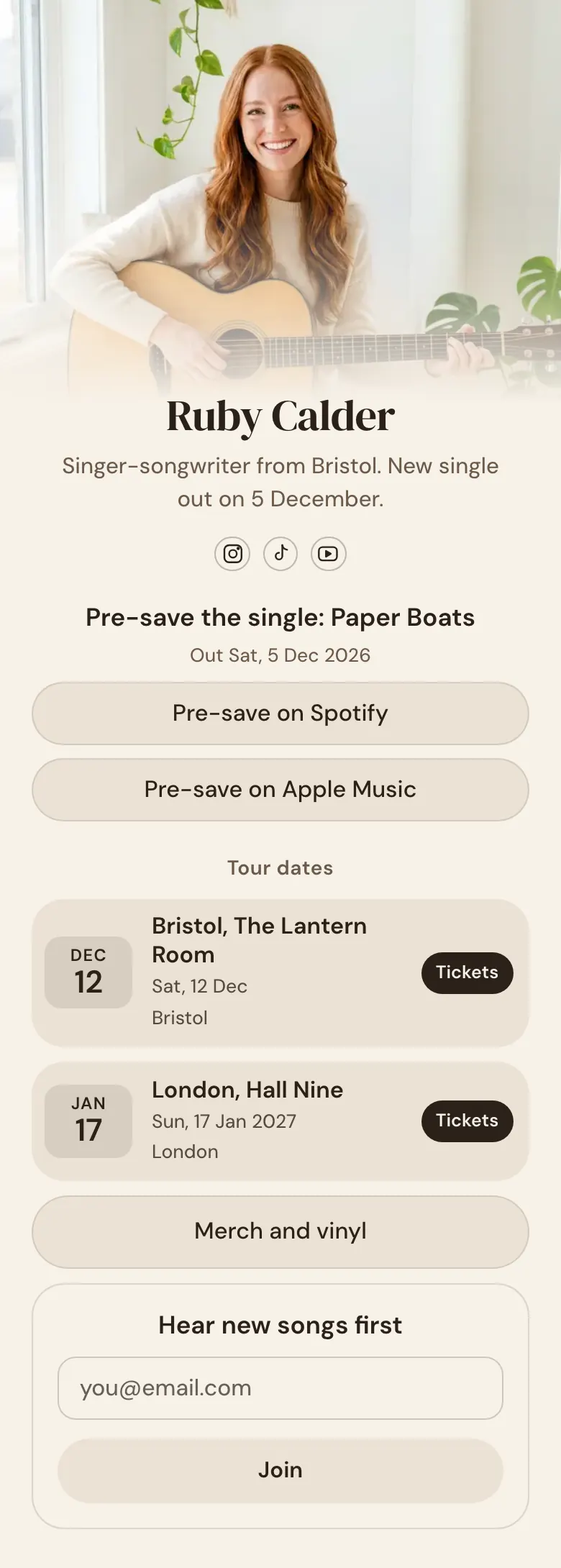
A fan who taps your bio link after a clip sees the new single first, with a button for Spotify and one for Apple Music. Two tour dates with “Tickets” buttons follow, then merch and a form for fans who want new songs first.
A musician's bio link for release week
The newest release goes first in a musician's link in bio, with a button for each music service, then tour dates with ticket links, a merch link and an email signup for fans. Most visitors arrive from a clip of one song, so the song comes first and what a loyal fan wants comes after it. On More.You, one release block holds every service button.
What is on this page
- Name and bioRuby CalderSinger-songwriter from Bristol. New single out on 5 December.
- Social iconsInstagram, TikTok, YouTube
- Music releasePre-save the single: Paper Boats5 Dec
One button for each music service, so a fan opens “Paper Boats” in the app they already use.
- Section titleTour dates
“Tour dates” sits between the single and the shows, so a fan looking for Bristol or London stops scrolling there.
- EventBristol, The Lantern Room12 Dec, Bristol
Each show has its date, venue and city, and the “Tickets” button opens your ticket page for that night.
- EventLondon, Hall Nine17 Jan, London
- LinkMerch and vinyl
“Merch and vinyl” is under the shows, where the fans who came for a ticket are still reading.
- Email signupHear new songs firstJoin
Fans type an email under “Hear new songs first”, so you have their address when the next song is out.
Who it is for
Solo artists and bands with a release date and a few shows ahead get the most from this page, most of all those whose listeners find them through short clips on Instagram, TikTok and YouTube. A DJ who plays club sets and shares mixes should use the template for DJs.
How to make it yours
Open Ruby's page
On Ruby's page the release comes first, then two tour dates, a merch link and a fan signup. That order suits the weeks around a new single.
Enter your single and shows
Type your song title and release date, then paste your link for each music service. Use your own press photo as the cover and enter your dates, venues and ticket links.
Publish before release day
Publish the page, then add its link to your Instagram, TikTok and YouTube profiles before the release date. Tell viewers at the end of each clip that the single and the tickets are in your bio.
- Add a link to the finished song, move it to the top and give it a start time on your release date. Visitors do not see it before then.
- Delete the block of a show once it is over, so the next city is always first. On the sample, London moves to the top after 12 Dec.
- Label the merch button with what is in the shop. “Merch and vinyl” tells a record collector more than “Store” does.
Questions
What should a musician put in their link in bio?
Put your newest release at the top, then your live dates, your merch and a form where fans leave an email. A listener who heard a short clip wants the full song first. The fans closest to you then check for a show near them and for something to buy.
How do I link my single on Spotify and Apple Music from one bio link?
A single music release block is enough. It has a button for each service you add a link for, from Spotify and Apple Music to Deezer, YouTube, Amazon Music and TIDAL. Ruby's page names the single, Paper Boats, shows the date, 5 Dec, and has two buttons. A fan taps their own service, and your release opens there.
Where do tour dates go in an Instagram bio link?
Under the release, with one event block for each show. A block holds the date, the name of the show and the place, and a tap opens your ticket page. On the sample, Bristol on 12 Dec is above London on 17 Jan, so the next show is always the first one a fan reads.
Is this link in bio template free for musicians?
Yes, it is free to create and publish on More.You, and the Free plan has every block type on Ruby's page, the release block and the events among them. The cream background and the serif name belong to the sample. Set your own colours, use your own cover photo and choose one of 31 fonts.
Start your page with this template
Type the name you want after more.you/ and create your account. Then change the words and photos to yours.
 more.you/yourname
Before you go
Put everything you share behind one link
More.You is a free link in bio page. No card needed.
- Start from a template made for your work
- Add links, products, bookings and events
- See how many people tap each link