Join this week and get Pro free for 6 monthsLiked the free tool? Get your own page with Pro freeMoving to More.You? Get Pro free for 6 monthsPick a template and get Pro free for 6 monthsTry every Pro feature free for 6 monthsPut it into practice with Pro free for 6 months
Get Pro freeSign upTemplatesSee all templatesPricing



Product
Page blocksLinks, products, bookings, events and opening hoursThemes and fonts15 colour themes, 31 fonts, buttons and backgroundsClick analyticsPage views, clicks on each link, countries and devicesLinktree importPaste your Linktree address and pick the links to bringResources
TemplateAfter dark
Link in bio template for DJs
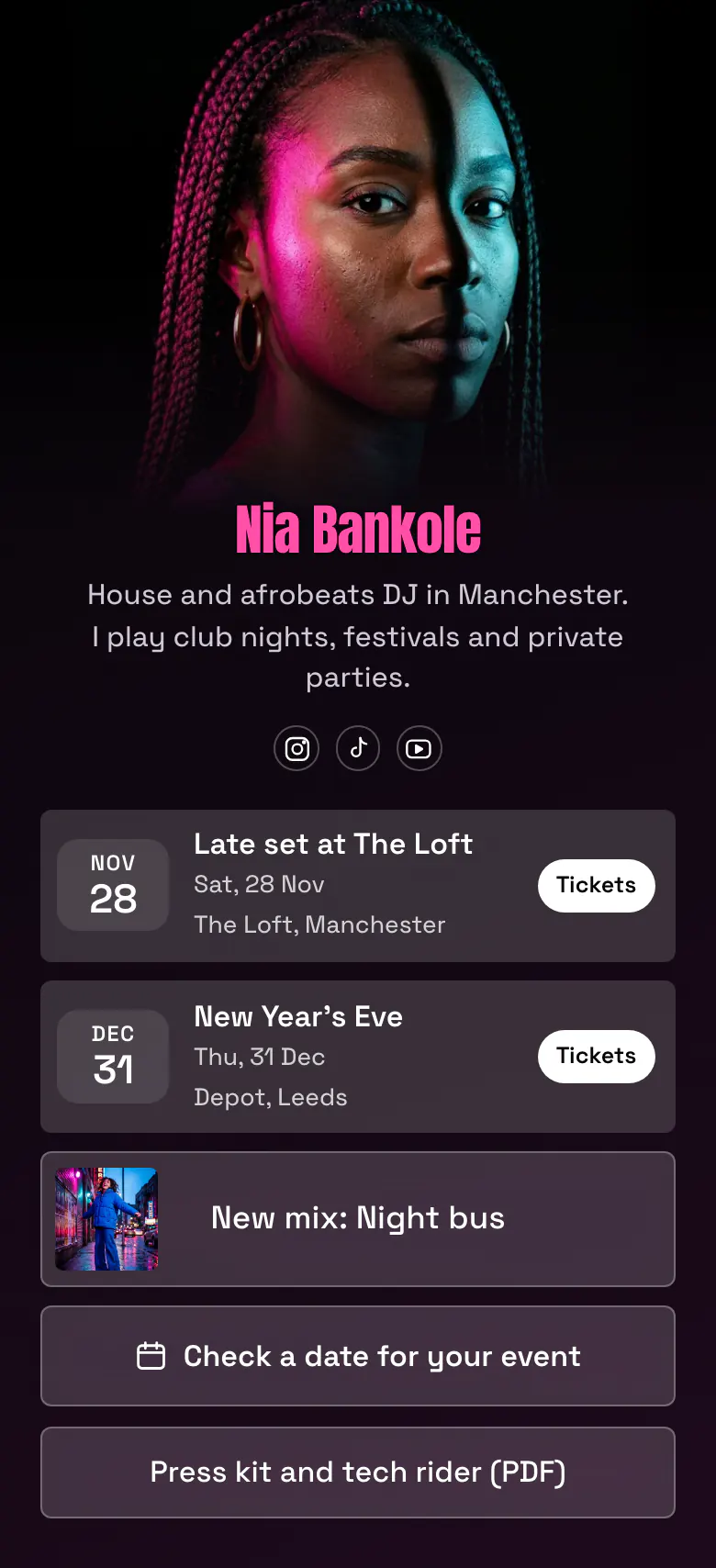
Fans see your next two gigs first, each with a Tickets button. Your newest mix follows. Promoters and private clients then find a button to ask for a date and a link to your press kit.
The bio link a working DJ needs
A DJ should put these in a link in bio, in this order: the next gigs with ticket links, the newest mix, a booking button for promoters and private clients, and a press kit with the tech rider. A gig date loses its value the morning after, so dates come before the mix, which stays good for months.
What is on this page
- Name and bioNia BankoleHouse and afrobeats DJ in Manchester. I play club nights, festivals and private parties.
- Social iconsInstagram, TikTok, YouTube
- EventLate set at The Loft28 Nov, The Loft, Manchester
Each gig shows its date, name and place, such as 28 Nov at The Loft. Tickets opens your ticket page.
- EventNew Year's Eve31 Dec, Depot, Leeds
- Featured linkNew mix: Night bus
New mix: Night bus has a cover picture, so people who missed the gig can still hear you.
- BookingCheck a date for your event
The button reads Check a date for your event, which fits promoters and couples, and opens the booking form or service you use.
- LinkPress kit and tech rider (PDF)
The press kit link gives a promoter your photos, your story and your equipment list in one PDF.
Who it is for
Club, festival and private party DJs who promote their own dates on Instagram and TikTok and answer booking requests themselves. It fits a DJ with at least one gig that has a ticket link. If you mostly release your own tracks and tour as an artist, start from the template for musicians instead.
How to make it yours
Start with After dark
Press Use this template and create a More.You account under your DJ name. Two gigs, the mix, the booking button and the press kit link are already in the order a DJ needs.
Add your gigs and mix
Enter your real dates with their ticket links, link your newest mix on SoundCloud, Mixcloud or YouTube, and paste the address of your press kit PDF.
Share it before the weekend
Publish your DJ page and paste more.you/yourname into your Instagram, TikTok and YouTube profiles. Then every gig post can end with the words tickets in bio.
- Remove a gig the morning after you play it. A past date at the top of the page tells a promoter you are not active.
- Write the booking button for the person who taps it. The words Check a date for your event work for a promoter and for a couple planning a wedding.
- Keep the tech rider in the same PDF as the press kit. A promoter with both can confirm you without a second message.
Questions
What should a DJ put in their link in bio?
Put your next gigs with ticket links at the top, then your newest mix, then a way to book you. Fans tap the link to find the night, and promoters tap it to judge you. A press kit link at the end of the page is for the promoters and takes one line.
How do I add gig dates and ticket links to my Instagram bio?
Add one event to your bio link for each gig. An event shows the date, the name of the night and the place, and one tap opens the ticket page on the site that sells the tickets. Keep the nearest date first and remove it after you have played.
Where should a DJ keep a press kit or EPK?
One plain button in your bio link is the right place, under the gigs and the mix. Promoters and venue bookers search for it there. Save the press kit and the tech rider as one PDF with a public address, and name the button clearly, as Press kit and tech rider (PDF) does.
Is this DJ link in bio template free?
Creating and publishing this DJ page is free, with every block type the template uses. The black background, the pink name and the see-through buttons are a starting point. You set your own colours, choose solid, glass or outline buttons, and put your own press photo on the cover.
Start your page with this template
Type the name you want after more.you/ and create your account. Then change the words and photos to yours.
 more.you/yourname
Before you go
Put everything you share behind one link
More.You is a free link in bio page. No card needed.
- Start from a template made for your work
- Add links, products, bookings and events
- See how many people tap each link