
The best digital products to sell are files you make once and sell many times: templates, ebooks and guides, printables, presets, checklists and short courses. Pick the one that answers the question your audience already asks you most. Then price it for the fee you pay: at Gumroad’s 10% + $0.50 per direct sale, a $29 product leaves you $25.60.
You already answer the same five questions in your DMs every week. Which preset did you use, how do you plan your week, what goes in your grocery list. Each of those answers is a product somebody would pay $9 for, and most creators give it away in a reply.
This guide lists 12 digital products to sell, what each one needs from you, and what you keep per sale at six price points. It is for creators with an audience on Instagram, TikTok or YouTube who want a first or second product, and it ends where the sale starts: the link in your bio.
Key Takeaways
- Sell the answer to your most-asked question. The best digital product idea is the one your followers already request in comments and DMs.
- Low prices need volume. After a 10% + $0.50 fee, a $9 template takes 132 sales to earn $1,000, while a $99 course takes 12.
- Start small, then stack. A $5 to $15 product tests demand in a week; a course comes after people buy the small one.
- Checkout lives on a seller platform. Gumroad, Payhip and similar tools take payment and deliver the file; your bio page sends buyers there.
- Fees differ by route. Gumroad charges 10% + $0.50 on direct sales and 30% on sales through its Discover marketplace.
What digital products sell best?
Digital products that sell best solve one specific, repeated problem and deliver the result fast. A template saves an hour of setup, a preset gets a look in one tap, a checklist removes a decision. Buyers pay for time saved or a result they can see. They pay less for information they could find free, unless you package it better than the free version.
Three tests sort a good idea from a weak one before you build anything:
- The ask test. Has someone asked you for this, in words, more than three times? Screenshot those comments. They become your sales page copy.
- The proof test. Can you show the result in one image or one 10-second clip? A before and after edit sells a preset. A filled-in planner page sells a planner.
- The repeat test. Can you update it or build a second version? A product line beats a one-off, because the people who buy one product are the easiest buyers for the next.
12 digital products to sell as a creator
Each idea below names the build, the tools most creators use, and a typical price band to test. The price bands are starting points to test, not market data.
1. Templates
Notion workspaces, Canva social post sets, Google Sheets budget trackers, content calendars and pitch deck layouts. A template saves the buyer the setup hour, which is easy to show in a screen recording. Test at $9 to $29, and sell a bundle of related templates at a higher price.
2. Ebooks and PDF guides
A recipe collection, a city guide, a 30-page playbook on how you grew your account. Write it in Google Docs or Canva, export to PDF, done. Guides sell when the title promises one outcome (“Meal prep for a week in 90 minutes”), not a broad topic. Test at $9 to $19.
3. Printables and planners
Wall art, planner inserts, habit trackers, kids’ activity pages and wedding signage. The buyer prints at home, so you never ship anything. Printables suit design-minded creators and work well as low-price entry products at $3 to $12.
4. Lightroom presets and video LUTs
If your followers ask about your edit, the preset is the product. Sell a pack of 5 to 10 with a before and after for each. Presets are one of the easiest products to prove on camera, which makes them a strong fit for Instagram and TikTok. Our guide to selling presets and templates covers packaging and tier pricing.
5. Checklists and swipe files
A one-page launch checklist, 50 caption openers, a packing list, a brand pitch email set. They take an afternoon to make and sell for $5 to $12. A checklist also makes a good free lead magnet when you want an email list more than revenue.
6. Mini courses
Five to ten short videos that teach one skill end to end: editing Reels in CapCut, sourdough from starter to loaf, a beginner strength plan. Record on your phone, host on a course or seller platform. Test at $29 to $99 once a smaller product has sold.
7. Recorded workshops
Teach a live session once, record it, then sell the recording with your slides. A workshop gives you a launch date (urgency) and a product afterwards (evergreen sales). Price the recording below the live ticket.
8. Stock photos and video clips
Photographers and videographers can sell themed packs: flat lays, city b-roll, hand shots for product content. Other creators and small brands buy them to fill their feeds. Sell packs on your own terms, and state the license in plain words on the product page.
9. Sample packs, sound effects and music
Producers sell drum kits, loops, presets for synths and royalty-free tracks for video intros. Musicians with an audience of other musicians have a ready market. Price by pack size and say clearly what the buyer may use the sounds for.
10. Design assets
Fonts, icon sets, mockups, social media frames, SVG files for cutting machines. Design assets suit designers whose audience is other creators. Bundle them by use (“everything for a launch week”) rather than by file type.
11. Spreadsheet tools and calculators
A pricing calculator for freelancers, a wedding budget sheet, a rate card builder for brand deals. A spreadsheet that does the maths for the buyer feels more valuable than a PDF that explains the maths. Test at $9 to $25.
12. AI prompt packs and workflow guides
Prompt sets for a job your audience does (writing product descriptions, planning a content week), with the inputs and outputs shown. Sell the workflow, not the prompts alone: the screenshots of a finished result are what make the pack worth paying for.
How much you keep per sale, and how many sales make $1,000
The table below runs six example prices through two published fee models. Gumroad charges 10% + $0.50 per direct sale and 30% when the buyer finds you through its Discover marketplace (gumroad.com, checked November 2026). Payhip’s Free plan charges a 5% transaction fee, with PayPal and Stripe fees on top (payhip.com, checked November 2026). The prices are illustrative.
| Example product | Price | You keep on Gumroad (direct) | Sales to earn $1,000 | You keep on Payhip Free (before PayPal/Stripe) |
|---|---|---|---|---|
| Checklist | $5 | $4.00 | 250 | $4.75 |
| Template | $9 | $7.60 | 132 | $8.55 |
| Ebook | $15 | $13.00 | 77 | $14.25 |
| Preset pack | $29 | $25.60 | 40 | $27.55 |
| Recorded workshop | $49 | $43.60 | 23 | $46.55 |
| Mini course | $99 | $88.60 | 12 | $94.05 |
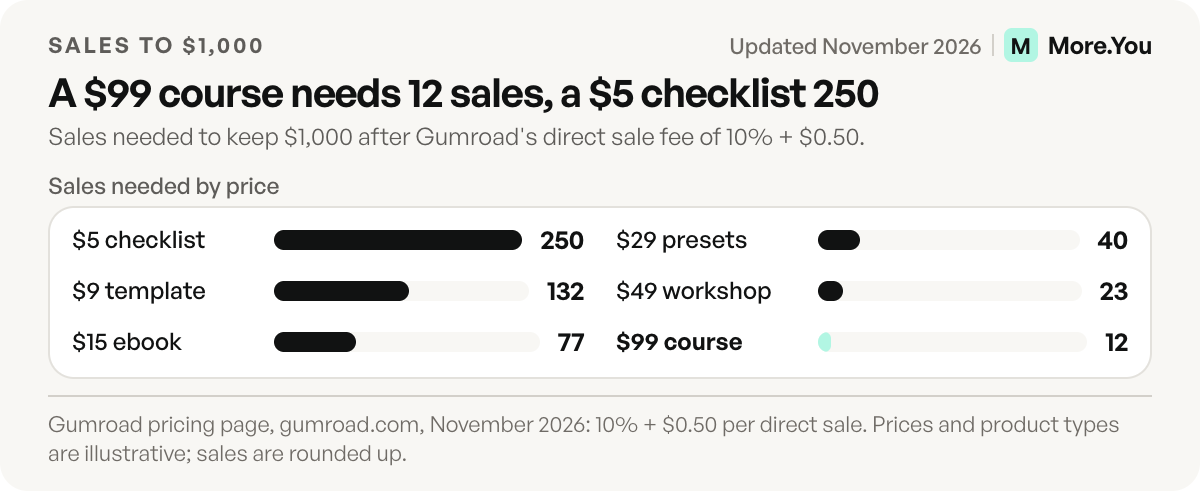
Two things stand out. The flat $0.50 takes 10% of a $5 sale but half a percent of a $99 one, so the cheapest products lose the most to fees. And 132 sales of a template is a much bigger ask from a small audience than 12 sales of a course. For a small audience, fewer sales at a higher price is the shorter path to $1,000.
Payhip’s paid plans lower the fee to 2% (Plus, $29 a month) or 0% (Pro, $99 a month), so a monthly plan starts to pay for itself once your sales are steady (payhip.com, checked November 2026).
Where to sell digital products and how buyers find them
More.You is an AI-native link in bio platform. Each product block on a page also becomes Product structured data, so search engines and AI assistants can read what you sell and what it costs.
The sale itself runs on a seller platform. Gumroad and Payhip host the file, take payment and send the download. Your bio page is the step before: the place a follower lands after your post, sees the product with its price, and taps through. A product block shows the name, price and a one-line promise, then links to the checkout. Our guide to selling digital products from your link in bio walks through that setup step by step.
Put the newest product first during a launch, and keep the rest below it. When a product has its own question (“Does this work on Android?”), answer it in an FAQ block on the same page, so the buyer does not need to DM you.
How to choose your first digital product
Start with the smallest product that answers your most-asked question. Build it in a weekend, price it at $9 to $19, and post about it three times in one week. Then read the numbers: clicks on the product block, sales on the seller platform, and the questions people ask.
If it sells, add the next step up. A preset pack leads to an editing course. A budget template leads to a money workshop. If it does not sell, change the title and the proof image before you change the product. The title and the image are the cheapest parts to change.
Digital products sit next to other income on the same page. Our list of creator income streams shows how products, affiliate links, bookings and brand deals fit together. YouTube creators can compare a product sale with ad revenue in our breakdown of how much YouTube pays per view: one $29 sale is worth about 11,100 long-form views at the median rate.
Put your first product on your bio page
Add a product block with the name, the price and the result it gives, and link it to your Gumroad or Payhip checkout. The block also ships as Product structured data, so AI assistants can read what you sell. Create your More.You page on the Free plan, which includes every block type.
FAQ
What is the easiest digital product to make and sell?
A checklist or a one-page template is the easiest. You can build it in an afternoon with Canva or Google Docs, and it answers one question your audience already asks. Price it between $5 and $12 to test demand before you build something bigger.
What are the most profitable digital products to sell?
Courses and workshops usually earn the most per sale, because a fixed fee takes a smaller share of a higher price. After a 10% plus $0.50 fee, a $99 course leaves $88.60 per sale, so 12 sales earn about $1,000. Templates and presets earn less per sale but are easier to sell.
Can you sell digital products with a small audience?
Yes, if the product solves a narrow problem for that audience. Start with a low-price product, ask for feedback from the first buyers, and use their words in the next version.
Where should I sell digital products?
Use a seller platform such as Gumroad or Payhip for payment and file delivery, then link to it from your bio page. Gumroad charges 10% plus $0.50 per direct sale and 30% through its Discover marketplace. Payhip’s Free plan charges 5% plus PayPal or Stripe fees.
How do I price my first digital product?
Price your first product between $9 and $19 and test it with one week of posts. Work out what you keep after fees before you set the price. If people buy quickly and ask for more, raise the price or add a higher tier.
Sources
- Gumroad pricing: direct and Discover sale fees (gumroad.com, checked November 2026)
- Payhip pricing: Free, Plus and Pro plans and transaction fees (payhip.com, checked November 2026)
- More.You blocks and structured data: more.you/features/bio-page-blocks and more.you/features/ai-native-pages (November 2026)
- More.You pricing and the Free plan (more.you/pricing, November 2026)
Platform rules and prices checked November 2026.