
A UGC portfolio is one page of your best sample videos, built so a brand manager can decide in a single scroll whether to hire you. It needs six sections: an intro, your niche, video samples grouped by format, results, rates with a way to book or contact you, and a usage rights note. A bio page holds all six, and its link is already in your profile.
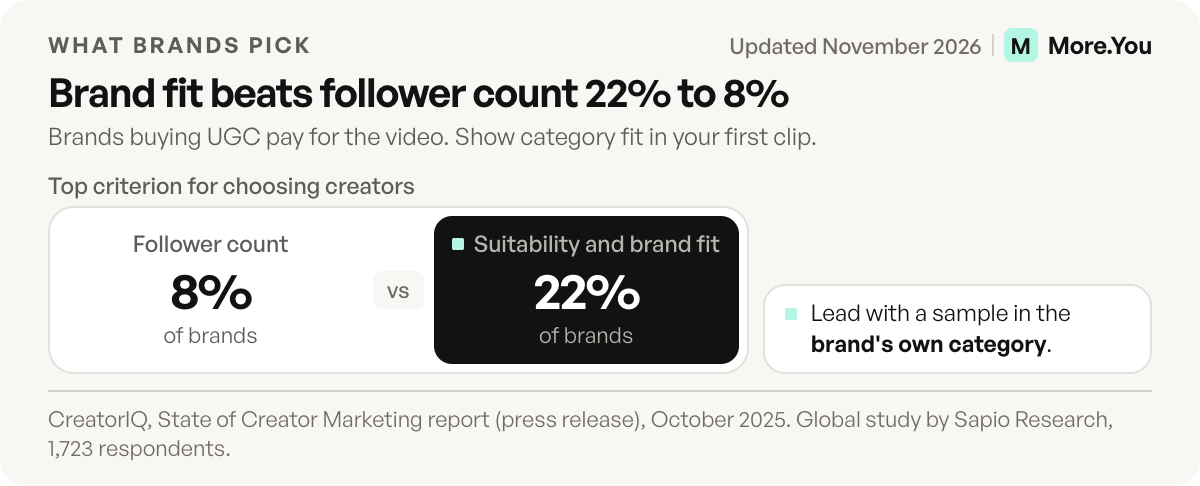
Many portfolios lose the brand before the first clip plays. A request-access screen, a horizontal video, or a headline that says “content creator” ends the review. Brands buying UGC pay for the video, so your follower count carries little weight here. In CreatorIQ’s State of Creator Marketing report (October 2025), suitability and brand fit topped brands’ criteria for choosing creators at 22%, and follower count ranked last at 8%.
Below: the order brands check, layouts by niche, a copyable template, and a plan for your first portfolio with no clients. If a brand wants a post on your account and asks for audience numbers, send a media kit for creators instead.
Key Takeaways
- Order beats volume. Category fit, playback and the hook come first, or the brand never reaches your rates.
- Three to six labelled clips is enough. Each label names the format, the niche and whether the job was paid, gifted or a sample.
- Put a rights line on the page. Organic use and paid ad use are two different purchases.
- No clients yet is fine. Three spec videos for products you own and have used, clearly labelled as samples, can earn a first reply.
- A bio page doubles as the portfolio. Blocks group your samples and per-block clicks show which sample brands open.
What is a UGC portfolio, and what does a brand manager check first?
It’s a work sample that proves you can make a short video a brand could post on its own channels or run as an ad. Brand managers read it in a rough order: right category, link opens, first clip hooks, ad-ready format, honest proof, easy to hire.
Twine, a freelance marketplace, tells brands to play three or four clips before reading a caption, and warns: “If the hook doesn’t land in the first three seconds, the rest of the portfolio doesn’t matter much” (twine.net, November 2026). The order below is our reasoning from that guidance, not a timed study.
| Order | What the brand checks | What answers it on your page |
|---|---|---|
| 1 | Category fit | A headline naming your niche and formats: “UGC videos for skincare and wellness brands” |
| 2 | Playback | Every sample link opens on a phone, signed out, with no request-access screen |
| 3 | Hook | The first clip in the brand’s category, with something happening in the first 3 seconds |
| 4 | Ad format | Vertical 9:16 video with on-screen text clear of the ad buttons |
| 5 | Range | At least three formats, including one where you speak to camera |
| 6 | Proof | A label on every clip: paid, gifted or sample, plus any repeat client |
| 7 | Price, rights, contact | A starting price, one rights line, and one way to book or reply |
The six sections of a UGC creator portfolio
Every section answers one of the checks above. If a block answers none of them, such as a long origin story or a follower screenshot, cut it.
1. Intro
Your name, a clear photo and one line under 15 words that says who you make videos for. The bio page design guide covers header layouts and button styles.
2. Niche
Name one or two categories, never five. A beauty manager who sees a pasta clip first has to scroll to find their category. Split the page by niche, or lead with the category you’re pitching this week.
3. Video samples by format
Group samples by format: testimonial, demo, unboxing, voiceover, problem-and-fix. Twine lists “no spoken audio anywhere” as a red flag and asks for “vertical, platform-native clips” (twine.net, November 2026). Meta’s Instagram Reels ad specs recommend 9:16 and say to keep at least 14% of the top, 35% of the bottom and 6% of each side free of text and logos. Captions placed inside those margins show a brand you know where its ad buttons sit.
Host each clip where it plays without a login. An unlisted YouTube video can be watched by anyone with the link, and viewers don’t need a Google Account, according to YouTube Help. Your own TikTok or Reels posts work too.
4. Results
Label every clip truthfully: “Paid ad for a skincare brand”, “Gifted” or “Sample, not a paid job”. Twine tells brands that multiple clips for the same brand “usually means the first round worked” (twine.net, November 2026), so say when a client hired you twice. Share a performance number only with the client’s permission.
5. Rates and contact or booking
One line does the job: “Videos from $X each. Paid ad use is quoted separately.” For reference, Collabstr reports that UGC packages on its marketplace list at an average of $180 and pay out an average of $154 (collabstr.com, November 2026). That’s one marketplace, so use it as a range check. For creator rates on sponsored posts, see how much influencers make.
Then give one next step: an email link, or a bookings block for a 15-minute call if you sell retainers (see bookings through link in bio).
6. Usage rights note
Twine names “no mention of usage rights or licensing terms” as a red flag (twine.net, November 2026). One line covers it: “Organic use for 90 days included. Paid ads and ads from my handle are quoted separately.” If a brand runs ads from your TikTok account, TikTok’s Spark Ads guide lets the creator set the authorization at 7, 30, 60 or 365 days.
UGC portfolio examples by niche
These are layout patterns, not real creators. Each row shows the lead clip and how to fill the rest.
| Niche | Lead clip | Format mix (3 to 6 clips) | Next step block |
|---|---|---|---|
| Skincare and beauty | Problem-and-fix with a texture close-up | Routine demo, talking review, get-ready-with-me | Bookings block for a call |
| Food and drink | First-taste reaction | Recipe demo, unboxing, voiceover over b-roll | Email link with “send me your product” |
| Tech and apps | Screen recording with a face cam corner | Setup demo, feature walkthrough, honest review | Bookings block for a demo call |
| Fitness and wellness | Product in use mid-workout | Testimonial, routine demo, voiceover | Email link |
| Home and pets | Before-and-after of a room or a pet routine | Unboxing, assembly demo, talking review | Email link |
| Fashion and jewellery | Try-on with three looks in 15 seconds | Styling demo, unboxing, voiceover | Bookings block for a styling brief |
A UGC portfolio template you can copy
Build it top to bottom. Every item is a block or a page setting, so you can rearrange it later.
- Header: name, photo, and the niche line: “UGC videos for [category] brands: [format], [format], [format].”
- About text: two or three sentences on where you film, your turnaround and what a brand gets in a delivery.
- Group 1, your strongest format: two link blocks, each titled with format, niche, length and label, such as “Testimonial, skincare, 22s (sample)”.
- Group 2 and Group 3: one or two clips each, in other formats.
- Proof line: a link block for any repeat client you have permission to name.
- Next step: a bookings block or an email link.
- FAQ block: starting price, usage rights, turnaround, revision rounds, raw footage.
How to make a UGC portfolio with no brand clients
Film three spec videos, one per format, for products you already own and have used. Spec work is unpaid work you choose yourself to show your skill. Under each clip, add one line on the goal: “Goal: get a busy parent to try this cleanser in 20 seconds.” That line shows a brand you can work from a brief.
The FTC’s Endorsement Guides FAQ says: “You can’t talk about your experience with a product if you haven’t tried it.” So film products you’ve used, and never use a logo in a way that suggests a brand hired you. After each paid job you can show, swap out your weakest spec clip.
When the page is ready, pitch brands as a creator with the link in your first message.
Why brands do not reply, and the fix
A portfolio that gets views and no replies usually breaks one of the seven checks above. Find your case below.
The first clip is not their category. Fix: reorder so the category you pitch leads.
A sample needs a login. Fix: open every link signed out on a phone.
No label on a clip. Fix: add paid, gifted or sample to each title.
No price or rights line. Fix: add one starting price and one rights sentence.
Ten clips and no order. Fix: cut to the three to six that match the brief.
Where to host a UGC portfolio
Host it at one address you can paste into a pitch, where a brand manager can watch your samples without signing in. Five homes cover most creators. More.You publishes this blog.
| Option | Cost (November 2026) | What it does well | Good to know |
|---|---|---|---|
| Julip | See its site for current plans | Built for UGC work: samples by niche, service packages, usage rights and deliverables | Paid tool, check the plan before you commit |
| Beacons media kit | Free; custom media kit domain from $10/mo | A media kit that updates daily, rate cards, past projects | Beacons branding stays until the $30/mo plan |
| Canva site | Free, up to 5 sites on canva.site | Fast layouts from templates | ”Designed with Canva” footer on Free; custom domain on paid plans |
| Notion site | Free on one notion.site address | Edits like a document | Custom domain is a $10/mo add-on |
| A bio page | Free on More.You | The link you already share, with blocks for samples, bookings and rates | Samples open where you host the videos |
Julip is the most specialized of the five. Its FAQ says UGC creators can show product videos, sort them by niche, set service packages and add usage rights and deliverables (myjulip.com, checked 11 November 2026). It suits creators who want brands to buy a package on the portfolio itself.
Beacons includes a media kit with rate cards and past projects on its Free plan, and a custom media kit domain starts on Creator at $10 a month (beacons.ai, November 2026). Canva’s help centre says Free accounts can have up to five live sites on a free address, with a Canva badge, and a custom domain needs a paid plan (canva.com, November 2026), and Notion publishes free sites on a notion.site address, with a custom domain at $10 a month per domain, or $8 billed annually (notion.com, November 2026).
Why a bio page works as the portfolio
A bio page portfolio lives at the address you already share, so every update reaches your profile, pitch emails and DMs at once. On More.You, the bio page blocks map onto the template above: link blocks for samples, a collection block to group them by format, a bookings block for the next step, and an FAQ block for rates and rights. The free plan shows views, clicks and click-through rate per block for 30 days, so you see which samples brands open. The Premium plan allows up to 5 pages, one per niche.
The page is also built for AI to read. Your FAQ block becomes FAQPage structured data, your about text doubles as the summary agents read, and every page ships its own llms.txt.
Brand managers read your portfolio, and AI assistants can read it too. Create your More.You page, add your three best samples, and give both a clear answer. Doing sponsored posts too? The link in bio for influencers guide covers that page.
FAQ
How many videos should a UGC portfolio have?
Start with three and stop at six. Twine tells brands to play three or four clips first, so your best work has to sit at the top. Send extra samples when a brand asks.
What is the difference between a portfolio and a media kit?
A portfolio sells the video a brand posts on its own channels or runs as an ad. A media kit sells your audience for a post on your account, so it needs follower and engagement numbers. Creators who do both keep two links and send the one that matches the brand’s request.
Should I put my rates on the page?
Put one starting price and one rights line. It filters out brands with a much smaller budget and saves a round of messages. Keep custom quotes for the reply.
Can I become a UGC creator with no followers?
Yes. Brands buying UGC pay for the video, and in CreatorIQ’s report follower count ranked last of brands’ selection criteria. Three labelled spec videos with a clear niche line are enough to ask for a first reply.
Is a free template good enough?
Yes, if you keep the order: niche first, a strong first clip, honest labels, then price, rights and contact. Test every link on a signed-out phone before you send it.
Sources
- CreatorIQ, State of Creator Marketing press release, October 2025 (checked November 2026)
- Meta for Business, Instagram Reels ad specs, November 2026
- YouTube Help, Change video privacy settings, November 2026
- TikTok Ads Manager Help, How to create Spark Ads, November 2026
- FTC, The FTC’s Endorsement Guides: What People Are Asking, November 2026
- Twine, “What to Look for in a Freelance UGC Creator’s Portfolio Before You Hire” (twine.net, November 2026)
- Collabstr, “Collabstr vs. Insense” UGC campaign comparison (collabstr.com, November 2026)
- Julip homepage, pricing card and FAQ (myjulip.com, November 2026)
- Beacons pricing, media kit features (beacons.ai, November 2026)
- Canva Sites plan limits (canva.com, November 2026)
- Notion Sites and custom domain add-on (notion.com, November 2026)
- More.You blocks (more.you/features/bio-page-blocks, November 2026)
- More.You analytics (more.you/features/analytics-attribution, November 2026)
- More.You AI-native pages (more.you/features/ai-native-pages, November 2026)
- More.You plans (more.you/pricing, November 2026)