Join this week and get Pro free for 6 monthsLiked the free tool? Get your own page with Pro freeMoving to More.You? Get Pro free for 6 monthsPick a template and get Pro free for 6 monthsTry every Pro feature free for 6 monthsPut it into practice with Pro free for 6 months
Get Pro freeSign upTemplatesSee all templatesPricing



Product
Page blocksLinks, products, bookings, events and opening hoursThemes and fonts15 colour themes, 31 fonts, buttons and backgroundsClick analyticsPage views, clicks on each link, countries and devicesLinktree importPaste your Linktree address and pick the links to bringResources
TemplateGolden hour
Link in bio template for astrology creators
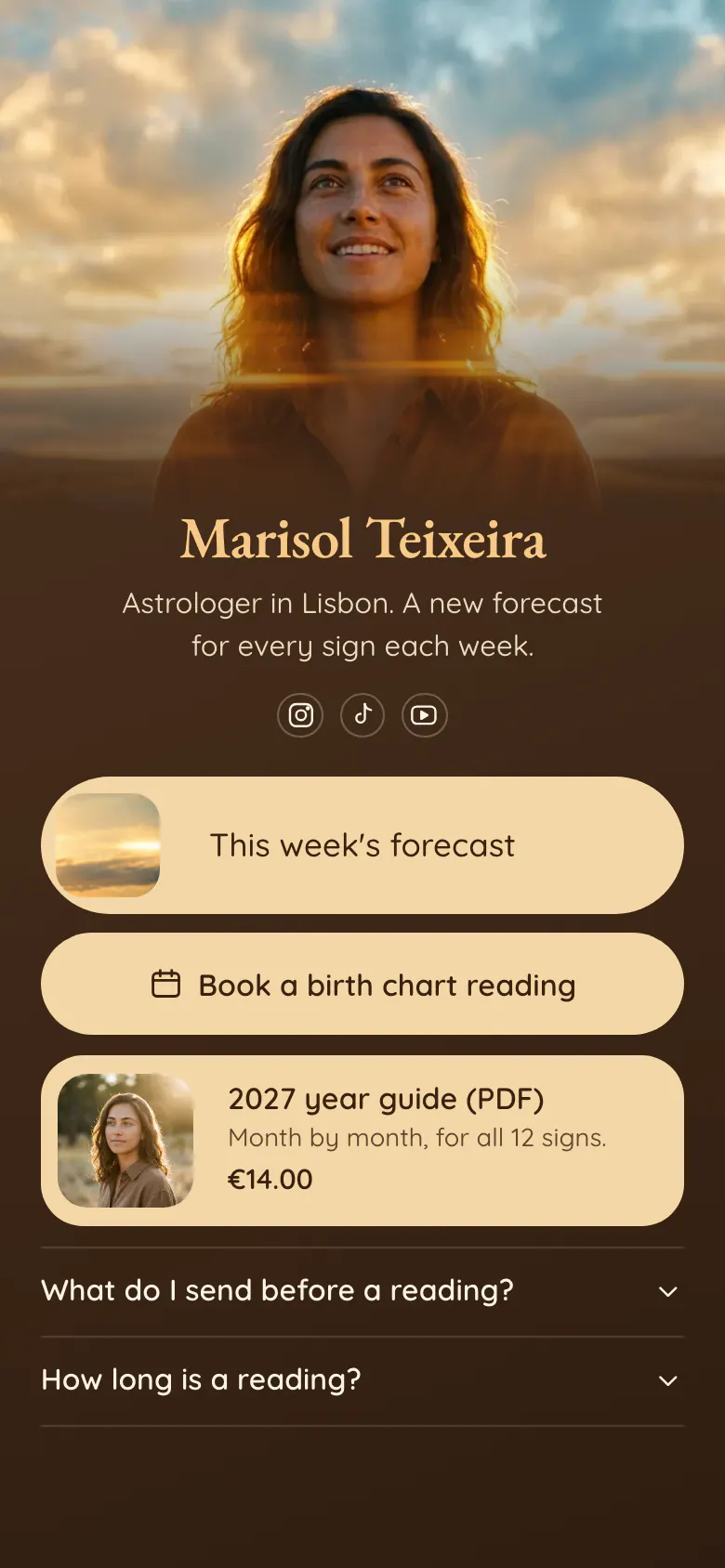
The forecast for their sign is what a viewer wants after a video, and here it is the first block. A birth chart reading to book and a €14 year guide come next, for those who want more than one week.
Link in bio essentials for astrologers
Put the current forecast first in an astrology link in bio, then a button to book a reading, one guide or report with its price, and answers to the questions people send before a reading. Most visitors come for the free forecast and a few of them book, so the order follows that. On More.You each of these is one block.
What is on this page
- Name and bioMarisol TeixeiraAstrologer in Lisbon. A new forecast for every sign each week.
- Social iconsInstagram, TikTok, YouTube
- Featured linkThis week's forecast
The forecast has a picture and sits first. Change where it leads each week, and the address in your bio stays the same.
- BookingBook a birth chart reading
The button names the reading, a birth chart reading, so no one asks which kind you offer. It opens the booking service you use.
- Product2027 year guide (PDF)€14.00
The 2027 year guide says what is inside, “Month by month, for all 12 signs”, and what it costs, €14.00. One tap opens your store.
- FAQWhat do I send before a reading?2 questions
“What do I send before a reading?” saves you a message. Ask here for the date, time and place of birth.
Who it is for
Astrologers and tarot readers who publish a forecast every week or month on TikTok, Instagram or YouTube and also give private readings. It fits someone who works alone and answers every booking message personally. If you only take clients and post no forecasts, start from the template for coaches. If you mainly sell PDFs, try the one for digital product sellers.
How to make it yours
Choose the forecast layout
Use this template is the button that starts your page. The page begins with a forecast link, a reading button and a guide with a price.
Add this week's forecast
Your newest forecast video goes in the first block. Put your name and photo where Marisol's are, and write your own reading name and guide price.
Put it in every bio
Your TikTok, Instagram and YouTube profiles each get the published link. End each video with “full forecast in my bio”, so viewers know where their sign is.
- Change the first block on the same day each week. Followers learn that your bio link always holds the current forecast.
- Before a new year, an eclipse or a Mercury retrograde, move the guide above the reading. Move it back when the date has passed.
- Write the length and the format of a reading in the FAQ, for example a video call or a recording. Then nobody books the wrong thing.
Questions
What should an astrologer put in their link in bio?
Your current forecast, a way to book a reading, one guide with a price and a short FAQ. Put the forecast first, because it is what you promise in your videos. The reading and the guide sit under it for followers who want something personal or something to keep.
How do I take birth chart reading bookings from TikTok or Instagram?
Add a booking button to the page in your bio. Here the button says “Book a birth chart reading” and opens the booking service you already use, where the client chooses a date. Use the FAQ under it to ask for the date, time and place of birth before the session.
Should I add a horoscope link for every zodiac sign?
Only if you publish a separate forecast for each sign. Then put the 12 links in a collection, a group under one title that opens and closes, so the page stays short. If one video covers all 12 signs, one forecast link at the top is enough.
Is this astrology template free to use?
Yes. You can create and publish your astrology page for free, and the Free plan includes the forecast link, the booking button, the product block and the FAQ. The brown background, the sand buttons and the font are yours to change.
Start your page with this template
Type the name you want after more.you/ and create your account. Then change the words and photos to yours.
 more.you/yourname
Before you go
Put everything you share behind one link
More.You is a free link in bio page. No card needed.
- Start from a template made for your work
- Add links, products, bookings and events
- See how many people tap each link