Join this week and get Pro free for 6 monthsLiked the free tool? Get your own page with Pro freeMoving to More.You? Get Pro free for 6 monthsPick a template and get Pro free for 6 monthsTry every Pro feature free for 6 monthsPut it into practice with Pro free for 6 months
Get Pro freeSign upTemplatesSee all templatesPricing



Product
Page blocksLinks, products, bookings, events and opening hoursThemes and fonts15 colour themes, 31 fonts, buttons and backgroundsClick analyticsPage views, clicks on each link, countries and devicesLinktree importPaste your Linktree address and pick the links to bringResources
TemplateBold eyes
Link in bio template for beauty creators
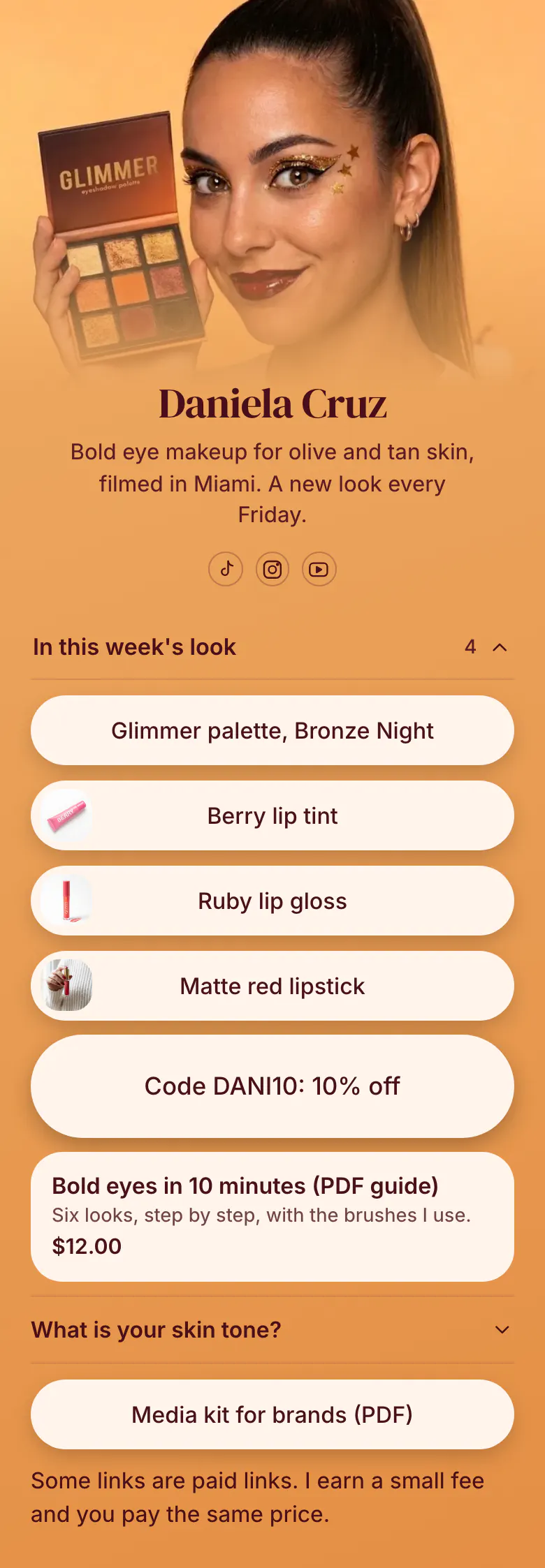
Followers arrive asking which palette that was. The first block answers with the four products from this week's look, and each one opens the shop with one tap. Daniela's code, her guide and her media kit follow.
Bio link essentials for beauty creators
Start a beauty creator's bio link with the products from the newest look, then add a discount code, a guide or product of your own with its price, an answer about skin tone and shade, and a media kit for brands. Followers tap the link minutes after a video to find one product, so that look must be at the top.
What is on this page
- Name and bioDaniela CruzBold eye makeup for olive and tan skin, filmed in Miami. A new look every Friday.
- Social iconsTikTok, Instagram, YouTube
- CollectionIn this week's look4 links
Groups the four products from one look under one title. A follower opens it and finds the exact shade.
- LinkGlimmer palette, Bronze Night
One link for each product, named the way you say it on camera, so followers match the name to the video.
- LinkBerry lip tint
- LinkRuby lip gloss
- LinkMatte red lipstick
- Featured linkCode DANI10: 10% off
Puts the code and the saving in the button text, so nobody has to search your captions for DANI10.
- ProductBold eyes in 10 minutes (PDF guide)$12.00
The guide appears with its name, a line about the six looks inside and its price. A tap opens the store where you sell it.
- FAQWhat is your skin tone?
The skin tone question fills a beauty creator's comments. Here it is answered once, where everyone can find it.
- LinkMedia kit for brands (PDF)
- TextSome links are paid links. I earn a small fee and you pay the same price.
Tells followers in plain words that some links are paid links and that they pay the same price.
Who it is for
Makeup and skin care creators who post looks or routines on TikTok, Instagram and YouTube, earn from product links and codes, and get shade questions under every video. A makeup artist who takes bookings for brides and events should start from the template for makeup artists, which opens with a trial to book.
How to make it yours
Open Bold eyes
Tap Use this template and choose your creator handle, so the address after more.you/ matches your TikTok. Daniela's sample look is there to replace, block by block.
List this week's products
Rename the collection after your own series. Paste a link for each product with the brand and shade in the button text, then add your code, your guide and your skin tone answer.
Link it under every video
Publish your page and put its address in your TikTok, Instagram and YouTube profiles. Say in each makeup video that the products are in your bio.
- Write the shade in the button text, like Glimmer palette, Bronze Night. The shade is what followers ask for, and the brand name alone is not enough.
- Give each product link a start time that matches your posting day. Visitors do not see the link before then, so Friday's look appears on Friday.
- Move the line about paid links up beside the product links if most of them earn you money. Advertising rules in many countries ask for the notice near the link.
Questions
What should a beauty creator put in their link in bio?
The products you used this week, your discount code, your own guide and a media kit. Put the product links first and name each one with its shade. Add one answer about your skin tone and a short line that says which links are paid.
How do I share product links and discount codes from my makeup videos?
Group the products from one video in a collection and name it after the look. Each product is a link with your own text, and the code gets its own button with the saving in the name, like Code DANI10: 10% off on the sample page. Followers then find everything from one makeup video in one place.
Do I have to disclose affiliate links in my bio link?
Yes, a beauty creator should tell followers when a link earns money. Rules differ by country, and the safe practice is a plain sentence close to the links. The sample page says that some links are paid links and that the follower pays the same price. Write your own line in words a new follower understands.
Which parts of the design can a beauty creator change?
Every colour, the font and the background. On a beauty page you set the background, the buttons and the text in your own shades, and you choose from 31 fonts. Behind your makeup photos, the background can be a solid colour, a gradient, a blur, a pattern or a photo.
Start your page with this template
Type the name you want after more.you/ and create your account. Then change the words and photos to yours.
 more.you/yourname
Before you go
Put everything you share behind one link
More.You is a free link in bio page. No card needed.
- Start from a template made for your work
- Add links, products, bookings and events
- See how many people tap each link