Join this week and get Pro free for 6 monthsLiked the free tool? Get your own page with Pro freeMoving to More.You? Get Pro free for 6 monthsPick a template and get Pro free for 6 monthsTry every Pro feature free for 6 monthsPut it into practice with Pro free for 6 months
Get Pro freeSign upTemplatesSee all templatesPricing



Product
Page blocksLinks, products, bookings, events and opening hoursThemes and fonts15 colour themes, 31 fonts, buttons and backgroundsClick analyticsPage views, clicks on each link, countries and devicesLinktree importPaste your Linktree address and pick the links to bringResources
TemplateDaily lesson
Link in bio template for content creators
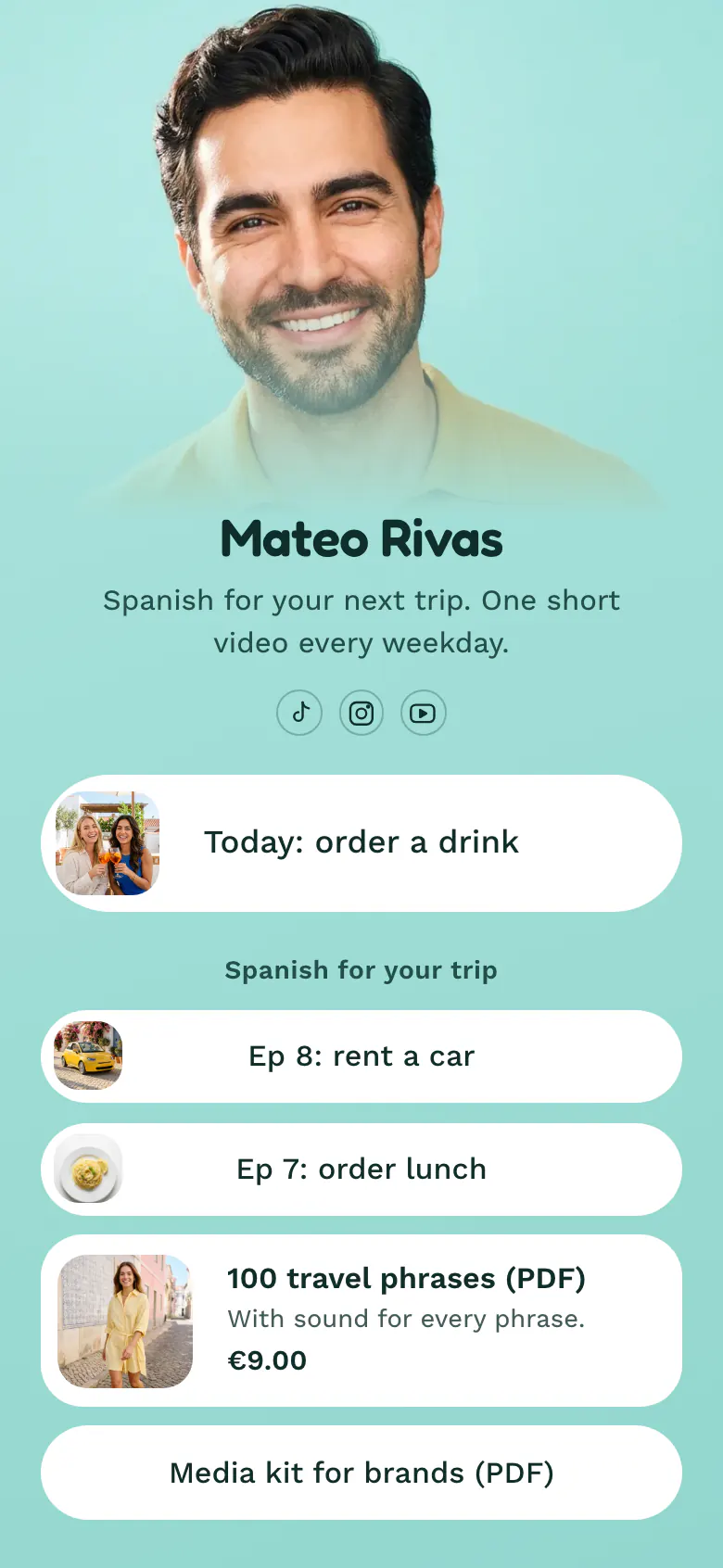
'Today: order a drink' is the top button on Mateo's page, because a viewer arrives from the video they saw a minute ago. Numbered episodes come next. A €9.00 phrase guide and a media kit sit lower, where buyers and brands look for them.
The right order for a creator's bio link
Content creators should put these in their link in bio, in this order: today's video, the series it belongs to, one product with a price, and a media kit for brands. Viewers arrive from a single post and look for that post first. A brand that wants to work with you will scroll, so the media kit can sit last.
What is on this page
- Name and bioMateo RivasSpanish for your next trip. One short video every weekday.
- Social iconsTikTok, Instagram, YouTube
- Featured linkToday: order a drink
One tap on the picture opens today's video, the same one your caption sent the viewer to find.
- Section titleSpanish for your trip
'Spanish for your trip' names the series, so a new viewer learns what the channel teaches before they scroll.
- LinkEp 8: rent a car
'Ep 8: rent a car' and 'Ep 7: order lunch' keep their numbers, so viewers follow the series in order. The media kit comes last.
- LinkEp 7: order lunch
- Product100 travel phrases (PDF)€9.00
The phrase guide shows a photo, its name and its price, €9.00. One tap opens your own store, where the viewer buys it.
- LinkMedia kit for brands (PDF)
Who it is for
You post short videos on TikTok, Instagram or YouTube on a fixed rhythm, and you number them as episodes. One small product, such as a PDF guide, is enough for this layout. A creator whose main work is a long weekly video should start from the template for YouTubers, where the video plays on the page.
How to make it yours
Pick Daily lesson
Find Daily lesson in the template gallery. It is laid out for a weekday series, with one large button for today's video, numbered episodes under it, then a guide and a media kit.
Make the episodes yours
Link today's video in the first button and name your episodes. Type the real price of your guide. Then add your photo and write your promise in the bio line, as Mateo does with 'One short video every weekday'.
Put the address in every profile
Publish and paste more.you/yourname into your TikTok, Instagram and YouTube profiles, the places where your daily videos run. Say 'link in bio' at the end of each video.
- Rename the first button each weekday, when the new video is posted. 'Today: order a drink' tells a viewer more than 'Watch my new video'.
- Give tomorrow's video link a start time. Visitors see it only from that moment, so you can prepare the page the evening before.
- Read the tap count on each episode link once a week. If 'rent a car' gets more taps than 'order lunch', film more of that kind and tell brands the number.
Questions
What should a content creator put in their link in bio?
Start with the video you posted today, because that is the reason most people tap. Under it, list the series by episode, show one product with its price, and end with a media kit for brands. On the sample page that means 'Today: order a drink', two episodes, a €9.00 phrase guide and a PDF.
Where should I put my media kit in my link in bio?
The media kit belongs at the bottom of the page, as a plain link with 'for brands' in the button text. Followers do not need it, and a brand manager who wants your numbers will scroll to find it. Replace the PDF each time your follower count or your prices change, so a brand's first email starts from the right numbers.
How do I sell a digital guide from my link in bio?
Add a product block with a photo, the name and the price of the guide. A viewer taps it and your own store opens, where they buy. Say what they get in one short line, as the sample does with 'With sound for every phrase'.
Is this link in bio template free for content creators?
Yes. A content creator can create and publish a More.You page for free, and the Free plan has every block type. The product block and the featured link for today's video are included. You can change the mint background, the round buttons and the font to match your channel.
Start your page with this template
Type the name you want after more.you/ and create your account. Then change the words and photos to yours.
 more.you/yourname
Before you go
Put everything you share behind one link
More.You is a free link in bio page. No card needed.
- Start from a template made for your work
- Add links, products, bookings and events
- See how many people tap each link