Join this week and get Pro free for 6 monthsLiked the free tool? Get your own page with Pro freeMoving to More.You? Get Pro free for 6 monthsPick a template and get Pro free for 6 monthsTry every Pro feature free for 6 monthsPut it into practice with Pro free for 6 months
Get Pro freeSign upTemplatesSee all templatesPricing



Product
Page blocksLinks, products, bookings, events and opening hoursThemes and fonts15 colour themes, 31 fonts, buttons and backgroundsClick analyticsPage views, clicks on each link, countries and devicesLinktree importPaste your Linktree address and pick the links to bringResources
TemplateFilm diary
Link in bio template for travel creators
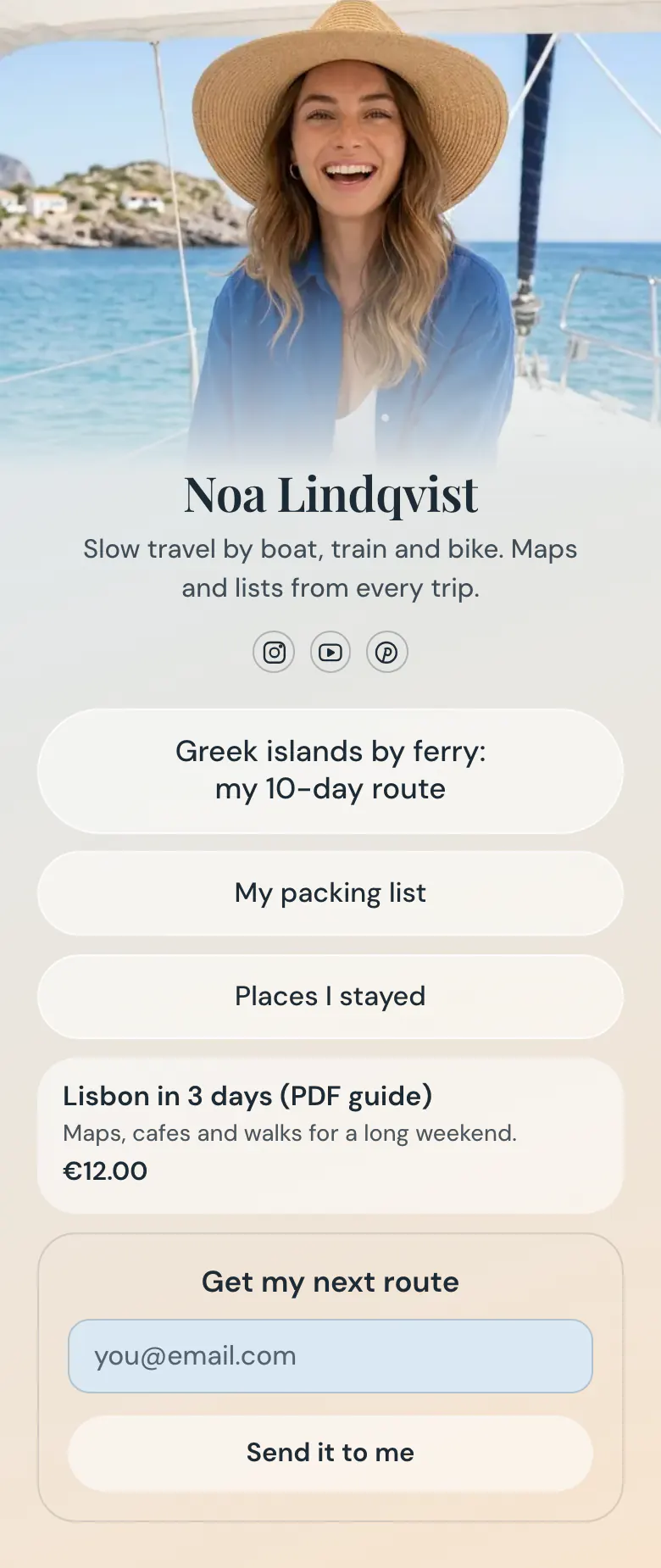
The reel was about Greek islands by ferry, so the first button is too. Noa's 10-day route leads the page. Her packing list and stays support it, then a €12 Lisbon guide and an email form close the page.
The order of a travel creator's links
Start a travel creator's link in bio with the route from the current trip, follow it with the lists followers ask for, such as packing and places to stay, then add a paid guide with its price and an email signup for the next trip. Followers arrive from one video about one place, and they leave if the first link is about somewhere else.
What is on this page
- Name and bioNoa LindqvistSlow travel by boat, train and bike. Maps and lists from every trip.
- Social iconsInstagram, YouTube, Pinterest
- Featured linkGreek islands by ferry: my 10-day route
The trip you are posting about now, named with the place and the length: Greek islands by ferry, a 10-day route.
- LinkMy packing list
Two lists followers ask for in comments, what you packed and where you stayed. Each button leads to the full post.
- LinkPlaces I stayed
- ProductLisbon in 3 days (PDF guide)€12.00
The Lisbon guide with its name, a line about what is inside and the price. Readers tap it and reach the store you already use.
- Email signupGet my next routeSend it to me
A form for anyone who wants the next route. They type an email address and press 'Send it to me'.
Who it is for
Solo travel creators and bloggers with one route, one list or one guide to share have enough for this page. It works for trips posted on Instagram, YouTube or Pinterest. Paid links to stays fit behind a button like 'Places I stayed'. People who plan trips for clients need a different first block, and the template for travel agencies opens with a planning call.
How to make it yours
Put your current trip first
Rename the first button of this template after the trip you are posting now. Name the place, the transport and the number of days.
Link your lists and guide
Your packing list and your stays each get a plain button. Then replace the Lisbon guide with your own guide, its price and the address of the store where readers get it.
Publish before the next reel
Publish the page, then paste its address into the Instagram, YouTube and Pinterest profiles where you post your trips. When a new trip starts, change the first button on the same day.
- Name the first button like a search: place, transport, number of days. 'Greek islands by ferry: my 10-day route' tells a stranger what they get.
- When a new trip starts, keep the old route as a plain link lower on the page. People who plan far ahead still look for it.
- Give readers a reason to leave an email address. The form can show a discount code after sign-up, for example for your Lisbon guide.
Questions
What should a travel creator put in their link in bio?
Lead with the trip your followers are watching now. After it, add the practical lists people request in comments, your packing list and the places you stayed, then one guide with a price. Finish with an email form, so a follower hears about your next route even in a week when they miss your posts.
How do I share affiliate links for hotels and gear in my bio?
Give each one its own button, named after the hotel or the item, and say on the page that the link is paid. A link opens any address, so a stay, a rail pass or a backpack can each have a button. Noa's page keeps this short with one button, 'Places I stayed', that leads to the full list.
How can I sell a travel guide from my Instagram bio?
Show the guide as a product with its name, a line about what is inside and the price. On Noa's page, 'Lisbon in 3 days' costs €12 and one tap opens the store where it is sold. You keep the store you already have, and prices can be shown in 12 currencies.
Can I use my own photo and colours on the travel page?
Yes, the photo and the colours are the first things to change. Noa's version has a cover photo from a boat, a soft blue to cream gradient and glass buttons. Replace the photo with one from your trip and choose your own background, button and text colours. Publishing your version is free.
Start your page with this template
Type the name you want after more.you/ and create your account. Then change the words and photos to yours.
 more.you/yourname
Before you go
Put everything you share behind one link
More.You is a free link in bio page. No card needed.
- Start from a template made for your work
- Add links, products, bookings and events
- See how many people tap each link