Join this week and get Pro free for 6 monthsLiked the free tool? Get your own page with Pro freeMoving to More.You? Get Pro free for 6 monthsPick a template and get Pro free for 6 monthsTry every Pro feature free for 6 monthsPut it into practice with Pro free for 6 months
Get Pro freeSign upTemplatesSee all templatesPricing



Product
Page blocksLinks, products, bookings, events and opening hoursThemes and fonts15 colour themes, 31 fonts, buttons and backgroundsClick analyticsPage views, clicks on each link, countries and devicesLinktree importPaste your Linktree address and pick the links to bringResources
TemplateStone steps
Link in bio template for online brands
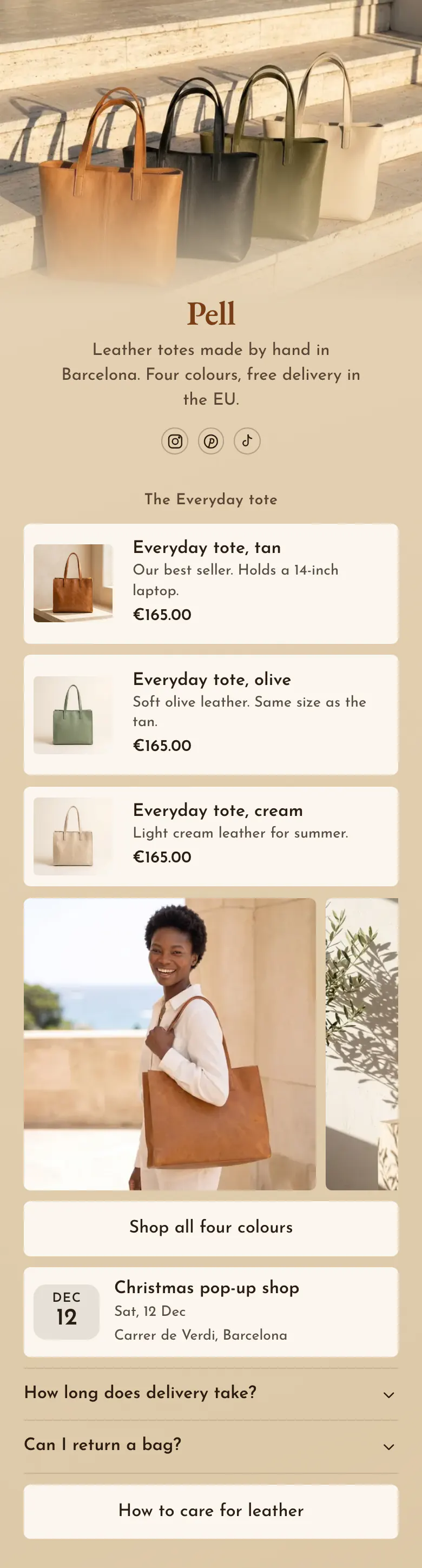
Shoppers see the Everyday tote in three colours, each with its price, before they scroll. Photos of the bag in use follow, then a link to the whole shop, a pop-up date and answers about delivery and returns.
The short answer for online brands
An online brand should put these in its link in bio, in this order: main products with a photo and a price, photos of the product in use, a link to the whole shop, and answers about delivery and returns. Shoppers want the price and the delivery terms before they open a store, and a pop-up date helps those who must see the product first.
What is on this page
- Name and bioPellLeather totes made by hand in Barcelona. Four colours, free delivery in the EU.
- Social iconsInstagram, Pinterest, TikTok
- Section titleThe Everyday tote
The Everyday tote names the product once, so the three colours under it read as one bag.
- ProductEveryday tote, tan€165.00
Each colour has a photo, a short line and the price, €165.00. One tap opens that colour in your own store.
- ProductEveryday tote, olive€165.00
- ProductEveryday tote, cream€165.00
- Gallery4 pictures
Four photos show the bag in use, starting with a tan tote on a shoulder, so shoppers can judge its size.
- LinkShop all four colours
One link, Shop all four colours, opens the whole store. The other, How to care for leather, helps people who already own a bag.
- EventChristmas pop-up shop12 Dec, Carrer de Verdi, Barcelona
The Christmas pop-up shop shows its date and place, 12 Dec on Carrer de Verdi, for people who want to touch the leather.
- FAQHow long does delivery take?2 questions
Two answers, how long delivery takes and how to return a bag, wait here for the shopper who is almost ready to order.
- LinkHow to care for leather
Who it is for
Small brands that make a few products and sell them from their own online store, with shoppers who arrive from Instagram, Pinterest or TikTok. It fits a brand with one main product in several colours. If you run a shop on a street with opening hours, start from the template for shops and boutiques instead.
How to make it yours
Choose Stone steps
Press Use this template and create a More.You account for your brand. A section title, three products, a photo row, a shop link, an event and two delivery questions are in place.
Add your products
Give each product its photo, name and price, and link it to its page in your store. Replace the tote photos with your product in real use.
Send shoppers from posts
Publish your brand page and paste more.you/yourname into your Instagram, Pinterest and TikTok profiles. A shopper who liked a post then finds the product and its price from your profile.
- Put your best seller first, as Pell does with the tan tote. The first product on the page gets the first look.
- Say what fits inside the product, as Pell does with Holds a 14-inch laptop. Size is the question that photos answer worst.
- When your newest post shows a product that sits low on the page, move that product to the top for the week.
Questions
What should an online brand put in its link in bio?
Show your main products with prices first. Then add photos of the product in use, a link to the whole shop and answers about delivery and returns. A visitor from a post already likes the product, so the page should give the price and the next tap without a search through your store.
How do I show products with prices in my link in bio?
Add one product block for each bag or item you sell. A product block shows a photo, a name and a price. On this page the Everyday tote appears in tan, olive and cream at €165.00 each. One tap opens that product in your own store, where the customer orders it. Pell shows euros, and a product price can be in any of 12 currencies.
Where should an online brand put delivery and returns information?
Answer both in an FAQ on your bio link. The Pell sample has two questions, one about delivery and one about returns, and each answer opens when a visitor taps the question. Put the short version in your bio line too, as Pell does with free delivery in the EU.
Can I change the colours and fonts of this template?
Every colour and font on the Pell page can change. Sand and cream are only its starting point. You set your own background, button and text colours, choose from 31 fonts and use your own product photo as the cover. A brand can create and publish the page for free.
Start your page with this template
Type the name you want after more.you/ and create your account. Then change the words and photos to yours.
 more.you/yourname
Before you go
Put everything you share behind one link
More.You is a free link in bio page. No card needed.
- Start from a template made for your work
- Add links, products, bookings and events
- See how many people tap each link