Join this week and get Pro free for 6 monthsLiked the free tool? Get your own page with Pro freeMoving to More.You? Get Pro free for 6 monthsPick a template and get Pro free for 6 monthsTry every Pro feature free for 6 monthsPut it into practice with Pro free for 6 months
Get Pro freeSign upTemplatesSee all templatesPricing



Product
Page blocksLinks, products, bookings, events and opening hoursThemes and fonts15 colour themes, 31 fonts, buttons and backgroundsClick analyticsPage views, clicks on each link, countries and devicesLinktree importPaste your Linktree address and pick the links to bringResources
TemplateGood home
Link in bio template for charities and nonprofits
Supporters want to help while the feeling lasts. Feed a dog is the first button and opens your own giving page. Meet our dogs, the adoption day and a Saturday volunteer link follow for people who can give time.
What a charity bio link should hold
Charities and nonprofits should put these in a link in bio, in this order: a link to their own giving page, the people or animals they help, the next event, a way to volunteer, and answers to common questions. A supporter acts right after a moving post or not at all, so the way to give comes first.
What is on this page
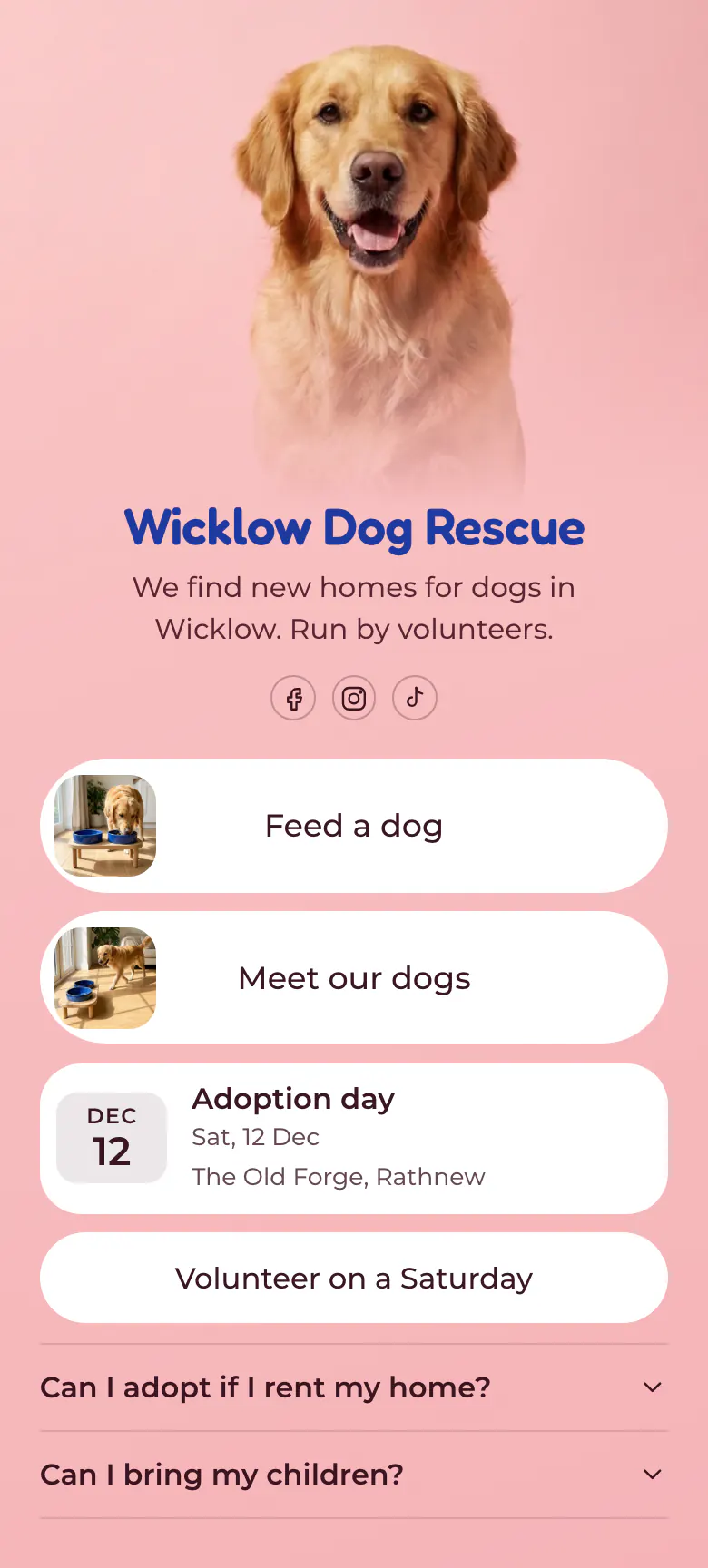
- Name and bioWicklow Dog RescueWe find new homes for dogs in Wicklow. Run by volunteers.
- Social iconsFacebook, Instagram, TikTok
- Featured linkFeed a dog
The Feed a dog button opens your own giving page. Meet our dogs opens the page of dogs that need a home. Both have a photo.
- Featured linkMeet our dogs
- EventAdoption day12 Dec, The Old Forge, Rathnew
Adoption day shows its date, name and place, 12 Dec at The Old Forge in Rathnew, so families can plan the visit.
- LinkVolunteer on a Saturday
The volunteer link asks for one named day, Saturday, which is easier to answer than a general call for help.
- FAQCan I adopt if I rent my home?2 questions
Two questions families ask before they visit: whether they can adopt in a rented home and whether children can come.
Who it is for
Small charities, rescues, food banks and community groups run by volunteers, with supporters who follow them on Facebook, Instagram or TikTok. It fits a group with one clear way to give and one regular event. A church or faith group should start from the template for churches and faith groups instead.
How to make it yours
Choose Good home
Press Use this template and create a More.You account for your charity. The giving link, the link to your dogs, the adoption day, the volunteer link and two questions are in place.
Name what a gift does
Link the first button to your giving page and name it after the result, as Feed a dog does. Add your own photos, your next event and your own questions.
Add it to every profile
Publish your charity page and paste more.you/yourname into your Facebook, Instagram and TikTok profiles. Each rescue story can then end with the words link in bio.
- Name the first button after what a gift does. Feed a dog tells a supporter more than Give does.
- Ask volunteers for one named day, as Volunteer on a Saturday does. A small and clear request is easier to accept.
- After an adoption day, replace the event with the next date the same evening, while new followers are still reading your page.
Questions
What should a charity or nonprofit put in its link in bio?
Put your way to give first, then the cause itself, then the next event and a way to volunteer. On this page that means Feed a dog, Meet our dogs, Adoption day and Volunteer on a Saturday. Each button names one action, so a supporter knows what happens after the tap.
How can supporters give through our Instagram bio?
Send them from the first button of your bio link to the giving page you already have. On the sample that button reads Feed a dog, shows a photo and opens the giving page in one tap. The gift is made there, so your receipts and records stay where they are today.
How do we promote an adoption day or a fundraiser on social media?
Add it as an event in your bio link and mention the link in each post. The event block shows the date, the name and the place, such as Adoption day on 12 Dec at The Old Forge. In the last week before the day, move the event to the top of the page.
Is this nonprofit link in bio template free?
Creating and publishing this page is free for a charity, and the Free plan has every block type the page uses. The pink background and the blue name come from the Wicklow Dog Rescue sample. You set your own colours for the background, the buttons and the text, so the page can match your charity's logo.
Start your page with this template
Type the name you want after more.you/ and create your account. Then change the words and photos to yours.
 more.you/yourname
Before you go
Put everything you share behind one link
More.You is a free link in bio page. No card needed.
- Start from a template made for your work
- Add links, products, bookings and events
- See how many people tap each link