Join this week and get Pro free for 6 monthsLiked the free tool? Get your own page with Pro freeMoving to More.You? Get Pro free for 6 monthsPick a template and get Pro free for 6 monthsTry every Pro feature free for 6 monthsPut it into practice with Pro free for 6 months
Get Pro freeSign upTemplatesSee all templatesPricing



Product
Page blocksLinks, products, bookings, events and opening hoursThemes and fonts15 colour themes, 31 fonts, buttons and backgroundsClick analyticsPage views, clicks on each link, countries and devicesLinktree importPaste your Linktree address and pick the links to bringResources
TemplateSunday morning
Link in bio template for churches and faith groups
On Saturday night a newcomer taps the link and finds the Sunday service, with its date and its place, at the top. Members who missed a week get the sermon and the livestream next, and the link to give is the last block.
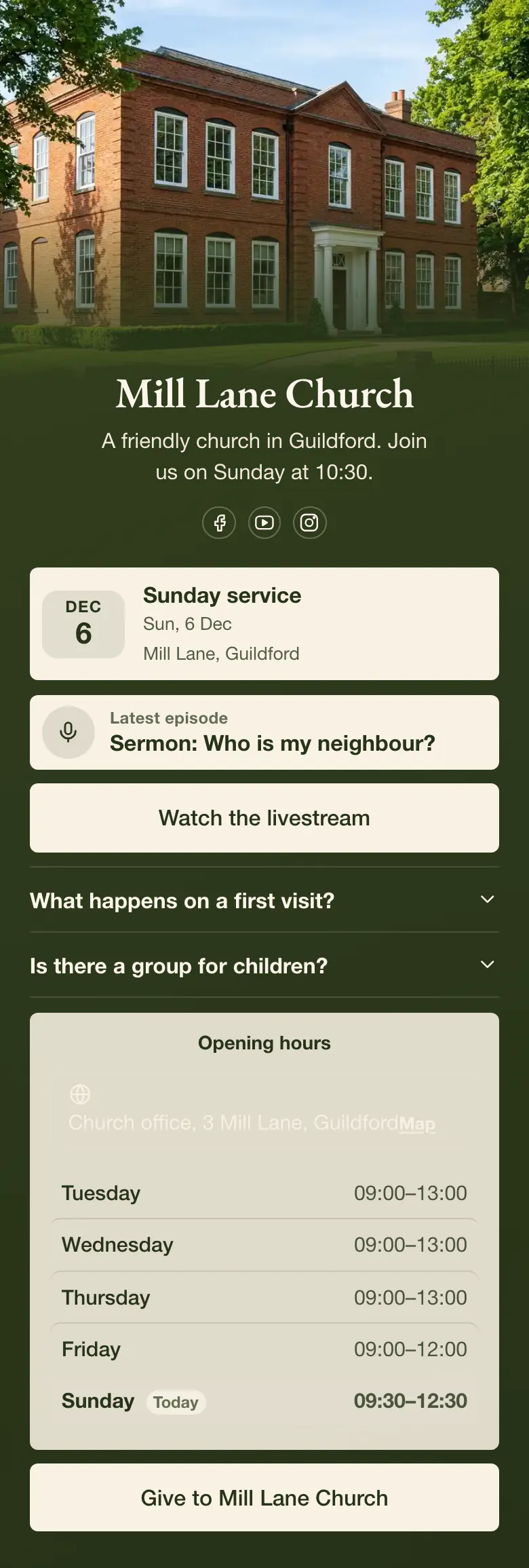
A church link in bio, in order
A church's bio link should carry, from top to bottom, the next service with its date and place, last week's sermon, the livestream, answers for first-time visitors, office hours and a link to give. Most people who tap the link want to know when and where to come on Sunday. Members want the sermon they missed.
What is on this page
- Name and bioMill Lane ChurchA friendly church in Guildford. Join us on Sunday at 10:30.
- Social iconsFacebook, YouTube, Instagram
- EventSunday service6 Dec, Mill Lane, Guildford
Shows the name, the date and the place of the next service. Change the date each week so it names the coming Sunday.
- Podcast episodeSermon: Who is my neighbour?
Carries the sermon title with a link to listen, for members who were away and newcomers who want to hear the preaching first.
- LinkWatch the livestream
One link opens the livestream for people at home. The other, at the foot of the page, opens your giving page.
- FAQWhat happens on a first visit?2 questions
Tells a newcomer that a welcomer meets them at the door and where children go, before they have to ask a stranger.
- Opening hoursTuesday, Wednesday, Thursday, Friday and SundayChurch office, 3 Mill Lane, Guildford
Lists when the church office is staffed, day by day, for anyone who needs to speak to someone in the week.
- LinkGive to Mill Lane Church
Who it is for
Churches, parishes and other faith groups with a weekly gathering, run by a small staff or by volunteers who post on Facebook, YouTube and Instagram. One volunteer with a phone can keep the page current each week. A group that mainly raises money for a cause has a closer match in the template for charities and nonprofits, where the link to give comes first.
How to make it yours
Start with Sunday morning
Create the church's account from the Use this template button, with the office email. The page then belongs to the church and stays when a volunteer moves away.
Add your service and sermon
Type your service name, date and place into the event. Change the sermon title and its link, paste your livestream and giving links, and set the office hours.
Share it on Sunday
After you publish, add the address to the church's Facebook, YouTube and Instagram profiles. A published page also has a QR code for people who are in the room.
- Put the service time in the bio line, as Mill Lane Church does with Sunday at 10:30. It is the one fact every church visitor needs.
- Replace the sermon title and link each Monday. An old sermon near the top tells visitors that nobody keeps the page current.
- Write the first-visit answer for someone who has never entered a church. Say how long the service lasts, what people wear and where to sit.
Questions
What should a church put in its link in bio?
The next service, a recent sermon, the livestream, answers for newcomers and a way to give. Begin with the service, because a person who is thinking about a visit needs the day and the place before anything else. Keep the giving link lower, where members know to find it.
How can a church share its sermons and livestream in one link?
One church page can carry both, with a block for each. On the sample page the sermon appears as an episode title with a link to listen, and a separate button opens the livestream. Followers on Instagram, Facebook and YouTube all get the same address, so nobody has to search for the right video.
Can a church add an online giving link to its bio page?
Yes. Add a link with your own words, like Give to Mill Lane Church on the sample page, and link it to the giving page your church already uses. One tap opens that page. Place the link after the service and the sermon, so the page welcomes people before it asks.
Does a church have to pay for a link in bio page?
No. A church can create and publish one page for free, on the Free plan. That plan has every block type, the event, the sermon episode and the opening hours included. Volunteers can change words and links at any time, and those changes save as they type.

Start your page with this template
Type the name you want after more.you/ and create your account. Then change the words and photos to yours.
 more.you/yourname
Before you go
Put everything you share behind one link
More.You is a free link in bio page. No card needed.
- Start from a template made for your work
- Add links, products, bookings and events
- See how many people tap each link