Join this week and get Pro free for 6 monthsLiked the free tool? Get your own page with Pro freeMoving to More.You? Get Pro free for 6 monthsPick a template and get Pro free for 6 monthsTry every Pro feature free for 6 monthsPut it into practice with Pro free for 6 months
Get Pro freeSign upTemplatesSee all templatesPricing



Product
Page blocksLinks, products, bookings, events and opening hoursThemes and fonts15 colour themes, 31 fonts, buttons and backgroundsClick analyticsPage views, clicks on each link, countries and devicesLinktree importPaste your Linktree address and pick the links to bringResources
TemplateMorning mat
Link in bio template for yoga instructors
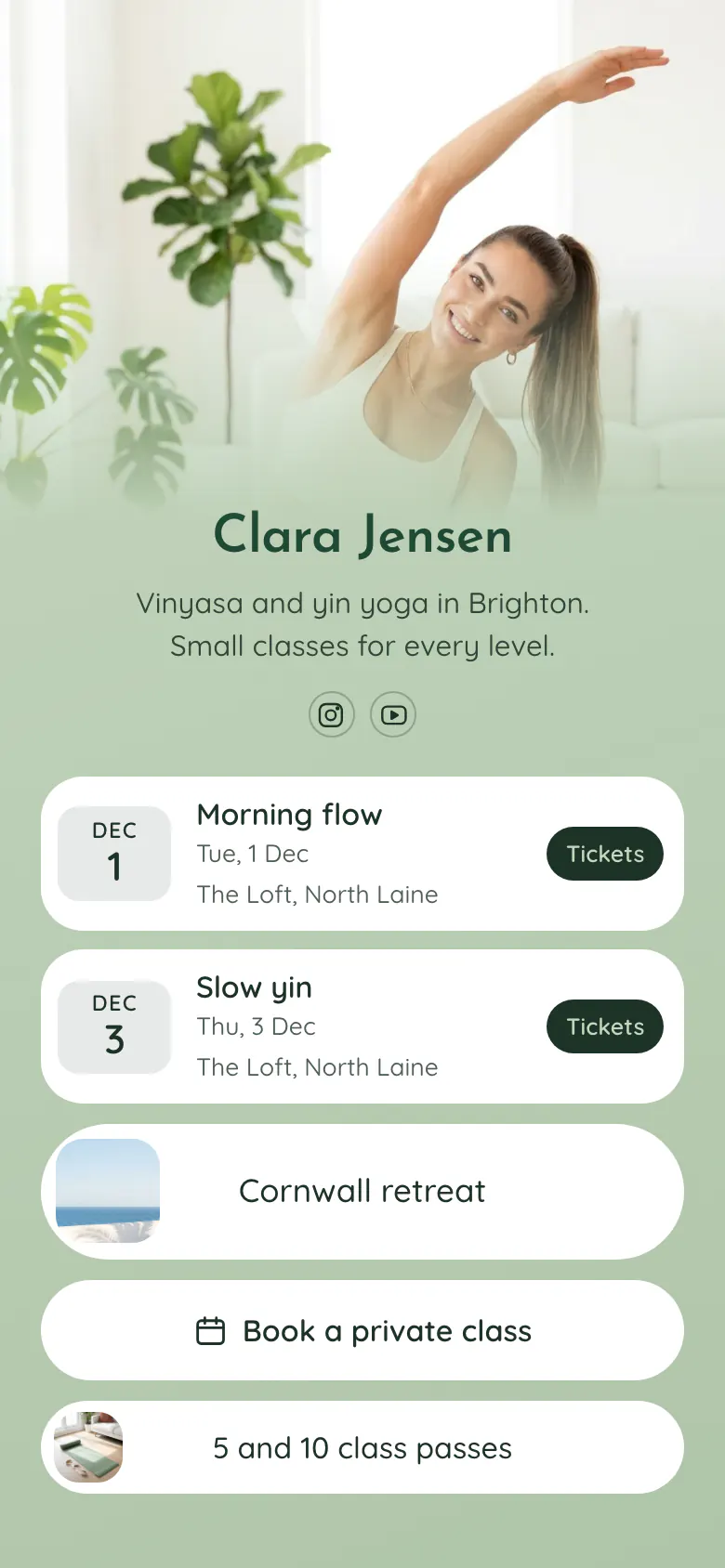
A student who taps your bio wants to know when the next class is and where. 'Morning flow' and 'Slow yin' are the first two blocks, each with its date and the studio. The Cornwall retreat, private classes and class passes follow.
Bio link essentials for a yoga instructor
Yoga instructors should put these in their link in bio, in order: this week's classes with date and place, a ticket link for each class, the next retreat or workshop, a button to book a private class, and class passes. Students check the bio shortly before they decide to come, so the weekly classes go first.
What is on this page
- Name and bioClara JensenVinyasa and yin yoga in Brighton. Small classes for every level.
- Social iconsInstagram, YouTube
- EventMorning flow1 Dec, The Loft, North Laine
'Morning flow' and 'Slow yin' each show a date and 'The Loft, North Laine'. Each Tickets button opens the ticket page for that class.
- EventSlow yin3 Dec, The Loft, North Laine
- Featured linkCornwall retreat
'Cornwall retreat' has a photo of the sea, so your largest offer is easy to see between the weekly blocks.
- BookingBook a private class
'Book a private class' opens the booking service you use, for students who prefer to practise alone with you.
- Link5 and 10 class passes
'5 and 10 class passes' has a small picture and opens the page where regular students get a pass.
Who it is for
Independent yoga teachers who rent studio space or teach in several places, fill small classes through Instagram and also offer passes or a retreat. Vinyasa, yin, pilates and meditation teachers can all use it. A studio with a team, a front desk and opening hours should start from the template for gyms and fitness studios.
How to make it yours
Choose Morning mat
Open the template gallery and choose Morning mat. Two class blocks, a retreat link with a photo, a private class button and a passes link are ready.
Add your classes
Replace Clara's name, photo and bio. Type the name, date and place of each class, paste the ticket links, and add your booking link for private classes.
Publish and tell your students
Publish, then paste more.you/yourname into your Instagram and YouTube profiles. Mention the address at the end of each class, so students can find next week's dates.
- Update the class blocks on the same day each week. A student who sees last week's date assumes the class no longer runs.
- Write the style and the level in the class name, like 'Slow yin, all levels'. Beginners stay home when they cannot tell if a class suits them.
- Move the retreat link to the top of the page while it still has places. Move it under the classes again when the retreat is full.
Questions
What should a yoga instructor put in their link in bio?
Show your next classes first, with the date, the studio and a ticket link. Add your retreat or workshop, a way to book a private class and your class passes. Skip old dates and long texts about your training, because a student mainly wants to know when and where to come.
How do yoga teachers take class bookings from Instagram?
Put a bio page address in your Instagram profile and add one block for each class. On the sample, 'Morning flow' and 'Slow yin' each have a Tickets button that opens the ticket page on the service the teacher already uses. Private classes have a separate booking button.
Should I list every weekly class or only the next ones?
List the next few classes, the ones a student can still join this week. The sample shows two, on 1 Dec and 3 Dec. You change the date in each block after the class, and a short list is quicker to keep correct than a full timetable.
Is the yoga template free, and can I change the green colours?
Yes. Creating and publishing your page is free, and every block type is on the Free plan. Change the sage green background, the white buttons and the dark green text to the colours of your own studio, and choose one of 31 fonts.
Start your page with this template
Type the name you want after more.you/ and create your account. Then change the words and photos to yours.
 more.you/yourname
Before you go
Put everything you share behind one link
More.You is a free link in bio page. No card needed.
- Start from a template made for your work
- Add links, products, bookings and events
- See how many people tap each link