Join this week and get Pro free for 6 monthsLiked the free tool? Get your own page with Pro freeMoving to More.You? Get Pro free for 6 monthsPick a template and get Pro free for 6 monthsTry every Pro feature free for 6 monthsPut it into practice with Pro free for 6 months
Get Pro freeSign upTemplatesSee all templatesPricing



Product
Page blocksLinks, products, bookings, events and opening hoursThemes and fonts15 colour themes, 31 fonts, buttons and backgroundsClick analyticsPage views, clicks on each link, countries and devicesLinktree importPaste your Linktree address and pick the links to bringResources
TemplateFriday market
Link in bio template for markets
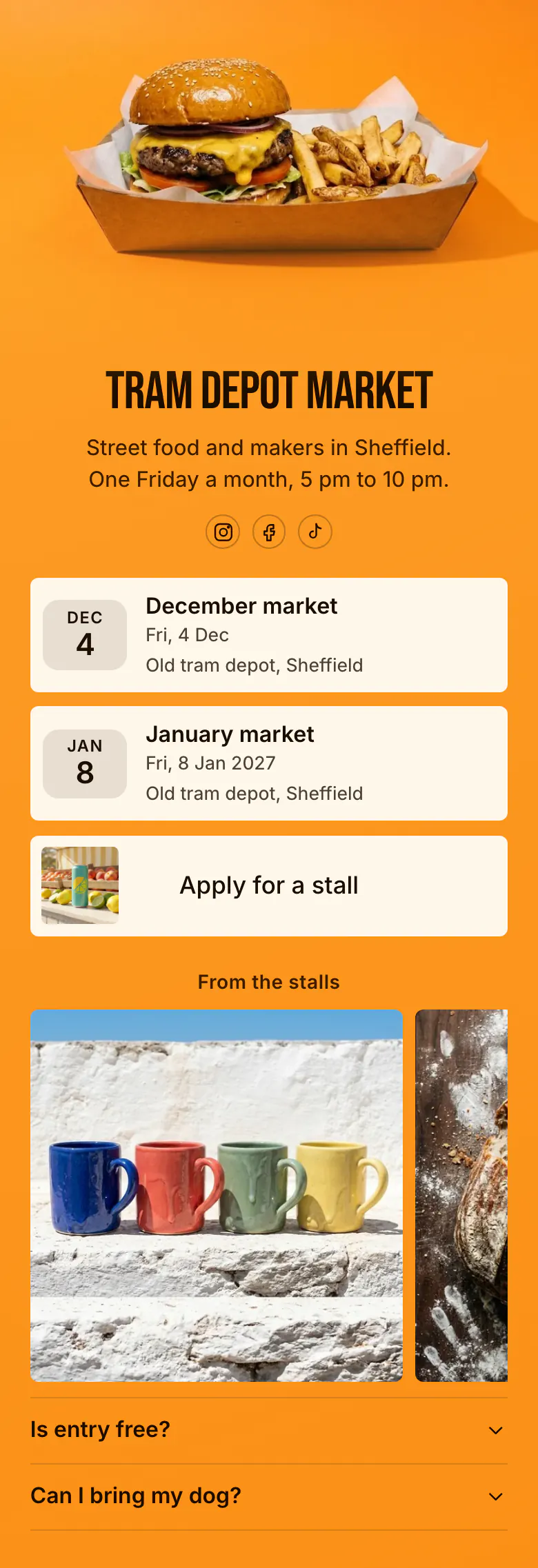
Most people who tap a market's bio link want the next date, so two dates with the place fill the top of this page. “Apply for a stall” follows for traders, then photos from the stalls and two visitor questions.
Dates, stalls and answers for a market's bio link
A market's link in bio should hold the next dates with the place, a link to apply for a stall, a few photos from the stalls and answers to the questions visitors send before every market. Dates lead since most people tap to check when the next market is. Traders scroll further for the application link.
What is on this page
- Name and bioTram Depot MarketStreet food and makers in Sheffield. One Friday a month, 5 pm to 10 pm.
- Social iconsInstagram, Facebook, TikTok
- EventDecember market4 Dec, Old tram depot, Sheffield
Each market date is its own block with the place, Old tram depot on the sample, so when and where are answered before a visitor scrolls.
- EventJanuary market8 Jan, Old tram depot, Sheffield
- Featured linkApply for a stall
“Apply for a stall” has a picture, which helps traders notice it between the dates and the photos.
- Section titleFrom the stalls
“From the stalls” tells a visitor that the photos below come from this market's own traders.
- Gallery3 pictures
Coloured mugs and a loaf of bread, three photos in all, show a new visitor what the stalls sell.
- FAQIs entry free?2 questions
“Is entry free?” and “Can I bring my dog?” open on a tap, so fewer people send them as messages.
Who it is for
Organisers of a market on set dates fit this page, such as a monthly street food night, a makers market, a farmers' market or a craft fair that takes stall applications. A trader with one stall and no events of their own should start from the template for shops and boutiques.
How to make it yours
Start with the market page
Two dates, a stall application link, a small gallery and two visitor questions are ready, all written for Tram Depot Market. Keep the order and replace the details.
Add your dates and photos
Enter your next two market dates and the place. Use your own cover photo, add pictures of real stalls and write the answers that visitors ask you for most.
Share it before market day
Once the page is published, set its link in your market's Instagram, Facebook and TikTok bios. Ask your traders to share the same link when they announce their stall.
- Write your hours in the line under your name, as the sample does with 5 pm to 10 pm. Visitors read that line before any block.
- The day after a market, delete its date and add the month after next, so the page always shows two markets ahead.
- When applications close, rename “Apply for a stall” to say that stalls are full for that month, or move it to the bottom of the page.
Questions
What should a market put in its link in bio?
Begin with the date and place of the next market, then the one after it. Add the stall application link for traders, a few photos from past markets and short answers about entry, dogs and parking. A visitor needs the date immediately, and a trader will scroll to find the form.
How do traders apply for a stall through our bio link?
Give them one link with a clear name, such as “Apply for a stall”. It opens your own application form, wherever you keep it. On this page it is a featured link with a picture, placed under the dates, so traders see it and visitors still read the dates first.
Which visitor questions belong on a market's bio page?
The ones you answer in messages before every market. For most organisers these are the entry price, dogs, parking, cash or card and what happens in rain. The sample page begins with entry and dogs. Each answer opens when a visitor taps the question, so the page stays short.
Can we change the orange colour and the food photo?
Yes, both are the sample's design. Replace the burger with your own cover photo and set your market's colours for the background, the buttons and the text. The tall poster lettering is one of 31 fonts. Press Save and the page keeps the new design.
Start your page with this template
Type the name you want after more.you/ and create your account. Then change the words and photos to yours.
 more.you/yourname
Before you go
Put everything you share behind one link
More.You is a free link in bio page. No card needed.
- Start from a template made for your work
- Add links, products, bookings and events
- See how many people tap each link