Join this week and get Pro free for 6 monthsLiked the free tool? Get your own page with Pro freeMoving to More.You? Get Pro free for 6 monthsPick a template and get Pro free for 6 monthsTry every Pro feature free for 6 monthsPut it into practice with Pro free for 6 months
Get Pro freeSign upTemplatesSee all templatesPricing



Product
Page blocksLinks, products, bookings, events and opening hoursThemes and fonts15 colour themes, 31 fonts, buttons and backgroundsClick analyticsPage views, clicks on each link, countries and devicesLinktree importPaste your Linktree address and pick the links to bringResources
TemplateChrome tips
Link in bio template for nail techs
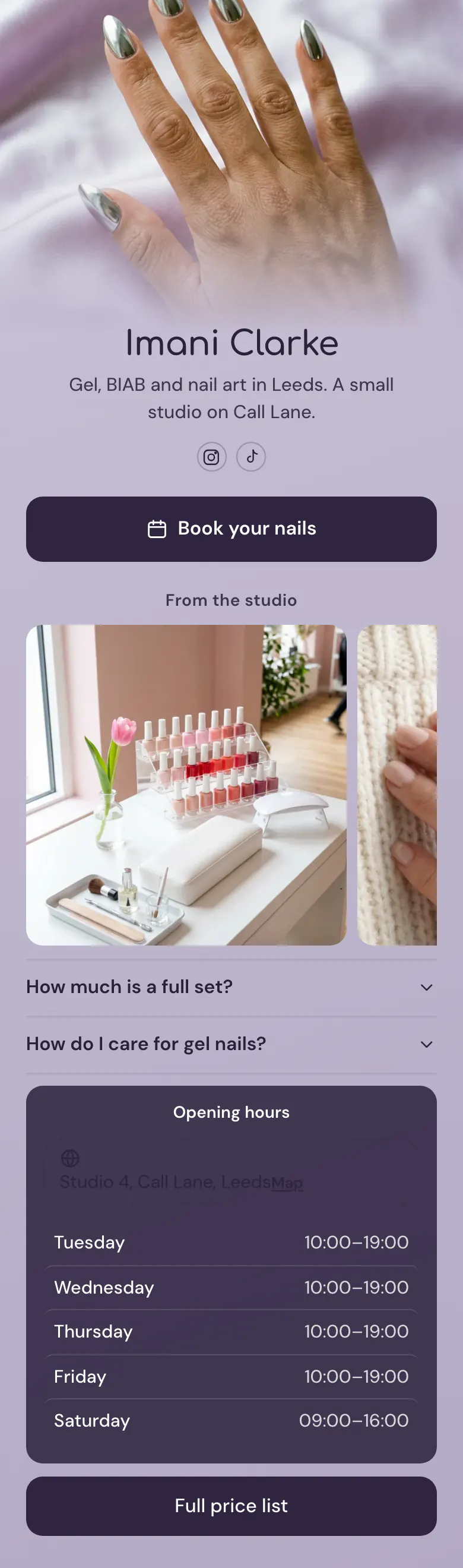
A client who taps your bio wants an appointment, so the booking button is the first block on the page. Photos from your studio, the price of a full set, gel aftercare and your working days follow in that order.
What a nail tech's link in bio needs
A nail tech's link in bio should hold, most important first: a booking button, photos of recent sets, prices for the main services, aftercare advice, working hours with the studio address, and a full price list. Clients choose from photos and prices, and each answer on the page is one message fewer in your DMs.
What is on this page
- Name and bioImani ClarkeGel, BIAB and nail art in Leeds. A small studio on Call Lane.
- Social iconsInstagram, TikTok
- BookingBook your nails
One tap opens your booking page on the service you already use, so a client chooses a day without a message to you.
- Section titleFrom the studio
'From the studio' tells a new follower that the photos under it show your own desk and your own work.
- Gallery3 pictures
Three photos of your desk and your sets. A client who wants chrome, BIAB or nail art looks for it here before booking.
- FAQHow much is a full set?2 questions
The price of a full set and gel aftercare open with one tap each. These two answers replace your most repeated DMs.
- Opening hoursTuesday to SaturdayStudio 4, Call Lane, Leeds
Your hours for each day from Tuesday to Saturday, with today's row marked, so nobody walks to Call Lane on a Monday.
- LinkFull price list
'Full price list' sits last, for the client who wants the price of infills, removal or nail art before booking.
Who it is for
It suits a nail tech who works alone, from a small studio, a rented desk in a salon or a room at home. Bookings arrive through a service such as Booksy or Fresha, and clients come from Instagram and TikTok. A salon with several techs and a long service menu should start from the template for salons and barbershops.
How to make it yours
Pick the nail tech template
Create your account from the Use this template button. You begin with the booking button, the gallery, two answers, the hours and the price list link.
Upload sets, write your price
Link the booking button to your Booksy, Fresha or other booking page. Upload three photos of your best sets, write your own price for a full set and set your working days.
Send clients one address
Publish, then add more.you/yourname to your Instagram and TikTok bios. Send the same address to clients who message you about prices or free dates.
- When a month fills, rename the booking button, for example 'Book for next month'. Clients stop asking in DMs if you have space.
- Change the three gallery photos when your style changes. A client who wants chrome looks for chrome in your newest pictures.
- Write one real price in the FAQ, for example your full set, and send the rest to the price list. A price that starts with 'from' brings more questions.
Questions
What should a nail tech put in their link in bio?
A booking button, then proof and prices. That means a few photos of recent sets, your price for a full set, aftercare for gel, your hours and your address. A client can then choose you, book and arrive without one message in between.
Should I put my nail prices in my Instagram bio link?
Yes, show at least your most asked price. 'How much is a full set?' is the first question in the sample FAQ, because clients ask it before anything else. Answer it on the page and link the full price list at the end. Clients who know the price arrive ready to book.
How do clients book a nail appointment from my bio link?
A tap on the booking button opens your booking page. The button works with the service you already use, for example Booksy, Fresha or Square, and any booking link works. The client chooses the treatment and the day there, and the appointment reaches you as usual.
Can I match the lilac page to my nail studio?
Yes. The background, the buttons and the text each take your own colour, so the lilac can become your studio's shade. The cover photo of chrome nails is a sample for your own work, and the buttons can be solid, glass or outline. Press Save and your design changes are kept.
Start your page with this template
Type the name you want after more.you/ and create your account. Then change the words and photos to yours.
 more.you/yourname
Before you go
Put everything you share behind one link
More.You is a free link in bio page. No card needed.
- Start from a template made for your work
- Add links, products, bookings and events
- See how many people tap each link