Join this week and get Pro free for 6 monthsLiked the free tool? Get your own page with Pro freeMoving to More.You? Get Pro free for 6 monthsPick a template and get Pro free for 6 monthsTry every Pro feature free for 6 monthsPut it into practice with Pro free for 6 months
Get Pro freeSign upTemplatesSee all templatesPricing



Product
Page blocksLinks, products, bookings, events and opening hoursThemes and fonts15 colour themes, 31 fonts, buttons and backgroundsClick analyticsPage views, clicks on each link, countries and devicesLinktree importPaste your Linktree address and pick the links to bringResources
TemplateSafe keys
Link in bio template for insurance brokers
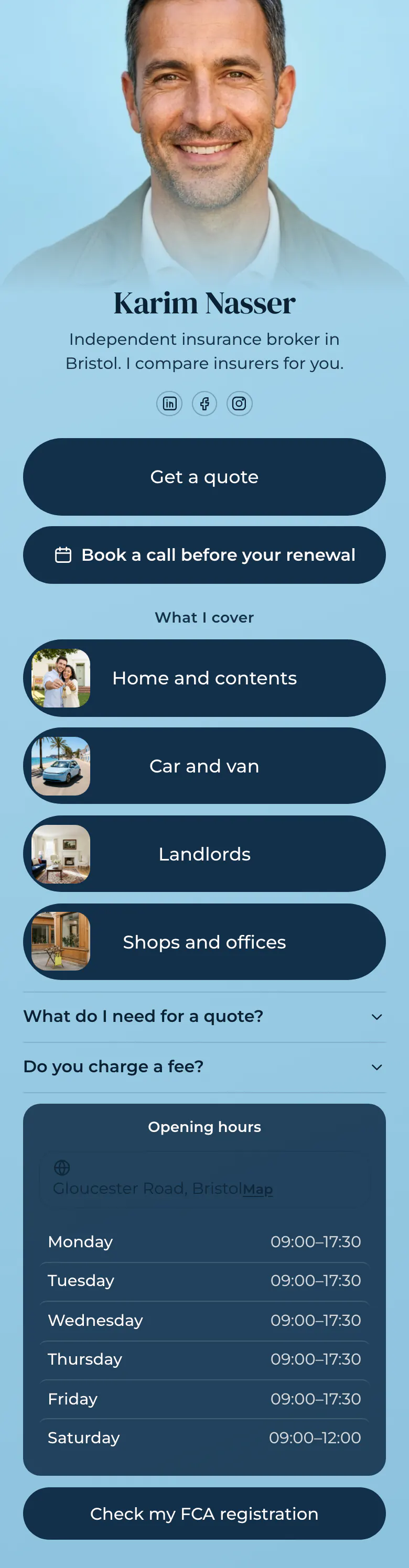
Get a quote is the first button, and a call before renewal is the second. Four picture cards then show what Karim covers, so a visitor with a van or a rental flat knows immediately that he is the right broker.
Link in bio checklist for insurance brokers
For an insurance broker the order is a quote request, a button to book a call, a card for each type of cover, answers to common questions, office hours and a link to the public register. People arrive close to a renewal date and want a price, so the quote comes before anything about the broker.
What is on this page
- Name and bioKarim NasserIndependent insurance broker in Bristol. I compare insurers for you.
- Social iconsLinkedIn, Facebook, Instagram
- Featured linkGet a quote
The quote request is the first button. Lower down, each type of cover has its own card with a picture, so visitors find theirs fast.
- BookingBook a call before your renewal
Names the moment clients care about, the weeks before a renewal. A tap opens your booking service for the call.
- Section titleWhat I cover
Three words, What I cover, tell a visitor that the cards below are types of insurance.
- Featured linkHome and contents
- Featured linkCar and van
- Featured linkLandlords
- Featured linkShops and offices
- FAQWhat do I need for a quote?2 questions
Answers what to prepare for a quote and how the broker is paid, two things people hesitate to ask.
- Opening hoursMonday to SaturdayGloucester Road, Bristol
For clients who prefer to phone or visit Gloucester Road. Each day has its hours, and today's row is marked.
- LinkCheck my FCA registration
A stranger can check on the public register that the broker is authorised, before sharing personal details.
Who it is for
Independent brokers, insurance agents and small local agencies who win clients through LinkedIn, Facebook groups and referrals, and handle several types of cover. It suits a broker whose clients phone in the weeks before a renewal date. For investment or pension advice, the template for financial advisors fits better, with a free first meeting and two guides.
How to make it yours
Pick Safe keys
Open sign-up with the Use this template button and name the page after your brokerage. Karim's sample shows where your quote link, cover cards and registration link go.
Add your cover and links
Change the four cards to the types of cover you sell, in the order clients ask for them. Paste your quote form and booking link, then write your own two answers.
Publish before renewal season
Once the page is published, add the address to your LinkedIn, Facebook and Instagram profiles and to your email signature, where clients look when a renewal letter arrives.
- List what a client needs for a quote in the first answer: the address, what to cover and past claims. Prepared clients get a price in one call.
- Check which cover card gets the most taps, since each link shows how many times visitors tapped it. Move the busiest card to the top of the list.
- Keep savings promises and sample prices away from the page. A quote depends on the client's details, and your regulator expects careful wording.
Questions
What should an insurance broker put in their link in bio?
Begin with a way to request a quote, since that is why most people tap the link. After it, add a call button, the types of cover you handle, short answers about what a quote needs and how you are paid, your office hours and proof that you are registered.
Can clients request an insurance quote from my bio link?
Yes, with a link to the quote form you already use. Make it the first button and name it plainly, like Get a quote on the sample page. A follower who reads your post about renewals taps once and reaches your form, so requests arrive where you handle them today.
Do insurance brokers need to show their registration in a bio link?
Showing it is good practice, and one link is enough. Insurance is bought on trust, and a link to your entry on the public register lets a new client check you before sharing personal details. The sample page ends with a button named Check my FCA registration. Use the name of the register in your own country on your button.
What does this page cost an insurance broker?
It costs nothing to create or to publish. The Free plan gives a broker one page with every block type, the booking button, the opening hours and the cover cards among them. You can replace the blue with your own colours, and a broker's design changes are kept when you press Save.
Start your page with this template
Type the name you want after more.you/ and create your account. Then change the words and photos to yours.
 more.you/yourname
Before you go
Put everything you share behind one link
More.You is a free link in bio page. No card needed.
- Start from a template made for your work
- Add links, products, bookings and events
- See how many people tap each link