Join this week and get Pro free for 6 monthsLiked the free tool? Get your own page with Pro freeMoving to More.You? Get Pro free for 6 monthsPick a template and get Pro free for 6 monthsTry every Pro feature free for 6 monthsPut it into practice with Pro free for 6 months
Get Pro freeSign upTemplatesSee all templatesPricing



Product
Page blocksLinks, products, bookings, events and opening hoursThemes and fonts15 colour themes, 31 fonts, buttons and backgroundsClick analyticsPage views, clicks on each link, countries and devicesLinktree importPaste your Linktree address and pick the links to bringResources
TemplateBright kitchen
Link in bio template for nutritionists
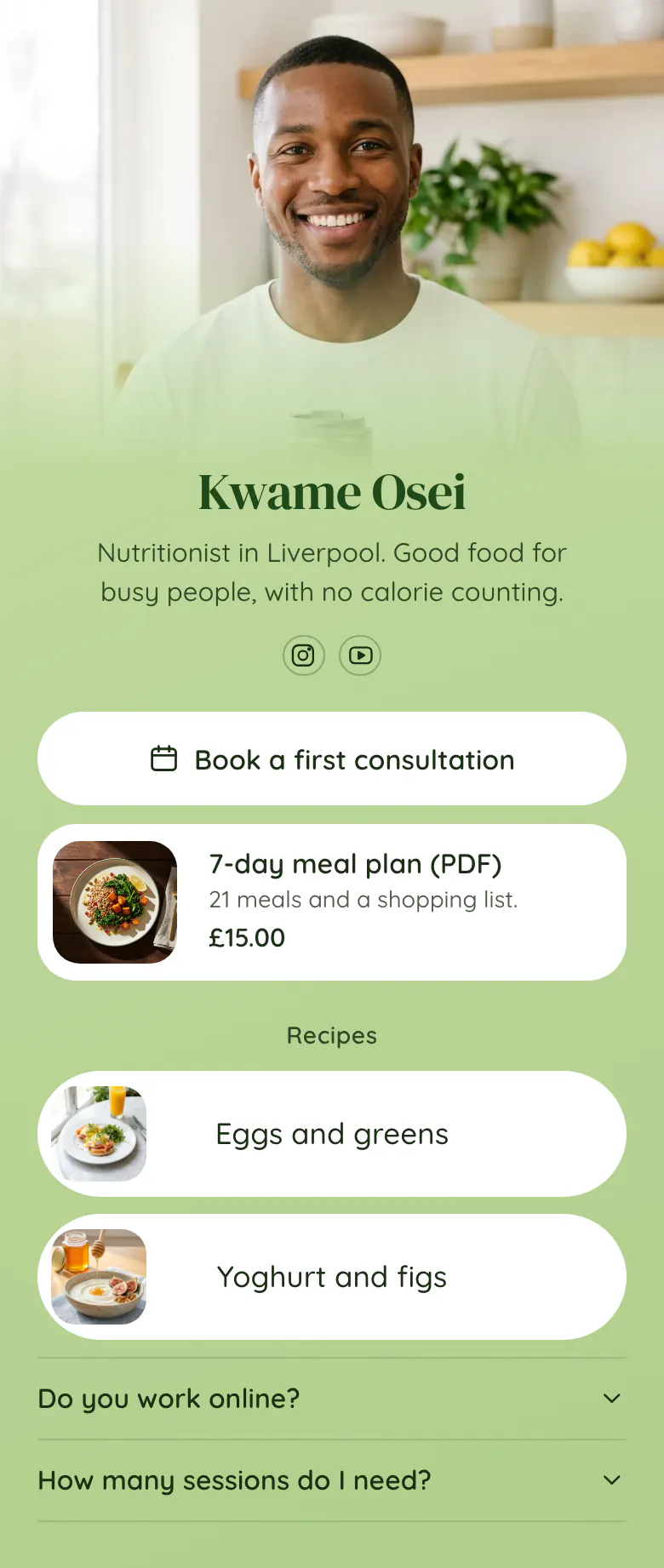
Recipe videos bring followers to a nutritionist. Consultations are the paid work. So the consultation button is first here, a £15 meal plan is second and two recipes with pictures come after.
A nutritionist's link in bio, in order
For a nutritionist's link in bio, the order is a button to book a first consultation, one paid plan with its price, the recipes from recent posts and a short FAQ with answers such as “Do you work online?”. Followers come for a recipe, and on the same page they see what working with you costs.
What is on this page
- Name and bioKwame OseiNutritionist in Liverpool. Good food for busy people, with no calorie counting.
- Social iconsInstagram, YouTube
- BookingBook a first consultation
“Book a first consultation” stays above the recipes, so a follower passes it on the way to the dish. It opens your booking service.
- Product7-day meal plan (PDF)£15.00
Followers see the £15.00 before they tap. The block shows a plate, the name “7-day meal plan (PDF)” and one line about what is inside.
- Section titleRecipes
The word “Recipes” tells a follower from a video that the dish is directly below.
- Featured linkEggs and greens
Each recipe has a picture of the plate. A follower finds the dish from your video without reading a word.
- Featured linkYoghurt and figs
- FAQDo you work online?2 questions
“Do you work online?” decides if a visitor from another city can book. Start your answer with yes or no.
Who it is for
Nutritionists and dietitians who work alone, see clients online or in one city, and post recipes on Instagram or YouTube. It fits when you have one starter product, such as a meal plan. If you post recipes and take no clients, start from the template for food creators. A practice with several practitioners should use the one for clinics and practices.
How to make it yours
Use the nutritionist template
One press on Use this template gives you the consultation button, the meal plan and two recipe links, in the order clients need them.
Add your food
Link the two recipes you posted most recently, each with a photo of the finished plate. Then change Kwame's name and kitchen photo to yours and write your own plan name and price.
Link it under recipes
Put the published link in your Instagram bio and your YouTube channel description. End each recipe caption with “full recipe in my bio”, so followers know where to find it.
- When you post a new recipe video, add its link above the older ones the same day. Followers search for the newest dish first.
- Say what the plan contains in one line, like “21 meals and a shopping list”. A count of meals is clearer than a promise.
- The bio line under your name should say who you help and one thing you do differently. The sample says “Good food for busy people, with no calorie counting”.
Questions
What should a nutritionist put in their link in bio?
A consultation booking button, one meal plan or guide with its price, your latest recipes and a short FAQ. Clients need the first two and followers want the third. Keep the booking button first, so a growing list of recipes never moves it down the screen.
Can I sell a meal plan from my link in bio?
You can show it with a photo, a name and a price, and send people to your store in one tap. The product block on this page shows a 7-day meal plan at £15.00. Followers see what it costs before they open the store where you sell the PDF.
Should a nutritionist's bio link have recipes or only services?
Both, with services first. Recipes are why people follow you, and the link they tap is usually under a recipe video. Put the consultation and the paid plan above the recipes. A follower who came for “Eggs and greens” then sees your offer while scrolling to the recipe.
How much does it cost to use this template?
Nothing. A nutritionist can create and publish this page for free, and every block on it is in the Free plan. The green background, the white buttons and the serif heading are a starting point. You can set your own colours and choose another of the 31 fonts.
Start your page with this template
Type the name you want after more.you/ and create your account. Then change the words and photos to yours.
 more.you/yourname
Before you go
Put everything you share behind one link
More.You is a free link in bio page. No card needed.
- Start from a template made for your work
- Add links, products, bookings and events
- See how many people tap each link