Join this week and get Pro free for 6 monthsLiked the free tool? Get your own page with Pro freeMoving to More.You? Get Pro free for 6 monthsPick a template and get Pro free for 6 monthsTry every Pro feature free for 6 monthsPut it into practice with Pro free for 6 months
Get Pro freeSign upTemplatesSee all templatesPricing



Product
Page blocksLinks, products, bookings, events and opening hoursThemes and fonts15 colour themes, 31 fonts, buttons and backgroundsClick analyticsPage views, clicks on each link, countries and devicesLinktree importPaste your Linktree address and pick the links to bringResources
TemplateBlack ink
Link in bio template for tattoo artists
Clients ask a tattoo artist the same questions in DMs every week, about booking, flash, deposits and aftercare, and this page answers them in that order. The consultation button sits first, and guest spots in Wellington and Sydney come last.
What a tattoo artist's link in bio needs
In order of importance, a tattoo artist's link in bio holds a button to book a consultation, the flash that is available this month, answers about the deposit and aftercare, and the dates and cities of guest spots. Clients decide from pictures and book from one button, so the booking and the flash belong above everything else.
What is on this page
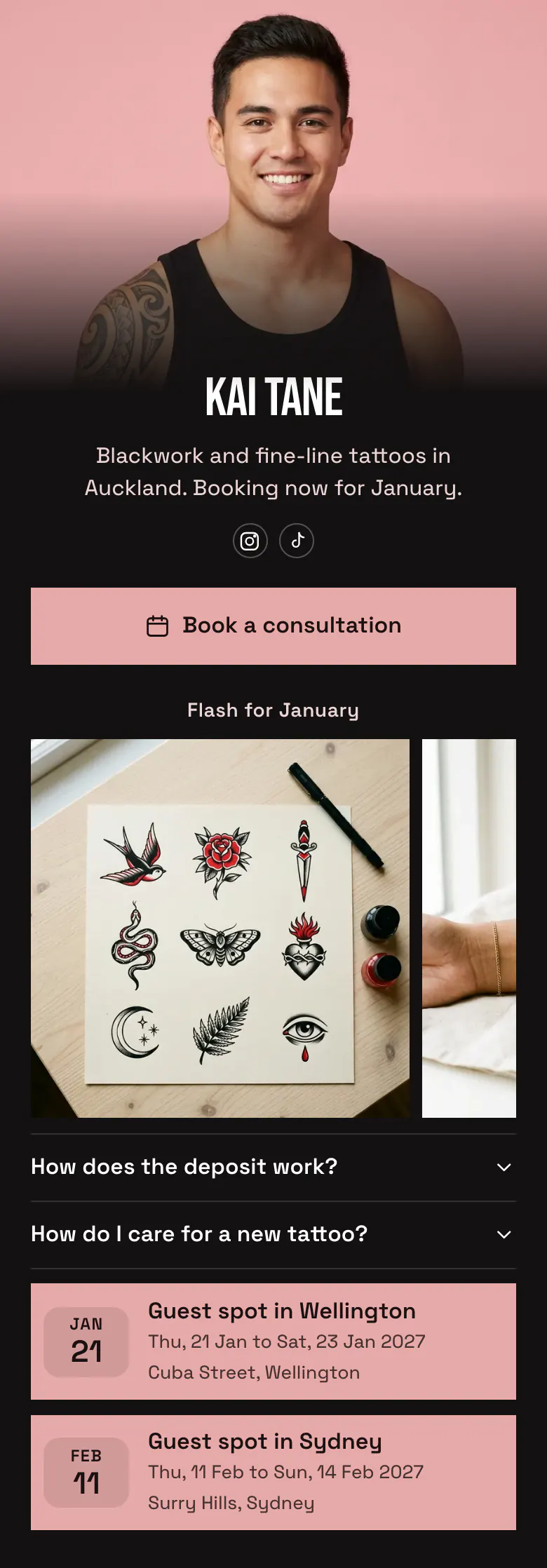
- Name and bioKai TaneBlackwork and fine-line tattoos in Auckland. Booking now for January.
- Social iconsInstagram, TikTok
- BookingBook a consultation
The pink button sits above the flash. One tap opens the booking service or form you already use for consultations.
- Section titleFlash for January
'Flash for January' dates the designs, so clients know that the sheet is current.
- Gallery3 pictures
The first photo is a flash sheet, with a swallow, a rose and a dagger among the designs. A client can name one before the consultation.
- FAQHow does the deposit work?2 questions
Deposit and aftercare answers open on a tap, so you type them once and stop repeating them in DMs.
- EventGuest spot in Wellington21 Jan, Cuba Street, Wellington
Clients in Wellington and Sydney see when you visit and where. A tap on a guest spot opens the page where they book for those dates.
- EventGuest spot in Sydney11 Feb, Surry Hills, Sydney
Who it is for
Choose it if you tattoo alone or as a resident in a shared studio, take bookings through Instagram and travel for guest spots. You draw flash and want clients to claim a design while the sheet is new. Artists who sell prints more often than they tattoo will find a better match in the template for artists.
How to make it yours
Choose the Black ink page
If clients book you by consultation, start from Black ink in the template gallery. The black page and the square pink button keep attention on your flash.
Upload flash, write your rules
Upload this month's flash before anything else. Then write your own deposit and aftercare answers, change the name and bio line, and add each guest spot with its dates and city.
Link it from every flash post
Once the page is published, more.you/yourname goes into your Instagram and TikTok bios. Write 'link in bio' in the caption each time you post new flash.
- Write your booking status in the bio line, as the sample does with 'Booking now for January', and the first question is answered before anyone asks.
- Change the section title when you post a new sheet. A month in the heading tells clients which designs are still available.
- Add a guest spot when the dates are fixed, and remove it after the trip. Clients in other cities plan a tattoo well ahead.
Questions
What should a tattoo artist put in their link in bio?
Booking goes on top, and proof of your style goes directly under it. A consultation button, a gallery of current flash, short answers about the deposit and aftercare, and your guest spot dates cover what clients ask. Add your city and your style to the bio line, as in 'Blackwork and fine-line tattoos in Auckland', because clients look for both.
How can clients book a tattoo through my Instagram bio?
Link one booking button from your bio page to the booking form or service you already use. Name it for the first step, such as 'Book a consultation', and make it the first block on a tattoo page. Clients who arrive from a flash post can then book without a DM.
Should I put my tattoo deposit policy in my link in bio?
Yes, write the deposit rules as a short FAQ answer. Say how much the deposit is, when it is due and what happens if a client moves the date. Clients read it before they book, which means fewer surprises on the day and shorter conversations in DMs.
What can a tattoo artist change in this template's design?
Every colour, the button shape and the font. The sample uses a black page and pink square buttons, so the flash is the most detailed thing on screen. You set your own colours for the background, the buttons and the text, and choose square or round corners. You create and publish the page without paying.
Start your page with this template
Type the name you want after more.you/ and create your account. Then change the words and photos to yours.
 more.you/yourname
Before you go
Put everything you share behind one link
More.You is a free link in bio page. No card needed.
- Start from a template made for your work
- Add links, products, bookings and events
- See how many people tap each link