Join this week and get Pro free for 6 monthsLiked the free tool? Get your own page with Pro freeMoving to More.You? Get Pro free for 6 monthsPick a template and get Pro free for 6 monthsTry every Pro feature free for 6 monthsPut it into practice with Pro free for 6 months
Get Pro freeSign upTemplatesSee all templatesPricing



Product
Page blocksLinks, products, bookings, events and opening hoursThemes and fonts15 colour themes, 31 fonts, buttons and backgroundsClick analyticsPage views, clicks on each link, countries and devicesLinktree importPaste your Linktree address and pick the links to bringResources
TemplateSlow sail
Link in bio template for YouTubers
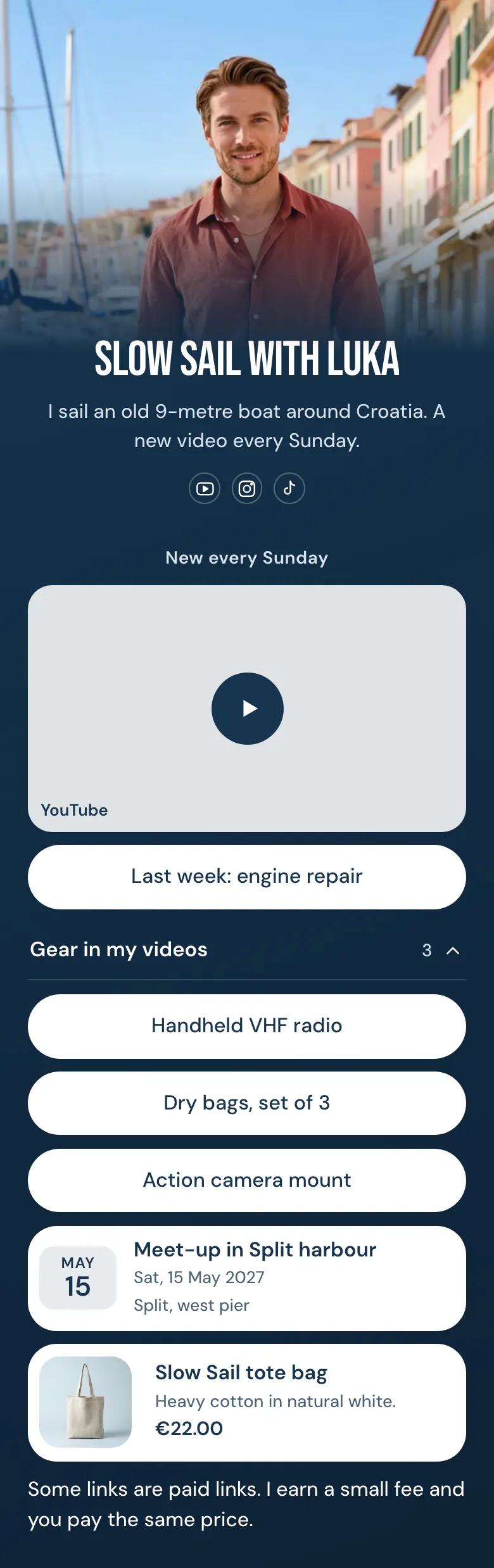
The newest video plays on the page itself, so a visitor from Instagram or TikTok can watch before they decide to subscribe. Last week's video, the gear seen on camera, a meet-up date and one piece of merch follow.
The short answer for YouTubers
A YouTuber's link in bio should start with the newest video, then the video before it, the gear viewers ask about, any meet-up or live date, and one piece of merch with a price. The video goes first because the channel is the product. Gear links need a short note that says they are paid links.
What is on this page
- Name and bioSlow Sail with LukaI sail an old 9-metre boat around Croatia. A new video every Sunday.
- Social iconsYouTube, Instagram, TikTok
- Section titleNew every Sunday
The heading above the video is the upload day, 'New every Sunday', so a first visitor knows when to return.
- EmbedYouTube video
This week's upload plays inside this block, so the page starts with your work and the links come second.
- LinkLast week: engine repair
'Last week: engine repair' gives a second video to people who have seen the new one.
- CollectionGear in my videos3 links
Viewers ask about gear in the comments. 'Gear in my videos' keeps three links under one title that opens and closes.
- LinkHandheld VHF radio
- LinkDry bags, set of 3
- LinkAction camera mount
- EventMeet-up in Split harbour15 May, Split, west pier
The block shows 15 May and 'Split, west pier', and opens the page with the details. Viewers who sail nearby can plan their route around it.
- ProductSlow Sail tote bag€22.00
One piece of merch is enough. The tote bag has a photo, a line about the cotton and €22.00, and leads to your merch store.
- TextSome links are paid links. I earn a small fee and you pay the same price.
A plain note tells viewers that some gear links are paid links, in words anyone understands.
Who it is for
One upload a week is the rhythm this page expects. Your audience also follows on Instagram and TikTok, you recommend gear on camera, and you sell a little merch or meet viewers in person. If your videos are short and daily, the template for content creators suits you better, with today's video as a picture link.
How to make it yours
Get the Slow sail template
A channel with a regular upload day fits Slow sail. The video block sits under a heading for your upload day, and the gear collection, an event and a merch block come after it.
Add your video and gear
The embed block takes the address of your newest YouTube video. List the gear you use on camera, add your merch with its real price, and put your channel name and photo on top.
Link it from your channel
Start on YouTube. After you publish, add more.you/yourname to your channel links and to each video description, then update your Instagram and TikTok bios.
- Each time you upload, put the new video in the embed block and move the old one to the 'last week' link. A visitor should see your newest work first.
- On the sample the paid links note sits at the bottom. If most of your links are gear links, move the note up, directly under the gear collection.
- Name gear by what it is, such as 'Handheld VHF radio', and leave model codes for the shop page. Viewers remember the object they saw on screen.
Questions
What should a YouTuber put in their link in bio?
Your newest video is the first thing to show, either as a video that plays on the page or as a link with a picture. Add the previous video, a collection of the gear you use, your next meet-up if you have one, and merch. Finish with a short note if any link is a paid link.
How do I disclose affiliate links in my link in bio?
Write one plain sentence on the page, close to the links it covers. The sample says 'Some links are paid links' and adds that the buyer's price stays the same. Use words your viewers know, and avoid short codes or hashtags that hide the meaning.
Can I put a YouTube video on my link in bio page?
Yes. An embed block shows a YouTube video that plays on the page, so visitors from Instagram or TikTok can watch your newest upload where they are. Put it first, under a small heading with your upload day, as in 'New every Sunday'.
Are the video embed and the merch block free for YouTubers?
Both are on the Free plan, which has every block type, including the video embed, collections, events and products. It is free for a YouTuber to create and publish a More.You page. The navy background, the white buttons and the font of the sample are all yours to change.
Start your page with this template
Type the name you want after more.you/ and create your account. Then change the words and photos to yours.
 more.you/yourname
Before you go
Put everything you share behind one link
More.You is a free link in bio page. No card needed.
- Start from a template made for your work
- Add links, products, bookings and events
- See how many people tap each link