Join this week and get Pro free for 6 monthsLiked the free tool? Get your own page with Pro freeMoving to More.You? Get Pro free for 6 monthsPick a template and get Pro free for 6 monthsTry every Pro feature free for 6 monthsPut it into practice with Pro free for 6 months
Get Pro freeSign upTemplatesSee all templatesPricing



Product
Page blocksLinks, products, bookings, events and opening hoursThemes and fonts15 colour themes, 31 fonts, buttons and backgroundsClick analyticsPage views, clicks on each link, countries and devicesLinktree importPaste your Linktree address and pick the links to bringResources
TemplateOfficial only
Link in bio template for OnlyFans creators
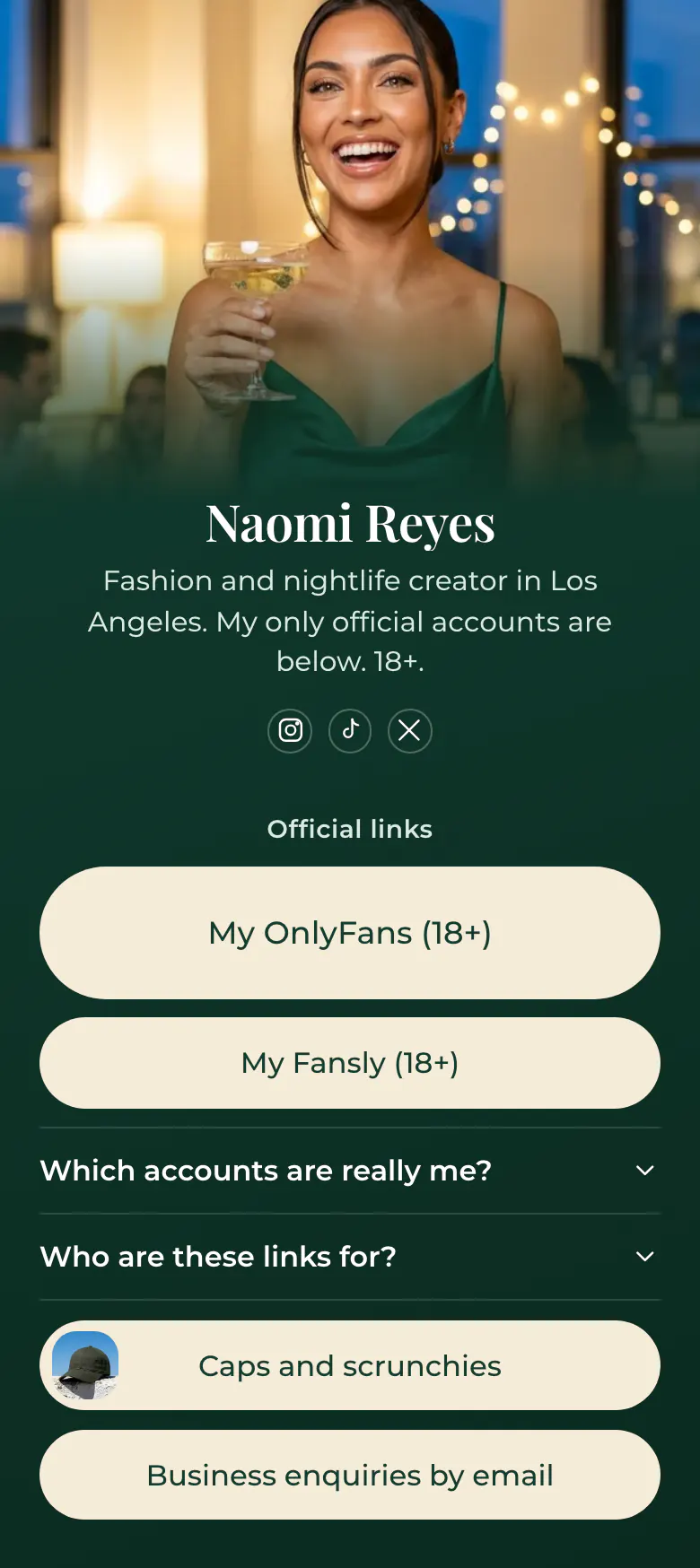
Two buttons under the title Official links carry the 18+ mark, and the bio says these are Naomi's only real accounts. Fans reach the right profile, a copied account is easier to spot, and the page itself stays safe for work.
Safe link in bio basics for OnlyFans creators
The safe order for an OnlyFans creator is official accounts first, each marked 18+, then an answer about which accounts are real, social icons, merch and a business contact. Fans arrive from Instagram, TikTok or X and need proof they found the real person. The page names every official account and keeps its own photos and words safe for work.
What is on this page
- Name and bioNaomi ReyesFashion and nightlife creator in Los Angeles. My only official accounts are below. 18+.
- Social iconsInstagram, TikTok, X
- Section titleOfficial links
The words Official links tell a fan that any account missing from this list is not the creator.
- Featured linkMy OnlyFans (18+)
The main account gets the larger button. The 18+ mark in its name warns a visitor before they tap.
- LinkMy Fansly (18+)
A second paid account sits here with the same 18+ mark. Further down, two more links open the merch shop and a business email.
- FAQWhich accounts are really me?2 questions
Confirms which accounts are real and that the links are for adults, for fans who ask if a profile is fake.
- LinkCaps and scrunchies
- LinkBusiness enquiries by email
Who it is for
Creators with a paid page on OnlyFans or Fansly who promote it from Instagram, TikTok and X, manage their own accounts and have seen fake profiles use their photos. Models who look for agency and brand work get more from the template for models, which opens with pictures and measurements.
How to make it yours
Claim your creator name
Sign-up starts at the Use this template button. Pick the creator name fans already see on Instagram, TikTok and X, so the address itself looks official.
List your real accounts
Enter your own accounts where the sample buttons are and keep the 18+ mark in each name. Use a cover photo that is safe for work, and write the answer about fake profiles in your own words.
Make it your one link
Publish, then use this single address in your Instagram, TikTok and X bios. Fans learn that any other link is not yours.
- Keep every photo and word on the page safe for work. Social apps have strict rules about adult content, so a clean page before your paid account is the careful choice.
- Say in one sentence that you never ask for money in messages, as Naomi's sample answer does. Fake accounts often start with a direct message.
- Add each new account to the list on the day you open it. A fan who finds a profile that is missing from your page should treat it as fake.
Questions
What should an OnlyFans creator put in their link in bio?
Put your official paid accounts first, clearly marked 18+, with proof of which profiles are yours. Add your social icons, a short answer about fake accounts, your merch if you have any and an email for business. Keep explicit photos and words for the paid account.
How do I stop fake accounts from using my name and photos?
Nobody can stop every copy, but you can make the real accounts easy to check. Publish one page that lists every official account, and say on each social profile that this page is the only source. A fan who doubts a profile compares it with the list. The sample page gives that answer in its FAQ.
Can I link my OnlyFans from Instagram and TikTok with a bio link?
Many creators do it through a safe-for-work page, and this template is built for that. Read each app's own rules first, because they differ and they change. On your page, keep photos and words clean and mark adult links 18+, as Naomi's sample does.
Is the dark green design fixed, or can I change the colours and the cover photo?
Nothing in the design is fixed. The dark green and cream of the sample are a starting point, and you choose your own colours for the background, the buttons and the text. The top of a creator's page can be Classic, Hero with your photo as a cover, Banner, Cutout or Shape.
Start your page with this template
Type the name you want after more.you/ and create your account. Then change the words and photos to yours.
 more.you/yourname
Before you go
Put everything you share behind one link
More.You is a free link in bio page. No card needed.
- Start from a template made for your work
- Add links, products, bookings and events
- See how many people tap each link