Join this week and get Pro free for 6 monthsLiked the free tool? Get your own page with Pro freeMoving to More.You? Get Pro free for 6 monthsPick a template and get Pro free for 6 monthsTry every Pro feature free for 6 monthsPut it into practice with Pro free for 6 months
Get Pro freeSign upTemplatesSee all templatesPricing



Product
Page blocksLinks, products, bookings, events and opening hoursThemes and fonts15 colour themes, 31 fonts, buttons and backgroundsClick analyticsPage views, clicks on each link, countries and devicesLinktree importPaste your Linktree address and pick the links to bringResources
TemplateEditorial
Link in bio template for models
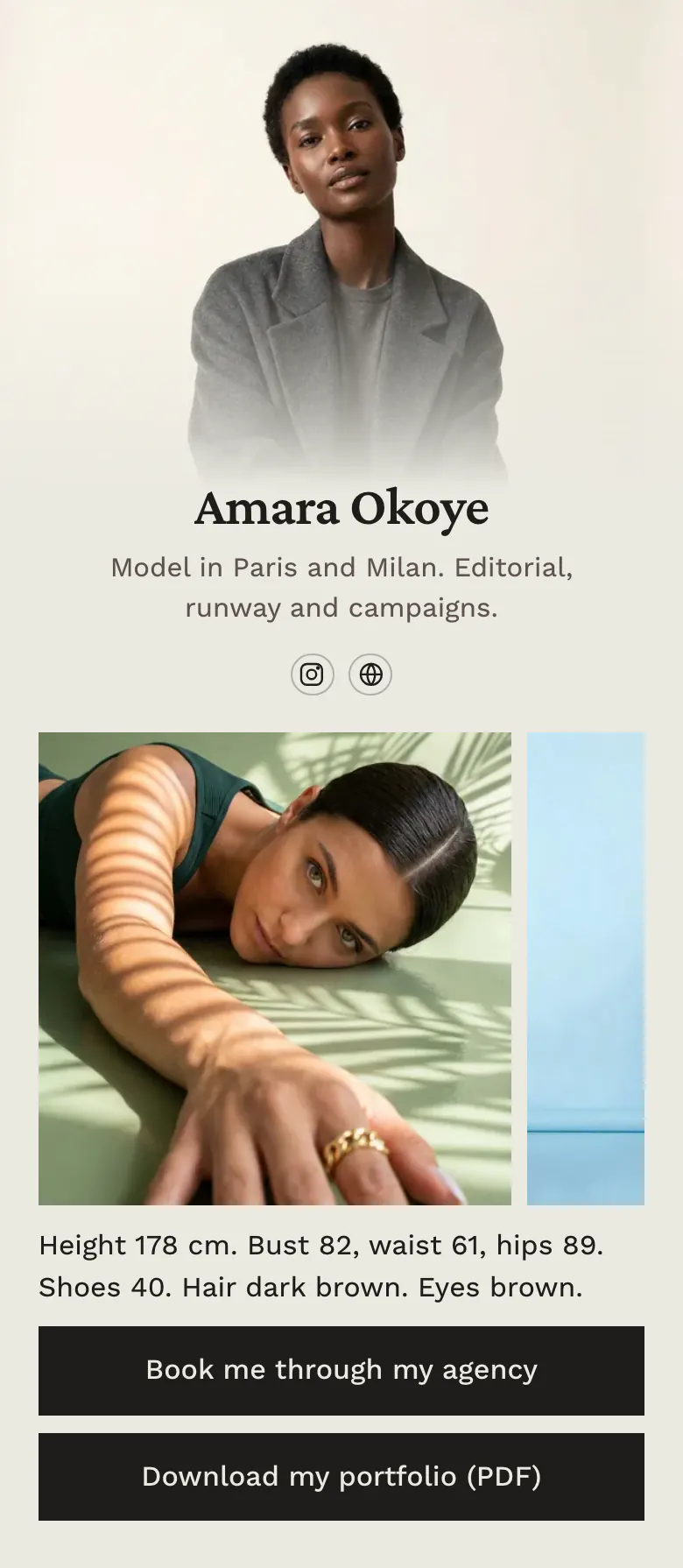
Three pictures come first, then one line of measurements: height 178 cm, bust 82, waist 61, hips 89, shoes 40. A casting director reads it like a comp card and reaches the agency button without a message to you.
A model's link in bio, block by block
Models should put a few strong pictures first, then measurements, the agency or contact for bookings, and a portfolio to download. Casting directors and photographers judge pictures and sizes first, and they want a booking route they can trust. On a More.You page, that order is a gallery, one line of text and two buttons.
What is on this page
- Name and bioAmara OkoyeModel in Paris and Milan. Editorial, runway and campaigns.
- Social iconsInstagram, Website
- Gallery3 pictures
The gallery shows your range before any words. Choose a portrait, a full-length picture and one image from a campaign or editorial.
- TextHeight 178 cm. Bust 82, waist 61, hips 89. Shoes 40. Hair dark brown. Eyes brown.
One line holds height, bust, waist, hips, shoe size, hair and eye colour, the details a casting director writes down.
- LinkBook me through my agency
'Book me through my agency' sends enquiries to your booker. The second button, 'Download my portfolio (PDF)', opens the full set of pictures.
- LinkDownload my portfolio (PDF)
Who it is for
Signed and freelance models who are found on Instagram by photographers, brands and casting directors. Fashion, commercial and fitness models can all use it as a digital comp card in their bio. Start from the template for UGC creators if brands pay you to film content more often than they book you for shoots.
How to make it yours
Choose the Editorial template
Find Editorial in the template gallery. It opens with Amara's three pictures and her measurements line, so you see how a comp card reads on a phone.
Add your pictures and sizes
Put your own pictures in the gallery and type your measurements. Point the first button to your agency page, or to your booking email if you are freelance.
Put it in your Instagram bio
Publish and paste more.you/yourname into your Instagram bio, where clients look first. Send the same address when a photographer asks for your comp card.
- Write measurements in the units your market uses. The sample uses centimetres for Paris and Milan, so add feet and inches if you also work in the United States.
- Keep one natural picture with little make-up and plain clothes, often called a digital. Agencies and casting directors ask to see one.
- Update the measurements line on the day your sizes or hair change. A fitting fails when the page and the person differ.
Questions
What should a model put in their link in bio?
Open with your best pictures, because a client judges those first. Add your height and measurements in one line, then one clear way to book you: your agency page if you are signed, your email if you are freelance. End with a portfolio or comp card that a client can download.
Should models put their measurements on their bio link?
Measurements belong on the page if you want castings. Clients need height, bust or chest, waist, hips and shoe size before they request you. One line on your page answers that once and saves a message each time. A client who has to ask for sizes may move to the next model on the list.
Can I use a link in bio page as a digital comp card?
A link in bio page works well as a comp card. A comp card is pictures, measurements and a booking contact, and this sample holds all three in that order. Share the page address in your Instagram bio, or show its QR code at a casting.
Is the model template free, and can I change the look?
Yes, the template is free and the look is yours to change. The Gallery block and every other block type are on the Free plan of More.You. Amara's page has a pale stone background and dark buttons. Choose your own colours and one of 31 fonts, and keep your portrait as a Hero cover.
Start your page with this template
Type the name you want after more.you/ and create your account. Then change the words and photos to yours.
 more.you/yourname
Before you go
Put everything you share behind one link
More.You is a free link in bio page. No card needed.
- Start from a template made for your work
- Add links, products, bookings and events
- See how many people tap each link