Join this week and get Pro free for 6 monthsLiked the free tool? Get your own page with Pro freeMoving to More.You? Get Pro free for 6 monthsPick a template and get Pro free for 6 monthsTry every Pro feature free for 6 monthsPut it into practice with Pro free for 6 months
Get Pro freeSign upTemplatesSee all templatesPricing



Product
Page blocksLinks, products, bookings, events and opening hoursThemes and fonts15 colour themes, 31 fonts, buttons and backgroundsClick analyticsPage views, clicks on each link, countries and devicesLinktree importPaste your Linktree address and pick the links to bringResources
TemplateTest bench
Link in bio template for tech influencers
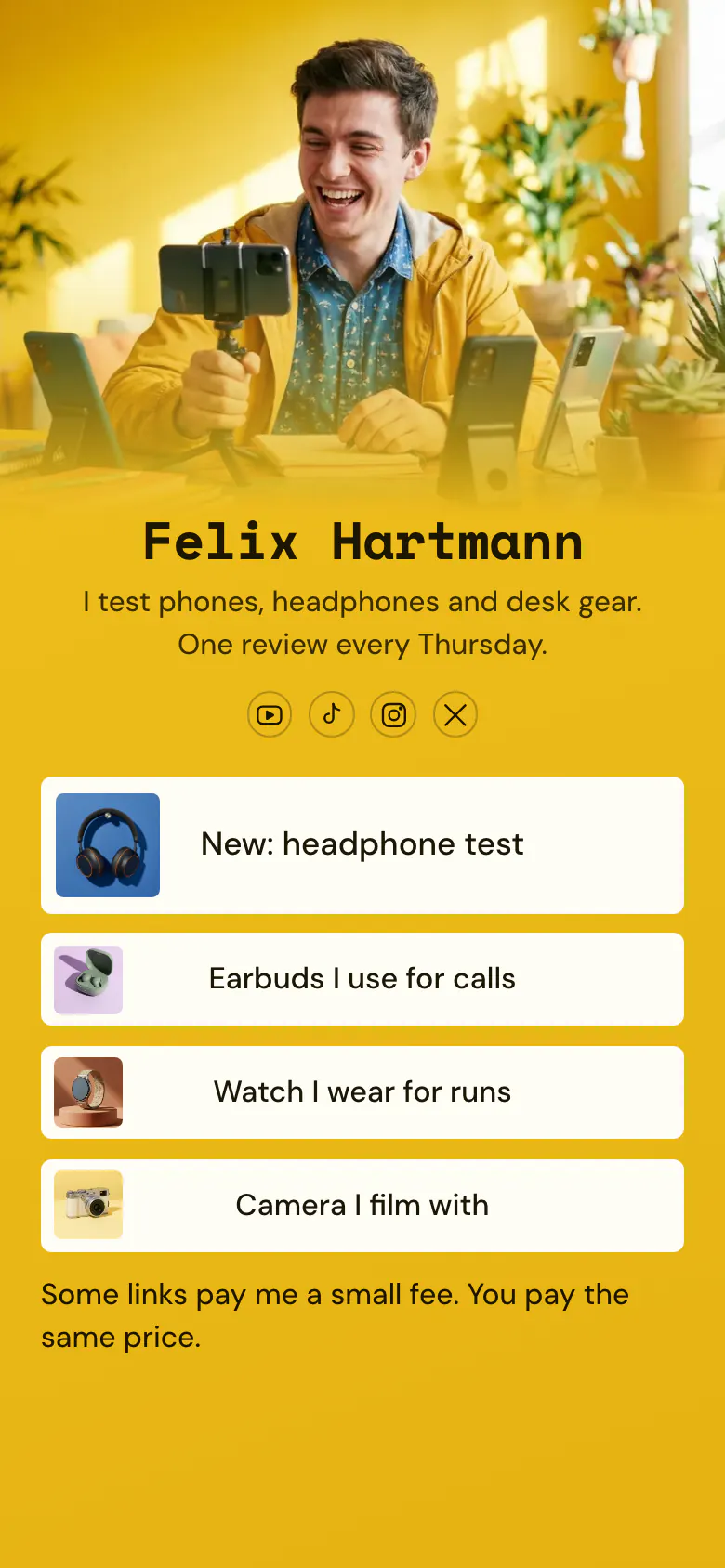
Each Thursday review goes to the top with a picture. Under it sit three things from the desk, named by what they are used for, such as calls, runs and filming. Viewers who ask which camera you use find it without a comment.
A tech reviewer's bio link, block by block
The newest review comes first in a tech reviewer's link in bio, then the gear the reviewer uses, each with a picture and its job, and last one line saying that some links are affiliate links. Viewers arrive wanting the verdict or the name of a product they saw on the desk, and this order gives them both.
What is on this page
- Name and bioFelix HartmannI test phones, headphones and desk gear. One review every Thursday.
- Social iconsYouTube, TikTok, Instagram, X
- Featured linkNew: headphone test
The word New starts the button, “New: headphone test”, beside a picture of the headphones. Change it each Thursday, when the next review is published.
- LinkEarbuds I use for calls
Earbuds for calls, a watch for runs, a camera for filming. Each link says what Felix uses the thing for and shows a small picture.
- LinkWatch I wear for runs
- LinkCamera I film with
- TextSome links pay me a small fee. You pay the same price.
One plain sentence under the gear tells viewers that some links earn Felix money and that the price stays the same for them.
Who it is for
Reviewers who post on YouTube, TikTok, Instagram or X and get asked about their own gear under every video. It fits phone, audio and desk setup channels with one new review a week. If long videos are your main work and you have playlists to show, start from the template for YouTubers. For product finds from one shop, use the one for Amazon affiliates.
How to make it yours
Create your review page
The Use this template button takes you to create an account. Your first page already holds one review link, three gear links and a disclosure line.
List your real gear
Link your newest review first. Then add the camera, the microphone and the other things you use, each with a picture and the job it does, and put your own name and photo on the cover.
Share it on every channel
A published page has one address for all your channels. Put it in your YouTube channel description and your TikTok, Instagram and X bio, and say “gear list in my bio” once in each video.
- Write what each thing is for, like “Camera I film with”. A model number means something only to people who already know the product.
- A link can have a start time, and visitors do not see it before then. Use it for a review you may not publish before a launch date.
- Change a gear link in the week a newer model replaces the old one on your desk. Last year's phone in a gear list tells viewers the page is old.
Questions
What should a tech influencer put in their link in bio?
The latest review, the gear you use and a line telling viewers that some links are paid. Start with the review, because it changes every week and is the reason for most taps. The gear list stays the same for months and answers the question under every video.
How do I share my gear list or desk setup in my bio?
Give each thing its own link with a small picture, and name it by what you use it for. This page lists “Earbuds I use for calls”, “Watch I wear for runs” and “Camera I film with”. For a long list, group the links in a collection that opens and closes under one title.
Do I have to say that my gear links are affiliate links?
Yes, where a link earns you money. Viewers trust a review more when they know how the reviewer is paid, and advertising rules in many countries ask for it. The sample page says it in one sentence under the gear links and adds that the viewer pays the same price.
Is it free to make this page, and can I change the yellow?
Yes to both. You can create and publish a page for your reviews at no cost, with every block type in the Free plan. The yellow, the off-white buttons and the monospace heading are a starting set. You choose your own colours and one of 31 fonts.
Start your page with this template
Type the name you want after more.you/ and create your account. Then change the words and photos to yours.
 more.you/yourname
Before you go
Put everything you share behind one link
More.You is a free link in bio page. No card needed.
- Start from a template made for your work
- Add links, products, bookings and events
- See how many people tap each link