Join this week and get Pro free for 6 monthsLiked the free tool? Get your own page with Pro freeMoving to More.You? Get Pro free for 6 monthsPick a template and get Pro free for 6 monthsTry every Pro feature free for 6 monthsPut it into practice with Pro free for 6 months
Get Pro freeSign upTemplatesSee all templatesPricing



Product
Page blocksLinks, products, bookings, events and opening hoursThemes and fonts15 colour themes, 31 fonts, buttons and backgroundsClick analyticsPage views, clicks on each link, countries and devicesLinktree importPaste your Linktree address and pick the links to bringResources
TemplateLive tonight
Link in bio template for streamers
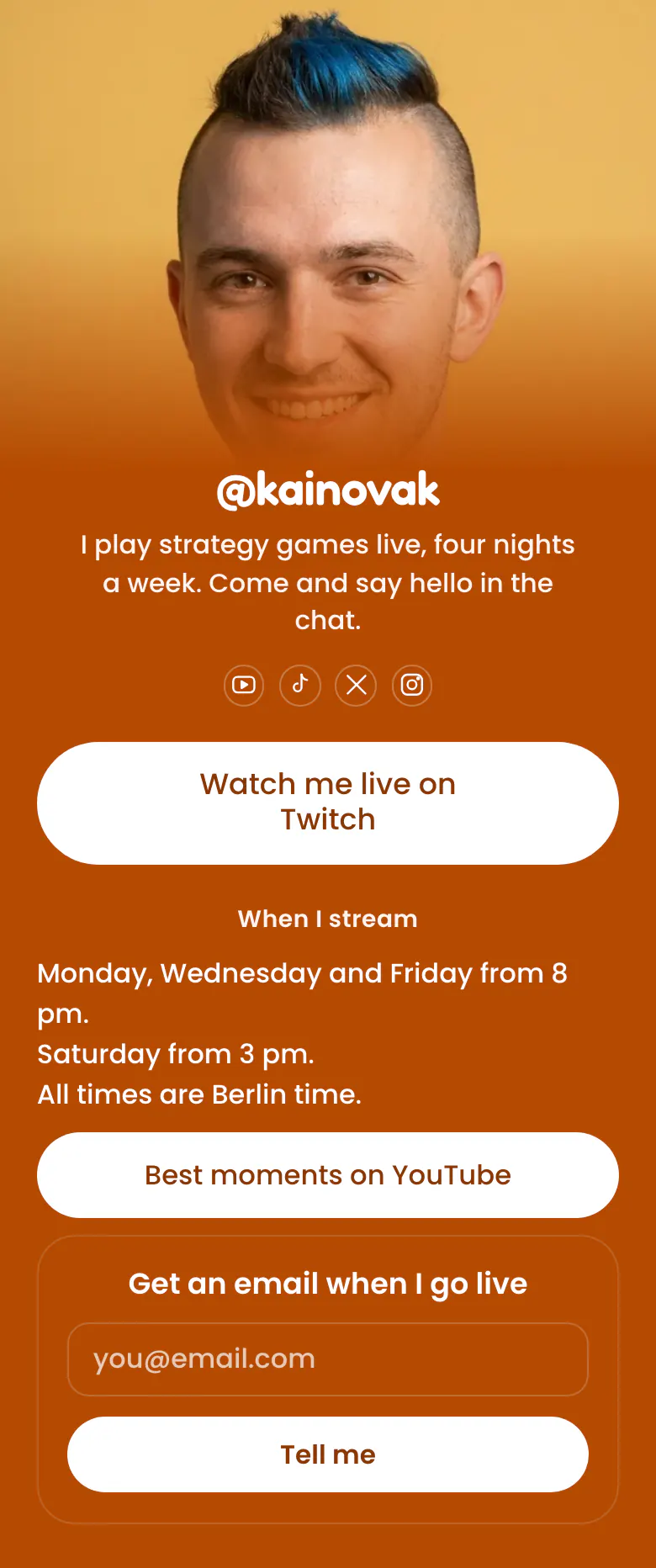
The first button sends a viewer to your Twitch channel. Your stream days with the time zone, your best moments on YouTube and an email form sit under it. A visitor on an offline Tuesday still learns that Wednesday at 8 pm is next.
The short answer for a streamer's bio link
A streamer's link in bio needs these, in this order: the live channel link, stream days and times with a time zone, a link to the best clips, and a form for viewers who want an email before the next stream. Many visitors arrive from a short clip while the streamer is offline, so the page must tell them when to return.
What is on this page
- Name and bio@kainovakI play strategy games live, four nights a week. Come and say hello in the chat.
- Social iconsYouTube, TikTok, X, Instagram
- Featured linkWatch me live on Twitch
The largest button on the page. One tap opens your Twitch channel, so a viewer from TikTok reaches your chat without a search.
- Section titleWhen I stream
A small heading, 'When I stream', for the question viewers leave under every clip. The answer is in the lines below it.
- TextMonday, Wednesday and Friday from 8 pm. Saturday from 3 pm. All times are Berlin time.
Your stream days and the hour you go live, with the time zone, here Berlin time, so viewers abroad can convert it to their own.
- LinkBest moments on YouTube
'Best moments on YouTube' is for the night you are offline. A new viewer watches your clips and returns on a stream day.
- Email signupGet an email when I go liveTell me
A viewer types an email address and presses 'Tell me'. The form collects addresses of people who want to know before you go live.
Who it is for
Solo streamers on Twitch, YouTube or Kick who go live on fixed days and find new viewers through short clips on TikTok and Instagram. A small channel with no sponsors yet fits well. If you post edited videos and rarely stream, start from the template for YouTubers instead.
How to make it yours
Start with the streamer template
Press Use this template and create your account to start with the Twitch button, the schedule text, the clips link and the email form in place.
Add your channel and schedule
Change the first button to your own Twitch, YouTube or Kick address. Write your real stream days and your time zone, then add your photo and your handle.
Add it to bios and panels
Publish the page and paste more.you/yourname into your TikTok, Instagram and YouTube bios, and into the panels under your Twitch stream.
- Write the time zone next to your stream times. Viewers in other countries leave when they must guess whether 8 pm is their evening or yours.
- Give the link for a special stream a start time. Visitors do not see it before then, so you can add it days early and announce it live.
- Compare the tap counts of the Twitch button and the YouTube button. If the clips get more taps, your visitors arrive while you are offline, so add more clips.
Questions
What should a streamer put in their link in bio?
Your live channel, your schedule, your clips and one way to hear from you, in that order. A viewer who taps your bio after a clip asks where you stream and when. Sponsor links, a Discord invite and merch can sit lower, after those answers.
Should a streamer link to Twitch or YouTube first?
Link first to the platform where you stream live. On the sample page that is Twitch, with the YouTube highlights lower. If you stream on two platforms, keep one as the first button. Add the second as a normal link under the schedule, so the choice stays clear.
Where should I put my stream schedule so new viewers see it?
Directly under your live button, as short text with a small heading. The sample uses the heading 'When I stream' and three lines: Monday, Wednesday and Friday from 8 pm, Saturday from 3 pm, and the time zone. Edit the text on the day your schedule changes, and the page saves it as you type.
Is a link in bio page for streamers free on More.You?
Yes. You create and publish the page for free. The Free plan has one page and every block type, so the featured Twitch button, the schedule text and the email form are all included. Your own colours can replace the orange background and the white buttons, to match your channel.
Start your page with this template
Type the name you want after more.you/ and create your account. Then change the words and photos to yours.
 more.you/yourname
Before you go
Put everything you share behind one link
More.You is a free link in bio page. No card needed.
- Start from a template made for your work
- Add links, products, bookings and events
- See how many people tap each link