Join this week and get Pro free for 6 monthsLiked the free tool? Get your own page with Pro freeMoving to More.You? Get Pro free for 6 monthsPick a template and get Pro free for 6 monthsTry every Pro feature free for 6 monthsPut it into practice with Pro free for 6 months
Get Pro freeSign upTemplatesSee all templatesPricing



Product
Page blocksLinks, products, bookings, events and opening hoursThemes and fonts15 colour themes, 31 fonts, buttons and backgroundsClick analyticsPage views, clicks on each link, countries and devicesLinktree importPaste your Linktree address and pick the links to bringResources
TemplateRace day
Link in bio template for athletes
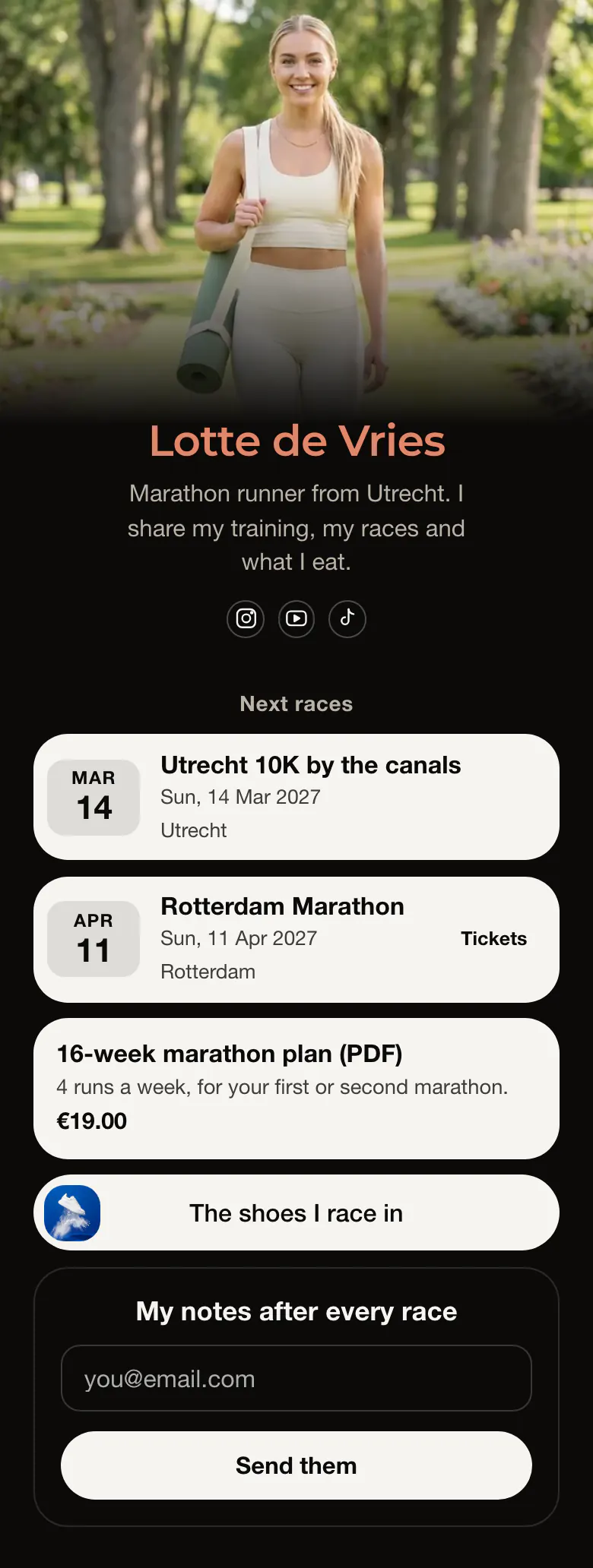
A follower sees your next two races before anything else: the Utrecht 10K on 14 Mar, then the Rotterdam Marathon on 11 Apr. The question you get most is answered first, and your training plan comes right after the dates.
What an athlete's link in bio needs
An athlete's link in bio needs the next races with dates and cities, then a training plan with its price, the gear you race in and an email form for race notes. Race dates change every season, and they are what followers and sponsors look for first. Each race on a More.You page is an event block, and one tap opens the entry page.
What is on this page
- Name and bioLotte de VriesMarathon runner from Utrecht. I share my training, my races and what I eat.
- Social iconsInstagram, YouTube, TikTok
- Section titleNext races
'Next races' is the heading above the two dates. It tells a visitor that both races are still to come.
- EventUtrecht 10K by the canals14 Mar, Utrecht
The Utrecht 10K and the Rotterdam Marathon each show a date, a name and a city, and each opens the race page you linked.
- EventRotterdam Marathon11 Apr, Rotterdam
- Product16-week marathon plan (PDF)€19.00
The 16-week marathon plan carries its price, €19.00, and a line on who it suits. Followers reach your own store in one tap.
- LinkThe shoes I race in
'The shoes I race in' answers the gear question once. A small picture on the button helps people notice it.
- Email signupMy notes after every raceSend them
'My notes after every race' is a form for an email address. It comes last, for followers who read the whole page.
Who it is for
Runners, triathletes, cyclists and swimmers who compete in public races and share their training on Instagram, YouTube or TikTok. A few races each season and one plan or guide to offer are enough to fill the page. Coaches with weekly clients should start from the template for personal trainers, where the first button is a free consultation.
How to make it yours
Start from Race day
Create a free More.You page and choose Race day. The two sample races, the 16-week plan and the shoe link show where each of your own details goes.
Add your races and plan
Replace Lotte's two races with your own names, dates and cities. Change the plan, its price and the shoe link, and use a photo from a race or a training run as the cover.
Publish before race week
Publish the page and paste more.you/yourname into your Instagram, YouTube and TikTok profiles before your next race week. Mention the link in a training video, so followers know where the dates are.
- Remove a race once you have run it, or change it into a link to your result. A past date in the first block makes the page look forgotten.
- Say who your plan is for in one line, as the sample does: 4 runs a week, for your first or second marathon.
- In race week, add your bib number to the bio line. Friends who follow the race on a tracking app then know who to search for.
Questions
What should an athlete put in their link in bio?
Your next races go first, each with its date and city. Under them, add one thing you offer, such as a training plan with a price. The gear people ask about and an email form for your race reports come next. Sponsor links go lower on the page, under the dates.
How do I share my race schedule with followers?
Add each race as an event on your link in bio page and put the page address in your profiles. Every event shows the date, the name and the place, and a tap opens the race page. Followers and sponsors then see your whole season as one list.
Where should I put sponsor links and discount codes?
Place them under your races and your own plan, and write the brand name on the button. When a link or a code earns you money, say so in a short line of text next to it. On this sample, 'The shoes I race in' is the place for a gear partner's link.
Is the athlete template free, and can I change the black design?
Yes, an athlete can create and publish this page for free, and the black can change. Race events, the product and the email form are all on the Free plan, which has every block type. Lotte's page is black with white buttons and Montserrat. Replace the black with your own colours and choose from 31 fonts.
Start your page with this template
Type the name you want after more.you/ and create your account. Then change the words and photos to yours.
 more.you/yourname
Before you go
Put everything you share behind one link
More.You is a free link in bio page. No card needed.
- Start from a template made for your work
- Add links, products, bookings and events
- See how many people tap each link