Join this week and get Pro free for 6 monthsLiked the free tool? Get your own page with Pro freeMoving to More.You? Get Pro free for 6 monthsPick a template and get Pro free for 6 monthsTry every Pro feature free for 6 monthsPut it into practice with Pro free for 6 months
Get Pro freeSign upTemplatesSee all templatesPricing



Product
Page blocksLinks, products, bookings, events and opening hoursThemes and fonts15 colour themes, 31 fonts, buttons and backgroundsClick analyticsPage views, clicks on each link, countries and devicesLinktree importPaste your Linktree address and pick the links to bringResources
TemplateRoom by room
Link in bio template for bloggers
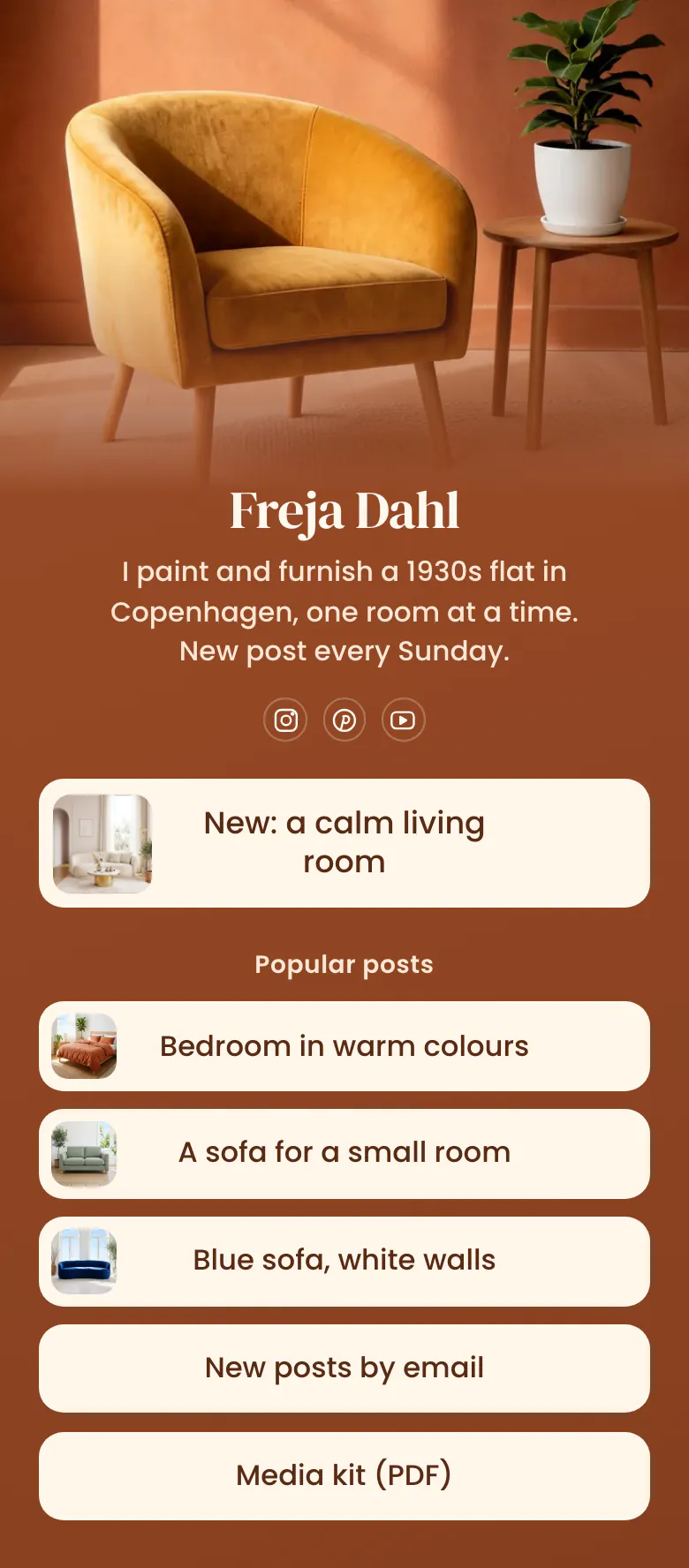
A reader who taps from Instagram or Pinterest wants the post behind the picture they saw. So the newest post is the first button, with its own picture. Popular posts, the newsletter and a media kit come after it.
Newest post first in a blogger's bio link
The newest post belongs first in a blogger's link in bio, followed by a few of the most read posts, a way to get new posts by email, and a media kit. A link in an Instagram caption does not open, so the bio link carries readers from the picture to the post.
What is on this page
- Name and bioFreja DahlI paint and furnish a 1930s flat in Copenhagen, one room at a time. New post every Sunday.
- Social iconsInstagram, Pinterest, YouTube
- Featured linkNew: a calm living room
The latest post gets the biggest button, with the same picture you posted, so a reader recognises it at once.
- Section titlePopular posts
'Popular posts' separates this week's post from the older ones that still bring readers.
- LinkBedroom in warm colours
Three popular posts each carry a small picture. The newsletter and media kit links under them stay plain.
- LinkA sofa for a small room
- LinkBlue sofa, white walls
- LinkNew posts by email
- LinkMedia kit (PDF)
Who it is for
Bloggers who write alone and publish on a fixed day are the best fit, because the first button changes with every post. Home, food, travel and craft blogs fit well, since each post has a strong picture. A writer whose main channel is email should look at the template for newsletter writers, which has a sign-up form on the page.
How to make it yours
Begin with Room by room
The template gallery has Room by room for blogs with a weekly post. One featured link holds the new post, and a short list of popular posts, a newsletter link and a media kit link sit under it.
Link your own posts
Paste the address of your newest post and give it the post's own picture. Choose three posts that readers return to, then change the name, the cover photo and the bio line to yours.
Publish, then update it weekly
Publish the page and add more.you/yourname to your Instagram, Pinterest and YouTube profiles. Each time you publish a post, change the first button to that post.
- Use the post's own title on the button, or a shorter form of it. 'A sofa for a small room' tells the reader what they get.
- Check which popular post gets the most taps each month and move it higher. Every post link shows how many times readers tapped it.
- Swap the newsletter link for an email signup block if you want readers to leave their address on your bio page, without a second page to load.
Questions
What should a blogger put in their link in bio?
Your latest picture or reel promised a post, so that post comes first. Add a short list of posts that readers return to, a newsletter link, and a media kit for brands. Keep the list short, so the new post is never lost among old links.
How do bloggers get traffic from Instagram and Pinterest?
Send every picture to one bio page that starts with the matching post. Name the first button after the post, give it the same picture, and change it when you publish. Readers who cannot find the post they saw leave, so the match matters more than the number of links.
How often should a blogger change the links in their bio?
Change the first link each time you publish. Freja's bio line says 'New post every Sunday', so the first button on her page changes every Sunday too. The popular posts can stay for months. Move one higher only when its tap count shows that readers still choose it.
Do bloggers pay to publish a link in bio page?
The page is free. A blogger pays nothing to create and publish it on More.You, and the Free plan has one page with every block type, so featured links with pictures and an email signup form are included. A page holds up to 50 blocks, far more than the sample uses.
Start your page with this template
Type the name you want after more.you/ and create your account. Then change the words and photos to yours.
 more.you/yourname
Before you go
Put everything you share behind one link
More.You is a free link in bio page. No card needed.
- Start from a template made for your work
- Add links, products, bookings and events
- See how many people tap each link