Join this week and get Pro free for 6 monthsLiked the free tool? Get your own page with Pro freeMoving to More.You? Get Pro free for 6 monthsPick a template and get Pro free for 6 monthsTry every Pro feature free for 6 monthsPut it into practice with Pro free for 6 months
Get Pro freeSign upTemplatesSee all templatesPricing



Product
Page blocksLinks, products, bookings, events and opening hoursThemes and fonts15 colour themes, 31 fonts, buttons and backgroundsClick analyticsPage views, clicks on each link, countries and devicesLinktree importPaste your Linktree address and pick the links to bringResources
TemplateSunday post
Link in bio template for newsletter writers
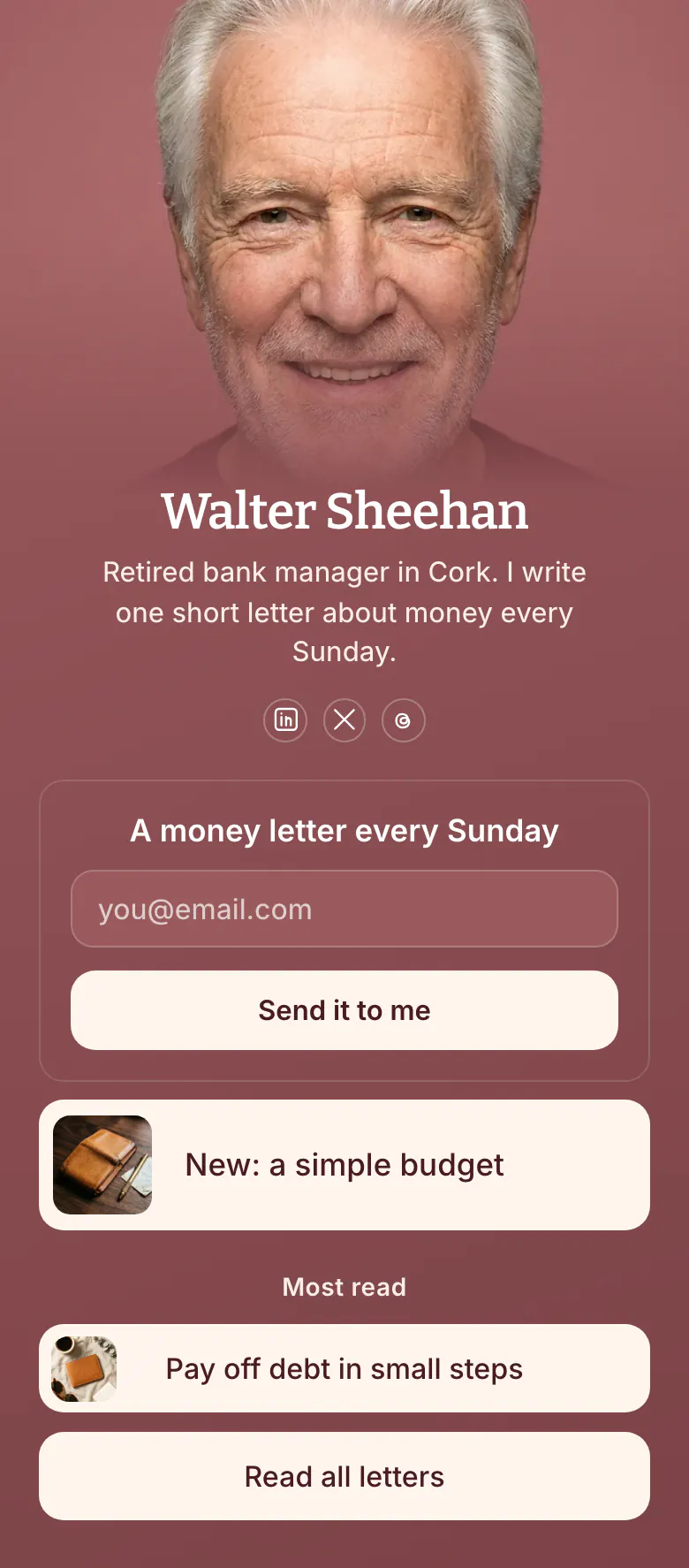
Readers come from a post on LinkedIn or X and see the form before anything else, under the promise “A money letter every Sunday”. The newest letter and the most read one follow, as samples of what will arrive.
What a newsletter writer's bio link needs
A newsletter writer's link in bio needs an email signup at the top, then the newest issue, the most read issue and a link to the archive. The form is first since a new subscriber is the result you want, and the letters under it are the proof for readers who are not ready to give an address.
What is on this page
- Name and bioWalter SheehanRetired bank manager in Cork. I write one short letter about money every Sunday.
- Social iconsLinkedIn, X, Threads
- Email signupA money letter every SundaySend it to me
A visitor types an email under “A money letter every Sunday” and taps “Send it to me”, all on this page.
- Featured linkNew: a simple budget
“New: a simple budget” shows the latest letter with a picture, for readers who want a sample first.
- Section titleMost read
“Most read” marks the letters that other readers chose, which tells a new reader where to begin.
- LinkPay off debt in small steps
“Pay off debt in small steps” opens one well-read letter, and “Read all letters” opens the archive.
- LinkRead all letters
Who it is for
Sunday post is a good match if you send one letter on a fixed day and find new readers on LinkedIn, X or Threads. It suits a first issue as well as a long archive, since the page links only two letters and the archive. Writers who publish most of their work as posts on their own site should look at the template for bloggers.
How to make it yours
Choose Sunday post
Walter's signup form is already the first block. His newest letter, one most read letter and a link to all letters are under it.
Write your promise
Replace the form title with what you send and when. Word the button from the reader's side, like “Send it to me”, then add your photo, your newest issue and your most read issue.
Publish and post the link
Your LinkedIn, X and Threads profiles each get the link once the page is published. Close each post with one line about the letter and where to join.
- Name the day and the topic in the form title. “A money letter every Sunday” says what arrives and when. “Subscribe to my newsletter” says neither.
- Change the featured link each time you send. A newest letter that is months old looks like a letter that stopped.
- If you collect sign-ups on the platform you send from, replace the form with a link named after your promise and keep it as the first block.
Questions
What should a newsletter writer put in their link in bio?
Put the sign-up form first, with one line that says what you send and how often. Add your newest letter and your most read letter as samples, then a link to every past issue. Readers who already trust you join at the top, and the others read a sample first.
Should my bio link open my sign-up page or a link in bio page?
A page with the form and your best letters together serves more readers. A sign-up page alone gives a careful reader nothing to judge. Here the form is the first block, so a ready reader types an email, and an unsure one opens “New: a simple budget” before deciding.
Which questions can I ask new subscribers when they sign up?
Ask as little as you need. The email signup block collects the address and can ask up to 8 extra questions, for example a first name or the money topic a reader cares about most. Each extra field is one more reason to stop, so keep the questions few.
Is a link in bio page with an email signup free?
Yes, and the email signup is included. A More.You page is free to create and publish, with every block type on the Free plan. Settings show how many subscribers you have. The rose background, the serif name and Walter's photo can each change to yours.
Start your page with this template
Type the name you want after more.you/ and create your account. Then change the words and photos to yours.
 more.you/yourname
Before you go
Put everything you share behind one link
More.You is a free link in bio page. No card needed.
- Start from a template made for your work
- Add links, products, bookings and events
- See how many people tap each link