Join this week and get Pro free for 6 monthsLiked the free tool? Get your own page with Pro freeMoving to More.You? Get Pro free for 6 monthsPick a template and get Pro free for 6 monthsTry every Pro feature free for 6 monthsPut it into practice with Pro free for 6 months
Get Pro freeSign upTemplatesSee all templatesPricing



Product
Page blocksLinks, products, bookings, events and opening hoursThemes and fonts15 colour themes, 31 fonts, buttons and backgroundsClick analyticsPage views, clicks on each link, countries and devicesLinktree importPaste your Linktree address and pick the links to bringResources
TemplateBlue plate
Link in bio template for food creators
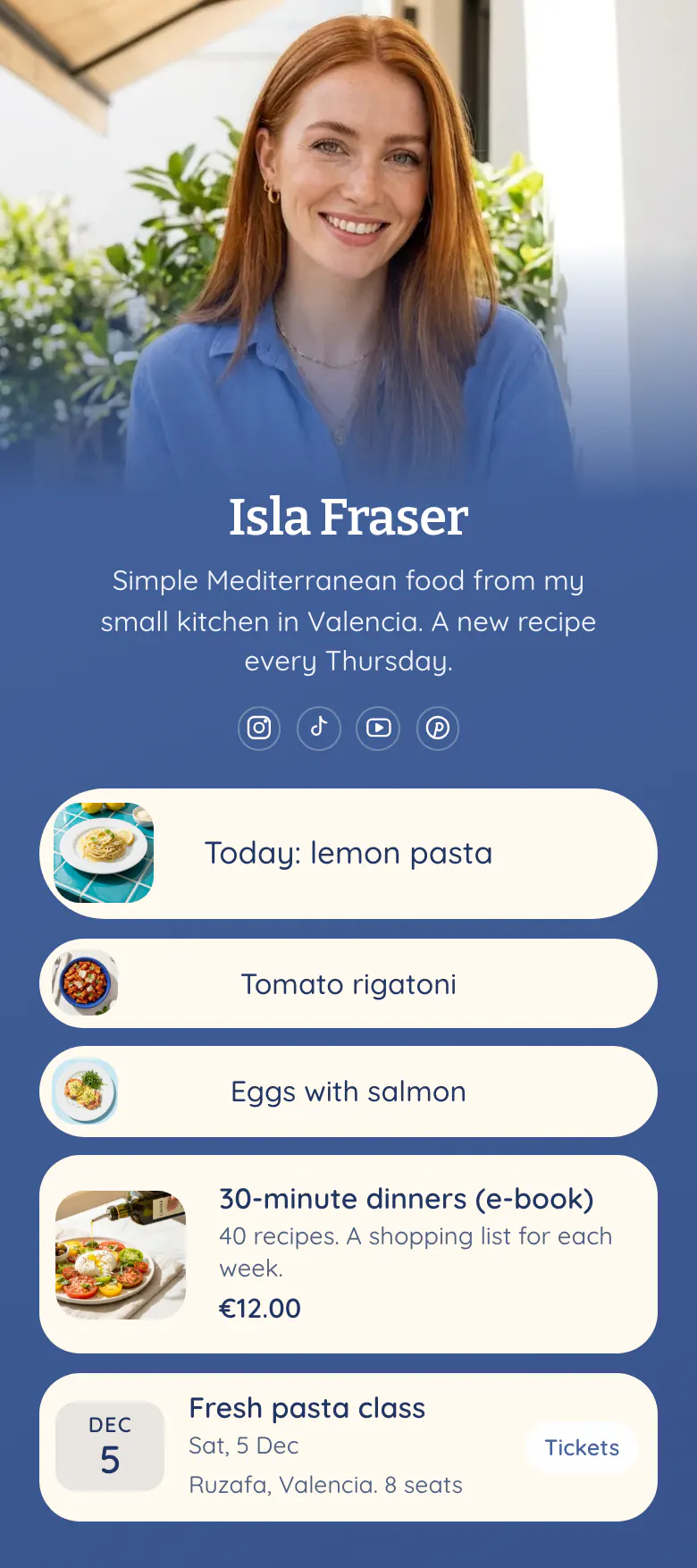
A follower who watched you cook lemon pasta wants that recipe while they are still hungry. So 'Today: lemon pasta' is the first button, with a photo of the plate. Two older dishes, a €12.00 e-book and a pasta class follow.
What food creators need in a bio link
Food creators should put these in their link in bio, in order: the recipe from today's video, two or three recent recipes with pictures, a cookbook or e-book with its price, and the date of the next class. Most visitors arrive right after a new video, so the newest recipe goes first and the things you sell go under it.
What is on this page
- Name and bioIsla FraserSimple Mediterranean food from my small kitchen in Valencia. A new recipe every Thursday.
- Social iconsInstagram, TikTok, YouTube, Pinterest
- Featured linkToday: lemon pasta
'Today: lemon pasta' has a photo of the dish, so a follower knows immediately it is the recipe from the newest video.
- LinkTomato rigatoni
'Tomato rigatoni' and 'Eggs with salmon' keep two older recipes one tap away, each with a small picture.
- LinkEggs with salmon
- Product30-minute dinners (e-book)€12.00
The e-book card shows a photo, the line '40 recipes' and €12.00. One tap opens the store where you sell it.
- EventFresh pasta class5 Dec, Ruzafa, Valencia. 8 seats
'Fresh pasta class' shows 5 Dec and Ruzafa, Valencia. The note '8 seats' tells followers the class is small.
Who it is for
Made for one person who cooks on camera and posts recipes on Instagram, TikTok, YouTube or Pinterest, and links them to a blog or recipe site. It suits a creator with a first e-book or a small class to announce. A restaurant or cafe with a menu and opening hours should start from the template for restaurants and cafes.
How to make it yours
Pick Blue plate
Open the template gallery and choose Blue plate. It starts with a recipe button, two more recipe links, an e-book card and a class block.
Add your own dishes
Replace Isla's name, photo and bio line with yours. Paste the link to today's recipe, add a photo of the plate, and type the real name and price of your e-book.
Publish before the next video
Publish the page and paste more.you/yourname into your Instagram, TikTok, YouTube and Pinterest profiles. Say 'recipe in my bio' in the video, so viewers know where to tap.
- Change the first button each time you post. Name it after the dish, like 'Today: lemon pasta', never 'New recipe', because followers search for the food they saw.
- Use the same photo on the button as on the video cover. A follower recognises the plate faster than they read the name.
- Write the number of seats in the place line of a class, as the sample does with '8 seats'. A small number tells followers to book early.
Questions
What should a food creator put in their link in bio?
Start with the recipe from your newest video, named after the dish. Add two or three older recipes with pictures, then what you sell, such as an e-book with its price, and the date of your next class. Keep the list short, because a follower came for one recipe.
How do I link a recipe from a Reel or a TikTok video?
Make the recipe the first button on your bio page and say 'recipe in my bio' in the video. A web address in an Instagram or TikTok caption cannot be tapped, so the bio is where a follower reaches your full recipe. Change the button when the next video is posted.
Where should my cookbook or e-book go on my bio page?
Place it under your free recipes, with a photo, one line about what is inside and the price. The sample shows '30-minute dinners (e-book)' with '40 recipes' and €12.00. A visitor gets the free recipe first and sees the book right after it. One tap opens the store where the book is sold.
Is this food creator template free, and can I change the blue design?
Yes to both. A page is free to create and publish on More.You, and the Free plan has every block type. The blue background, the cream buttons and the fonts can change to your own choices, and your own photo becomes the cover at the top.
Start your page with this template
Type the name you want after more.you/ and create your account. Then change the words and photos to yours.
 more.you/yourname
Before you go
Put everything you share behind one link
More.You is a free link in bio page. No card needed.
- Start from a template made for your work
- Add links, products, bookings and events
- See how many people tap each link