Join this week and get Pro free for 6 monthsLiked the free tool? Get your own page with Pro freeMoving to More.You? Get Pro free for 6 monthsPick a template and get Pro free for 6 monthsTry every Pro feature free for 6 monthsPut it into practice with Pro free for 6 months
Get Pro freeSign upTemplatesSee all templatesPricing



Product
Page blocksLinks, products, bookings, events and opening hoursThemes and fonts15 colour themes, 31 fonts, buttons and backgroundsClick analyticsPage views, clicks on each link, countries and devicesLinktree importPaste your Linktree address and pick the links to bringResources
TemplateLive class
Link in bio template for course creators
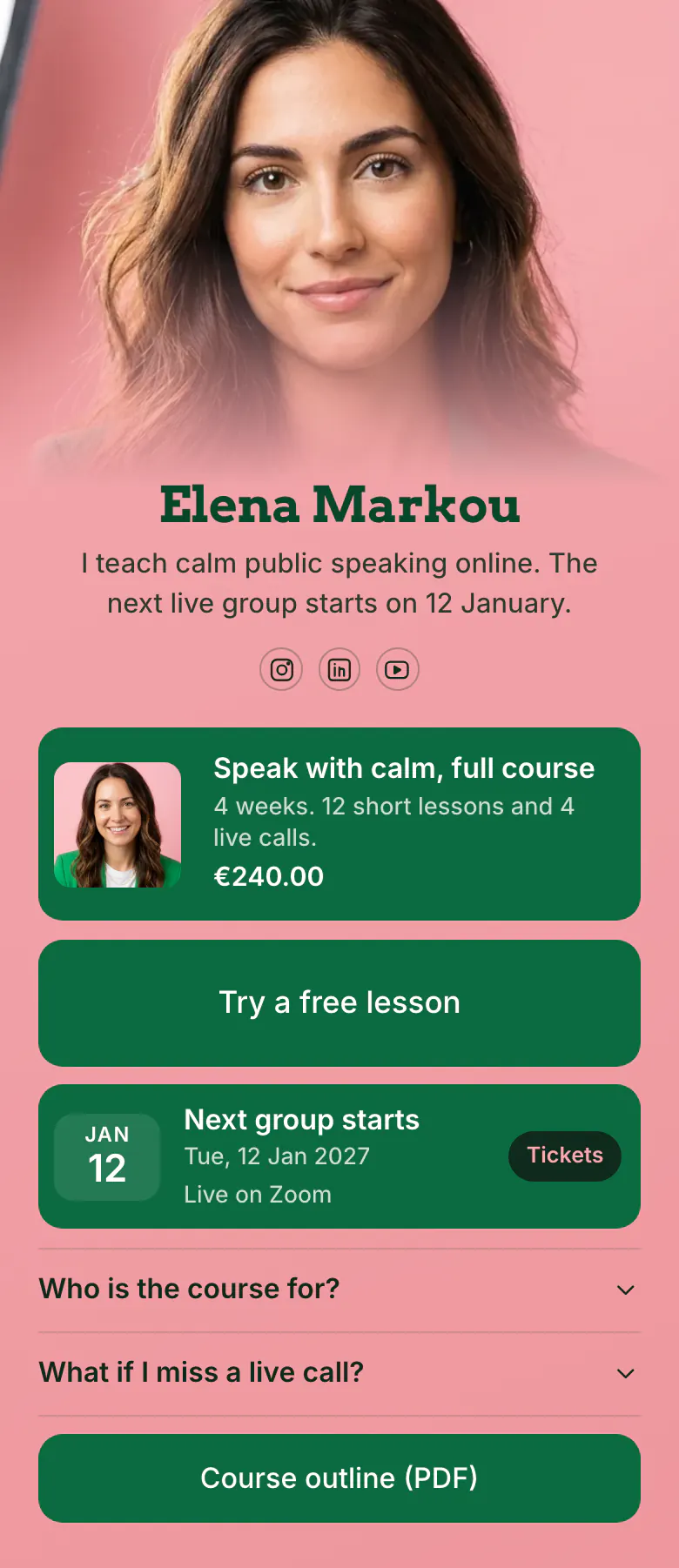
The course and its price, €240.00, come first, with one line that says what a student gets: 4 weeks, 12 short lessons and 4 live calls. A free lesson sits right under it for visitors who need proof before they enrol.
Five blocks for a course creator's bio link
Course creators should show the course with its price first, then a free lesson, the date the next group starts, answers to the doubts people have before they join, and the course outline. A visitor needs the offer, a sample and a date to decide, in that order. More.You shows the course as a product block that opens your own course page.
What is on this page
- Name and bioElena MarkouI teach calm public speaking online. The next live group starts on 12 January.
- Social iconsInstagram, LinkedIn, YouTube
- ProductSpeak with calm, full course€240.00
A picture, the length of the course and the price, €240.00, share one block. Your own course page opens when a visitor taps it.
- Featured linkTry a free lesson
'Try a free lesson' is a tall button for visitors who want to test your teaching before they spend money.
- EventNext group starts12 Jan, Live on Zoom
The start date, 12 Jan, has its own block, marked Live on Zoom. Students tap it to reach the page where they reserve a place.
- FAQWho is the course for?2 questions
Two doubts delay a sign-up, whether the course fits the person and what happens after a missed live call. Both are answered here.
- LinkCourse outline (PDF)
'Course outline (PDF)' comes last, for careful readers who want every lesson listed before they decide.
Who it is for
A teacher with one main online course and a group that starts on a fixed date gets the most from this page. Students find you on Instagram, LinkedIn or YouTube and want a price and a date before they write. Sellers of many small files, such as printables, should start from the template for digital product sellers.
How to make it yours
Create a Live class page
Begin a More.You page with Live class. The course block with its price is already first, and the free lesson button is the next thing a visitor sees.
Describe your own course
Write your course name, price and one line on what students get. Link a free lesson, set the date your next group starts and answer the two questions in your own words.
Announce the start date
Publish and put more.you/yourname in your Instagram, LinkedIn and YouTube profiles before you announce the next group. Mention the start date and the free lesson in each post until the group begins.
- Write the start date in your bio line too, as Elena does with 12 January. Visitors who never scroll still see when the group begins.
- When a group has started, replace the date with the next one before you post again. A course page with a past date looks closed.
- Describe the course in amounts a student can picture, like 4 weeks, 12 short lessons and 4 live calls. The price is then easier to judge.
Questions
What should a course creator put in their link in bio?
Put one course first, with its price and length. Add a free lesson so people can test your teaching, then the next start date. Answer the common doubts, such as who it is for and what happens when someone misses a call, and link the full outline for readers who want detail.
Should I show my course price in my bio link?
Show the price. When a course page hides it, people assume the price is high and few of them write to check. Someone who sees €240.00 beside 4 weeks, 12 short lessons and 4 live calls can judge the value alone. Those who are unsure still have the free lesson as a smaller step.
How do I get followers to join a live course group?
Give them a date and a small first step. Show when the next group starts, offer one free lesson, and answer the fear of missing lessons, for example what happens if someone misses a live call. Repeat the date in your posts in the last days before it.
Can I make a course page like this for free?
Yes, a course page like this is free to create and publish on More.You. Every block on this sample, the product, the event, the FAQ and the links, is on the Free plan. Students enrol in your own course store, which opens when they tap the course.
Start your page with this template
Type the name you want after more.you/ and create your account. Then change the words and photos to yours.
 more.you/yourname
Before you go
Put everything you share behind one link
More.You is a free link in bio page. No card needed.
- Start from a template made for your work
- Add links, products, bookings and events
- See how many people tap each link