Join this week and get Pro free for 6 monthsLiked the free tool? Get your own page with Pro freeMoving to More.You? Get Pro free for 6 monthsPick a template and get Pro free for 6 monthsTry every Pro feature free for 6 monthsPut it into practice with Pro free for 6 months
Get Pro freeSign upTemplatesSee all templatesPricing



Product
Page blocksLinks, products, bookings, events and opening hoursThemes and fonts15 colour themes, 31 fonts, buttons and backgroundsClick analyticsPage views, clicks on each link, countries and devicesLinktree importPaste your Linktree address and pick the links to bringResources
TemplateSample packs
Link in bio template for Gumroad creators
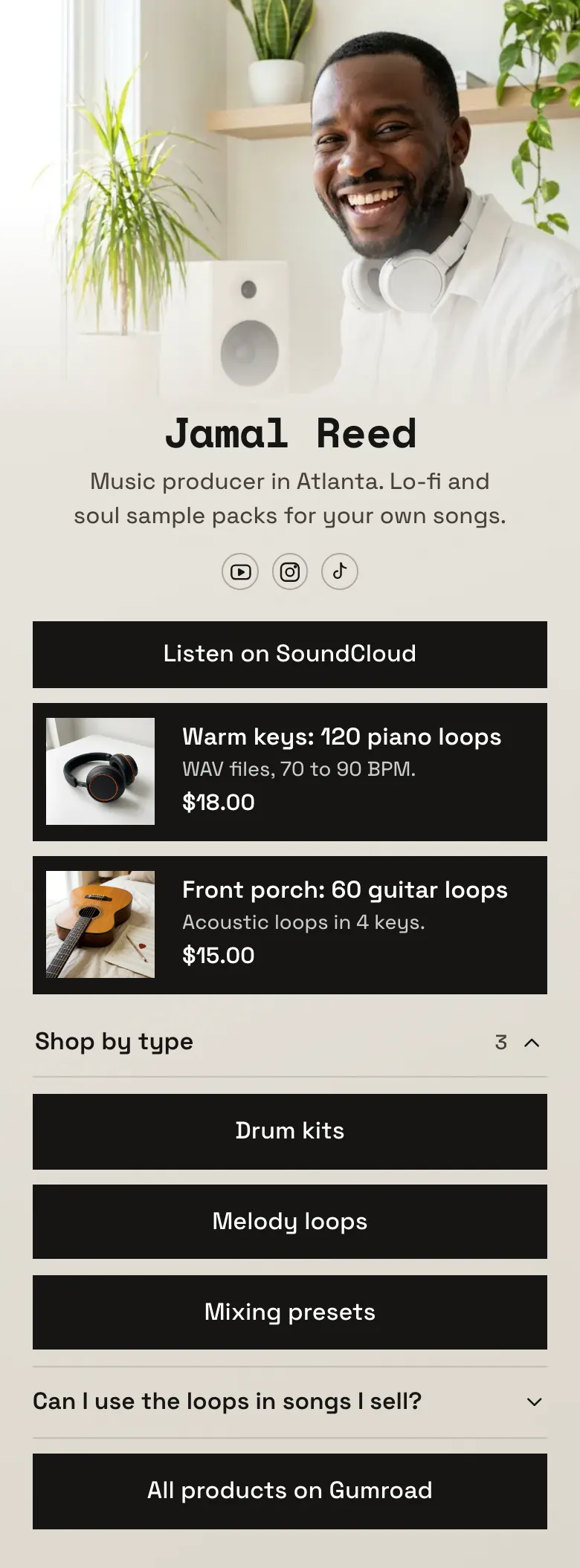
Buyers of digital products want proof before a price. Jamal's page starts with a demo track, then shows 'Warm keys' at $18.00 and 'Front porch' at $15.00, each with a picture and one line about the files.
What Gumroad creators put in a bio link
A Gumroad creator's link in bio works best with a preview first, then the best products with a picture and a price, shop links sorted by type, an answer about licence or use, and one button to the whole shop. A preview and a visible price answer the two doubts that stop a buyer. A More.You product block opens that product's Gumroad page.
What is on this page
- Name and bioJamal ReedMusic producer in Atlanta. Lo-fi and soul sample packs for your own songs.
- Social iconsYouTube, Instagram, TikTok
- EmbedPlayer from another site
Jamal's demo track on SoundCloud is the first block, above every price. A YouTube video of your work plays on the page.
- ProductWarm keys: 120 piano loops$18.00
Each pack shows a picture, a name, one line about the files and a price. A tap opens its Gumroad page.
- ProductFront porch: 60 guitar loops$15.00
- CollectionShop by type3 links
'Shop by type' holds three links, for drum kits, melody loops and mixing presets. Buyers who know what they need start here.
- LinkDrum kits
'All products on Gumroad' is the last button, for visitors who want to browse your whole shop.
- LinkMelody loops
- LinkMixing presets
- FAQCan I use the loops in songs I sell?
The one question is about the licence, whether loops may go into songs a buyer sells. Producers want that answer before they buy.
- LinkAll products on Gumroad
Who it is for
The sample belongs to a music producer, but designers, writers and other makers with a Gumroad shop can use the same page. You need two main products, a small catalogue and buyers who find you on YouTube, Instagram or TikTok. If you teach one course with a start date, begin with the template for course creators.
How to make it yours
Begin with Sample packs
Open Sample packs in the template gallery and make it your page. Jamal's two packs show where a picture, a file line and a price go for each product.
Add your Gumroad products
Paste the Gumroad link for each product and add its picture, name and price. Replace the demo with a preview of your own work, and write the licence answer in your words.
Add it to every description
Publish and add more.you/yourname to your YouTube channel, your Instagram bio and your TikTok bio. Name the link in the description of each beat or tutorial video.
- Write the file facts in the product line. The sample says WAV files, 70 to 90 BPM. An ebook would give its page count and format.
- Show two products on the page, not the whole catalogue. Choose your best pack and your newest, and send other items to the collection.
- Answer the licence question in one clear sentence. A buyer who is unsure about using your files in paid work will not buy.
Questions
What should a Gumroad creator put in their link in bio?
Lead with something a buyer can try, such as a demo, a sample page or a preview video. Follow it with two products that show a picture and a price, then group your other items by type. Add one answer about how buyers may use the files, and a last link to your full Gumroad shop.
Should I link to my Gumroad profile or to single products?
Use both. A single product link suits people who arrive from a video about that product, because one tap takes them to the right page. Keep the profile link too, as the last button, for visitors who want to see everything. The sample names it 'All products on Gumroad'.
How do I show Gumroad prices in my bio link?
Add a product block for each item and type the price into it. The sample shows 'Warm keys: 120 piano loops' at $18.00 and 'Front porch: 60 guitar loops' at $15.00. A price can be shown in one of 12 currencies, dollars on this sample. When you change a price on Gumroad, change it on the page as well.
Is this template free for Gumroad creators?
Yes, it is free to create and publish a page for your Gumroad shop. The Free plan on More.You has one page and every block type, product blocks included. A tap on a product opens its page in your Gumroad store.
Start your page with this template
Type the name you want after more.you/ and create your account. Then change the words and photos to yours.
 more.you/yourname
Before you go
Put everything you share behind one link
More.You is a free link in bio page. No card needed.
- Start from a template made for your work
- Add links, products, bookings and events
- See how many people tap each link