Join this week and get Pro free for 6 monthsLiked the free tool? Get your own page with Pro freeMoving to More.You? Get Pro free for 6 monthsPick a template and get Pro free for 6 monthsTry every Pro feature free for 6 monthsPut it into practice with Pro free for 6 months
Get Pro freeSign upTemplatesSee all templatesPricing



Product
Page blocksLinks, products, bookings, events and opening hoursThemes and fonts15 colour themes, 31 fonts, buttons and backgroundsClick analyticsPage views, clicks on each link, countries and devicesLinktree importPaste your Linktree address and pick the links to bringResources
TemplatePaper plans
Link in bio template for digital product sellers
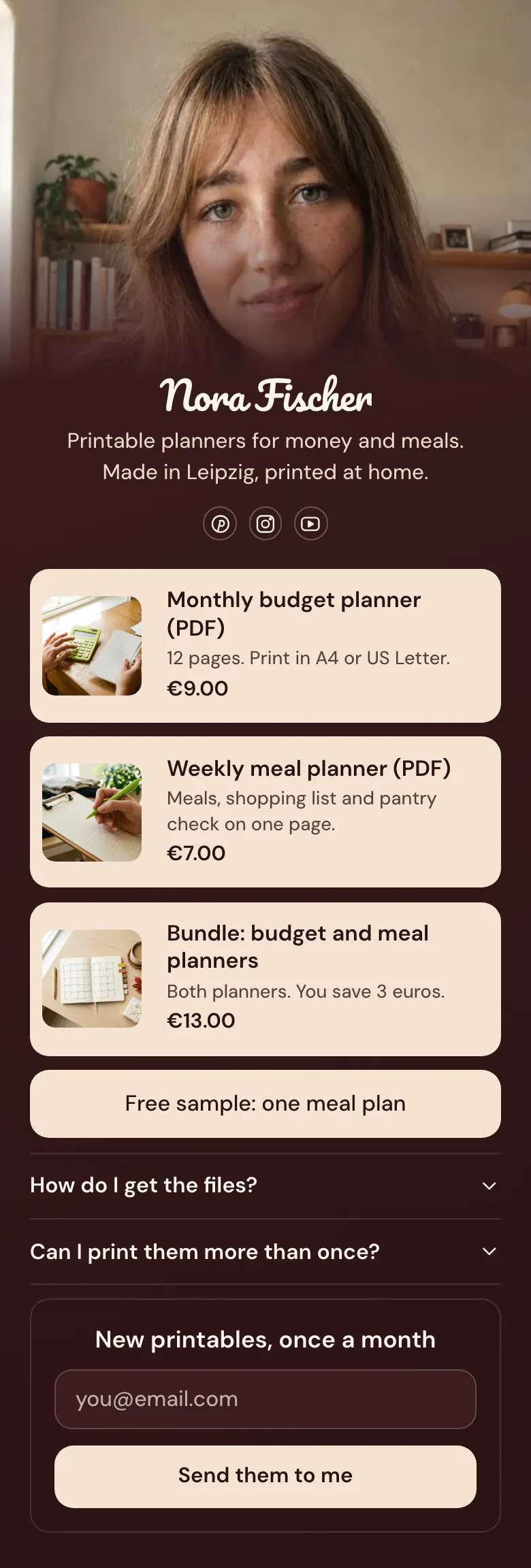
A buyer cannot hold a PDF, so each planner shows a picture, a price and one line about the pages inside. The free sample and two answers about the files sit lower, for the visitor who is not ready to buy today.
Bio link contents for digital product sellers
Digital product sellers should lead their link in bio with the main products, each with a picture and a price, followed by a bundle, one free sample, answers about how the files arrive, and an email form. A visitor has no way to look inside a file before they pay, so the price, the free sample and the download answer must remove the doubt.
What is on this page
- Name and bioNora FischerPrintable planners for money and meals. Made in Leipzig, printed at home.
- Social iconsPinterest, Instagram, YouTube
- ProductMonthly budget planner (PDF)€9.00
Every card shows a picture, the file name, one short line and the price. One tap opens that planner in your shop.
- ProductWeekly meal planner (PDF)€7.00
- ProductBundle: budget and meal planners€13.00
- LinkFree sample: one meal plan
The free sample button gives a careful buyer one meal plan to print and test before they spend 7 euros.
- FAQHow do I get the files?2 questions
How the files arrive and how often a buyer may print them. Both answers open with a tap, before anyone has to write to you.
- Email signupNew printables, once a monthSend them to me
A visitor leaves an email address to hear about new printables, which the sample promises once a month.
Who it is for
Made for one person with a small range of printables, planners, PDF guides or presets in a shop on Etsy, Gumroad or their own site. Buyers arrive from Pinterest boards, Instagram posts and YouTube videos. Sellers of one online course with lessons and a start date should begin with the template for course creators.
How to make it yours
Choose the printables template
After you press Use this template and create your account, three product cards, a sample button, two answers about files and an email form are your starting point.
Add your files and prices
Replace the planners with your own products. Give each one a cover picture, a name that says PDF or the file type, the page count and the price.
Share it in bios and files
Once the page is published, put more.you/yourname in your Instagram and TikTok bios, on your Pinterest profile and on the last page of each PDF you sell.
- Write the file type in the product name, as the sample does with (PDF). A buyer who expects a parcel in the post will write to complain.
- Place the bundle after the single products. A visitor who has read both prices sees the saving of 3 euros at once.
- Show a discount code after sign-up in the email form. A visitor who came for the free sample then has a reason to buy the bundle this week.
Questions
What should a link in bio for digital products include?
Products with prices come first, then a free sample and answers about delivery. Pictures of the pages inside say more than a long text. Close with an email form, because a visitor who liked the sample may buy next month, when you send news of a new printable.
How do customers get a digital file after they buy through my bio link?
The file comes from the shop where your product is listed. A product card on this page opens your listing, the buyer completes the order there, and that shop sends the download. Say so in one sentence in the FAQ, like the sample question 'How do I get the files?', so nobody waits for a parcel.
Should I offer a free printable in my link in bio?
Yes, one free sample is worth a place on the page. The sample page links one free meal plan under the three paid products. A careful buyer prints it, sees the quality and returns for the full planner. Keep the sample to one page of a paid file, so it shows your work and leaves a reason to buy.
Can I change the dark brown design to my shop colours?
Yes. You set your own colours for the background, the buttons and the text, so the dark brown and cream of the sample can become your shop colours. The background can also be a gradient, a pattern or a photo. There are 31 fonts, and your name can have its own, like the script lettering on Nora Fischer's page.
Start your page with this template
Type the name you want after more.you/ and create your account. Then change the words and photos to yours.
 more.you/yourname
Before you go
Put everything you share behind one link
More.You is a free link in bio page. No card needed.
- Start from a template made for your work
- Add links, products, bookings and events
- See how many people tap each link